7. Why I handwrite notes on source cards (a.k.a. literature notes)
Based on FP's video on YouTube. If you like this content, support the original creators by watching, liking and subscribing to their content.
Digital highlighting can become a backlog because it’s too easy to collect quotations without later digesting them.
Briefing
Handwriting “source cards” is presented as a practical fix for a common notes problem: digital systems make it too easy to hoard highlights and quotations, then leave the reader overwhelmed—or stuck—without ever digesting the material. The core claim is that quotations “undigested” by being rewritten in one’s own words rarely become useful. Instead of collecting lots of highlighted passages and processing them later, the method shifts attention to brief, handwritten reminders written while reading, with the deeper work happening afterward.
The approach starts with two earlier, less effective workflows. One involves accumulating highlights and then processing them only after finishing a text; the other tries to process highlights immediately by adding a sentence describing each passage as it’s highlighted. Both fail in practice because the process becomes time-consuming and frictionless in the wrong way: digital highlighting and copy-paste encourage collecting everything that might someday matter. The result is a backlog of highlights that demands too much effort to digest, so books and articles never get fully processed.
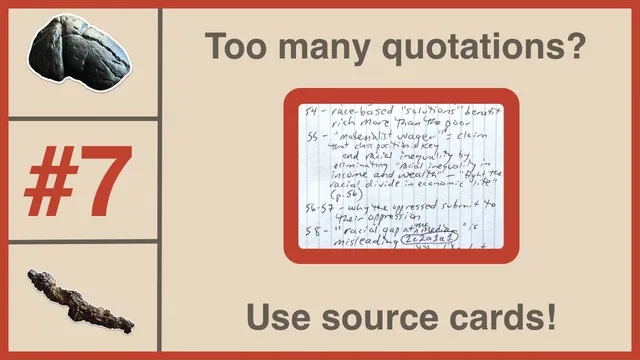
The alternative uses physical index cards as “source cards.” While reading, the note-taker may still highlight passages, but the card itself is reserved for very brief reminders—either points made in the text or personal reactions to those points. The cards are organized so that page numbers on the left correspond to where the ideas appear in the source. Later, those reminders are transformed into “idea cards” (the next step), typically producing about three to six idea cards per source card—often one per chapter for books, or per article.
Several design constraints make the method work. First, the system avoids writing quotations on source cards; handwriting quotations would be inconvenient and space-limited anyway. Second, the limited space on a single 5x8 card (front and back) forces selectivity, encouraging shorthand and compression—often requiring the writer to translate the text into their own words. Third, the physical format adds friction that nudges behavior toward digestion rather than collection. Even rotating cards vertically (as noted from Jeffrey Weber’s earlier video) can make the available writing space feel tighter, further reinforcing brevity.
The method also acknowledges a practical reality: the reader may need to revisit the text when drafting idea cards, but that’s acceptable as long as the system doesn’t default to writing quotations. For people who prefer digital workflows, two workarounds are suggested: keep source notes analog and scan them into a digital system, or configure a digital app to mimic the same “reminder-first” constraints.
Finally, the workflow pairs analog note-taking with digital reading. The note-taker typically uses an iPad to annotate PDFs, and plans to review various PDF annotation apps, directing viewers to fpnotes.io for email updates. The takeaway is less about index cards as a novelty and more about engineering friction so highlights don’t become a substitute for understanding.
Cornell Notes
The notes system centers on handwritten “source cards” that store brief reminders from a text, rather than collecting and transcribing quotations. Digital highlighting is criticized for enabling an overwhelming backlog and for producing “undigested” quotes that don’t become useful until rewritten in the reader’s own words. By forcing selectivity—no quotations on source cards, limited space per card, and the inconvenience of handwriting—this method nudges the reader toward digestion while reading. After finishing a chapter or article, those reminders are converted into multiple “idea cards” (often 3–6 per source card). The approach can be adapted for digital-first users by scanning cards or by designing app workflows that mimic the same constraints.
Why are highlights and quotations treated as a problem in digital note-taking?
What does a “source card” contain, and what does it deliberately avoid?
How do physical constraints (handwriting and limited space) improve the quality of notes?
What is the workflow after writing reminders on source cards?
How can the method be adapted for someone who prefers digital tools?
What role does the iPad play in the overall system?
Review Questions
- What specific behaviors make digital highlight-based note systems overwhelm readers, and how does the source-card method counter them?
- How do “no quotations on source cards” and limited card space function as productive friction?
- In what way does the reminder-to-idea-card conversion step depend on rewriting ideas in one’s own words?
Key Points
- 1
Digital highlighting can become a backlog because it’s too easy to collect quotations without later digesting them.
- 2
Undigested quotations are treated as low-value; digestion requires rewriting ideas in the reader’s own words.
- 3
Handwritten source cards store brief reminders tied to page locations, not full quotations.
- 4
Limited space and the inconvenience of handwriting discourage quotation hoarding and encourage shorthand and selectivity.
- 5
Source-card reminders are later converted into multiple idea cards (typically 3–6 per source card).
- 6
Analog constraints can be replicated digitally by scanning cards or by configuring apps to prioritize reminders over quotation collection.
- 7
The workflow separates digital reading/annotation (often on an iPad) from the digestion step performed through handwritten reminders.