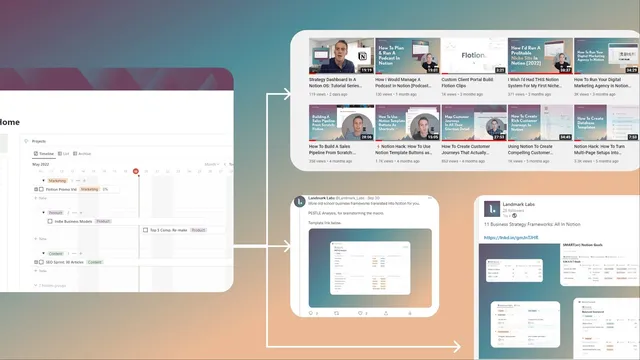
A Simple Content Repurposing System In Notion (From 1 Piece ➡️ 3-5 Posts)
Based on Landmark Labs's video on YouTube. If you like this content, support the original creators by watching, liking and subscribing to their content.
Use a Notion home dashboard with a primary content database plus a publishing calendar to manage both source assets and scheduled derivatives.
Briefing
A Notion-based repurposing system turns one “primary” content piece into multiple platform-specific posts with minimal manual work—by duplicating the source item into a publishing calendar and then tailoring each copy per channel. The core workflow is simple: store your main articles (or other flagship assets) in a primary content database, select which distribution channels matter, and use a calendar view to generate copies for each platform on the dates they should go live.
At the center is a home dashboard with two main parts: a primary content page and a publishing calendar. The primary content page acts as a brainstorming and management space for “primary content pieces,” while also letting creators choose distribution channels and rank/prioritize them. Channel selection matters because it controls which publishing links and quick links appear for each platform. The system also includes supporting tools: a hashtag database that tracks how often each hashtag has been used across posts, a master view showing scheduled posts and their timing, and a reach calculator that estimates output based on inputs like number of channels and publishing frequency.
The repurposing mechanics happen when a primary item is duplicated into the calendar. After creating or selecting a primary content piece—such as an SEO article—users fill in key properties like description, hashtags, the article link, and (optionally) a thumbnail. The system is positioned for repurposing rather than drafting full articles from scratch: the article is assumed to be ready on the site, and the template helps move it into distribution mode.
To generate platform-specific versions, the user drags the primary item into the publishing calendar while holding the Alt key. Holding Alt is the key detail: it creates a copy instead of moving the original. Once duplicated, the copy automatically lands in the correct filtered channel view based on where it was dropped in the calendar. From there, each copy can be tailored—adding a Twitter caption, adjusting Instagram formatting (including the likelihood that links may be less useful), or creating a LinkedIn-specific version with different properties and text.
The system also supports expanding beyond existing channels. If a desired platform (like LinkedIn) isn’t already configured, users can create a new channel and filter the calendar to that platform so future duplicates route correctly. When posts are ready, publishing links open the relevant platform workflow, letting creators copy the prepared content without rebuilding it from scratch.
Overall, the setup reduces the “hassle” of tracking one-off blog posts and manually recreating them per channel. Instead, it keeps related derivatives—blog, tweet, Instagram post, LinkedIn post—organized in one Notion database, with reusable properties like hashtags and links, plus scheduling and basic reach planning. A Pro access member template is referenced as the starting point for using the system.
Cornell Notes
The Notion repurposing system streamlines turning one primary content asset (like an SEO article) into multiple platform-specific posts. It uses a home dashboard with a primary content database and a publishing calendar, where channel selection determines what publishing links and filtered views appear. The key action is duplicating a primary item into the calendar using the Alt key, which creates a copy and routes it into the correct platform view. After duplication, each copy can be tailored with platform-appropriate captions, hashtags, and descriptions while keeping shared fields like the source link organized. The result is faster, more consistent multi-channel publishing with scheduling, hashtag tracking, and a simple reach calculator.
What are the two core areas of the Notion dashboard, and what job does each one perform?
Why does selecting and prioritizing channels matter in this system?
How does the system create platform-specific versions from one primary item?
What properties are expected for a primary content piece before repurposing?
How does the system help tailor posts differently across platforms?
What tools support planning and consistency beyond the duplication workflow?
Review Questions
- When duplicating a primary content item into the calendar, what specific keyboard action prevents moving the original and instead creates a copy?
- How does the system ensure a duplicated item becomes a Twitter post versus an Instagram post?
- Which properties on the primary content item are most important for the repurposing stage (and why)?
Key Points
- 1
Use a Notion home dashboard with a primary content database plus a publishing calendar to manage both source assets and scheduled derivatives.
- 2
Select and prioritize only the channels you actually plan to publish on so the correct publishing links and filtered views appear.
- 3
Create or confirm key primary-content properties—description, hashtags, source link, and optionally thumbnail—before duplicating into the calendar.
- 4
Duplicate primary items into the calendar with Alt held down to create copies rather than moving the original entry.
- 5
Drop duplicates into platform-filtered calendar views so each copy automatically becomes the correct type of post (Twitter, Instagram, LinkedIn, etc.).
- 6
Add new channels when needed (e.g., LinkedIn) so future duplicates route into the right filtered view.
- 7
Use the hashtag database, master schedule view, and reach calculator to keep repurposing consistent and track performance inputs over time.