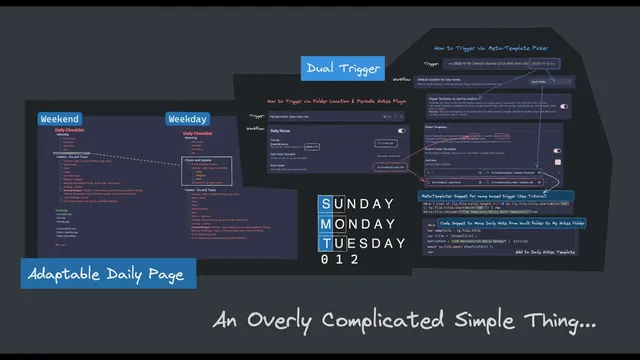
Adaptable Daily Page with Multiple Triggers
Based on Pamela Wang's video on YouTube. If you like this content, support the original creators by watching, liking and subscribing to their content.
Use periodic notes to generate daily note titles in a consistent YYYY-MM-DD format so templater can reliably parse dates.
Briefing
A conditional daily checklist can be automated so weekend pages omit work-related tasks while weekdays include them—without manually editing templates. The setup hinges on a templater snippet that reads the daily note’s date title, determines whether that date falls on Saturday/Sunday, and then either includes or skips a “workday” section accordingly. The practical payoff is less weekend friction and fewer burnout-inducing reminders, because work to-dos simply never get inserted into Sunday (and Saturday) daily pages.
The workflow starts with periodic notes to generate consistent daily note titles in the format “YYYY-MM-DD.” That date string becomes the key input for templater. Instead of relying on a dedicated “open today’s notes” daily-note hotkey, the system uses periodic notes to open/create the daily note, ensuring the title always matches the expected pattern. A notes folder is also used as a trigger target: when an empty file is created in the periodic notes daily folder, templater fires a “new file” template to populate the page.
Because the daily note template needs to work both when notes are created automatically and when a user clicks an empty placeholder, the configuration uses two layers of templater triggering. First, a periodic-notes trigger creates an empty daily note in the correct folder and then runs the daily note template. Second, a “meta template picker” handles cases where a user wants to create a daily note by interacting with an empty note file—avoiding the need to remember extra hotkeys. The meta picker checks the file title length (10 characters, matching the YYYY-MM-DD structure) and validates that the title begins with a plausible year (e.g., 1990s or 2000s) so it only applies to daily notes.
Inside the daily note template, the snippet converts the date title into a moment.js date object using a format string aligned to the title structure (year, month, day with zero-padding). It then uses the weekday name to decide whether the day is a weekend: it inspects the first character of the weekday (character index 0), treating “S” as the weekend marker (Sunday/Saturday) and anything else as a weekday. If the day is not a weekend, the template prints the work-related section into the page; if it is a weekend, that section is skipped. The result is a single adaptable daily template that automatically inserts the right checklist content based on the date—keeping weekend pages clean while preserving full weekday planning.
Cornell Notes
The system automates a daily checklist so weekday notes include work-related tasks, while Saturday/Sunday notes omit them. It relies on periodic notes to generate daily note titles in a consistent YYYY-MM-DD format, then uses templater to read that title and decide whether the date is a weekend. A moment.js date object is created from the title using a matching format string, and the snippet checks the weekday by inspecting the first character of the weekday name (S indicates Saturday/Sunday). Two templater triggers work together: periodic notes create empty daily files automatically, and a meta template picker handles creating/populating daily notes when users click an empty placeholder. This reduces weekend burnout by preventing work to-dos from appearing at all.
How does the template know whether a daily note is for a weekday or a weekend?
Why does the setup depend on periodic notes and a specific date-title format?
What role do “empty files” and folder-based triggers play?
Why are there two templater triggers: periodic notes and a meta template picker?
How does the meta template picker avoid applying daily-note logic to the wrong files?
Review Questions
- What exact conditions does the snippet use to decide whether to include the work-related checklist section?
- How do periodic notes and the meta template picker complement each other in the note-creation flow?
- Why is the daily note title length (10 characters) a critical part of the templater logic?
Key Points
- 1
Use periodic notes to generate daily note titles in a consistent YYYY-MM-DD format so templater can reliably parse dates.
- 2
Create an empty daily note file in the correct daily notes folder so templater can trigger on new file creation.
- 3
Use a templater snippet that converts the title into a moment.js date object and checks the weekday to detect weekends.
- 4
Detect weekends by inspecting the first character of the weekday name (S for Saturday/Sunday) and conditionally include the work section only for weekdays.
- 5
Employ two trigger layers—periodic notes for automatic creation and a meta template picker for manual creation via clicking an empty placeholder—to avoid extra hotkeys.
- 6
Add safeguards in the meta template picker (title length and year-range checks) so daily-note logic applies only to real daily notes.