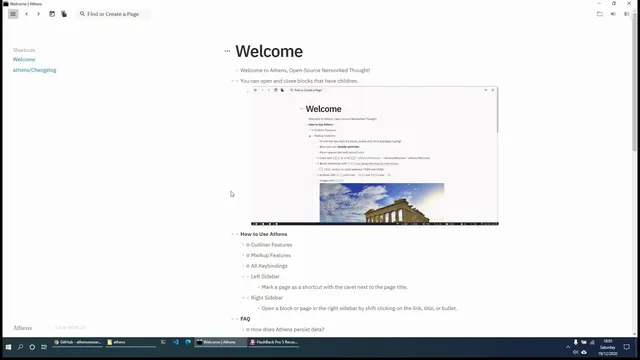
Athens Research - Open Source Roam Research Alternative for Notes / PKM / To Do / Journal
Based on Ed Nico's video on YouTube. If you like this content, support the original creators by watching, liking and subscribing to their content.
Athens Research is an open-source, network-style PKM tool with Roam-like outlining, currently in closed beta with access via local builds or the Open Collective wait list.
Briefing
Athens Research is an open-source, network-style knowledge management tool built to deliver Roam Research-like outlining and “link everything” workflows—while keeping the code accessible and editable. Built for personal and collective intelligence, it’s currently in closed beta, with access available via local builds or by joining a wait list through the Athens Research Open Collective sponsorship page.
Once installed, Athens Research presents a familiar daily-page workflow: a calendar icon opens today’s page, and the editor supports nested indentation for structured notes. Pages accumulate by date, so tomorrow’s daily entry appears as a new dated page. Creating additional pages is also straightforward—users can create a new page title, start writing immediately, and rely on the interface to suggest whether a similar page already exists in the library.
The standout feature is linking and backlinking at both page and block levels. By typing double square brackets, users can create links to other pages; clicking those links jumps to the target page. When a page is linked from elsewhere, Athens Research automatically shows a “linked references” section listing where the page is referenced. Shift-clicking a link opens the linked content in a right-hand sidebar without leaving the current page, enabling rapid cross-referencing while continuing to write.
Athens Research also supports block references using a different syntax (double parentheses/double brackets). Instead of linking to an entire page, users can link to a specific line or bullet, which generates a unique block ID. Hovering reveals link affordances, and clicking navigates directly to the block’s location. Backlinks work at this granular level too: the interface can display how many references point to a given block, and the count updates as new links are created.
The tool further streamlines note creation and reuse. Users can create new linked content directly from a link prompt, and they can type content in the sidebar (via shift-click) so it’s added to the target page without manually navigating back and forth. Renaming a page automatically updates link targets across the library, reducing the risk of broken references when titles change.
Beyond linking, Athens Research includes practical productivity features. It supports an inline to-do workflow: typing a task and using Ctrl+Enter converts it into a checkbox item that can be checked off. Everything is stored locally for offline use, with a visible database location under a user documents directory (saved as a transit file) and timestamps indicating last save time. Navigation tools—like back/forward arrows, a shortcut system for pinning frequently used pages, and sidebar controls—help users move quickly through an expanding network.
Because the software is still under active development, the interface hints at upcoming capabilities such as richer embeds (e.g., YouTube, iframes) and code embedding. For users who want a Roam-like graph of interconnected notes but prefer open-source control and local-first storage, Athens Research positions itself as a flexible alternative still taking shape in beta.
Cornell Notes
Athens Research is an open-source, local-first knowledge management tool with Roam Research-style outlining plus automatic linking and backlinking. Users can create daily pages by date, write nested notes, and generate new pages quickly. Double square brackets link entire pages and automatically show “linked references” (backlinks) where other pages point to them; shift-click opens linked content in a sidebar while staying on the current page. For finer granularity, block references use a different syntax and create unique block IDs, enabling backlinks and reference counts at the line/bullet level. Offline storage, checkbox to-dos via Ctrl+Enter, and automatic link updates on page renames round out the workflow.
How does Athens Research handle linking between pages, and what makes it useful for building a note network?
What’s the difference between page links and block references in Athens Research?
How can users create and reuse content across pages without navigating away and back repeatedly?
Why does renaming a page matter in a linking-heavy system, and how does Athens Research address it?
What productivity features exist beyond linking, such as tasks and offline storage?
How do reference counts and navigation tools help users manage a growing library?
Review Questions
- When would you choose a page link (double square brackets) versus a block reference (unique block ID), and what benefit does each provide?
- How does shift-click change the workflow for linking and writing, compared with clicking a link normally?
- What mechanisms in Athens Research help prevent broken links when renaming pages, and how would you verify that in practice?
Key Points
- 1
Athens Research is an open-source, network-style PKM tool with Roam-like outlining, currently in closed beta with access via local builds or the Open Collective wait list.
- 2
Daily pages are date-based and support nested indentation, making structured journaling and ongoing notes straightforward.
- 3
Double square brackets create page links and automatically generate backlink-style “linked references” on the destination page.
- 4
Block references connect specific lines/bullets using unique block IDs, enabling granular backlinks and reference counts.
- 5
Shift-click opens linked content in a right-hand sidebar so users can keep writing on the current page while reviewing or adding content elsewhere.
- 6
Ctrl+Enter converts typed items into checkbox to-dos, supporting actionable daily planning.
- 7
All notes are stored locally for offline use, with a visible local database location and automatic saving behavior.