Breadcrumbs - Everything you need to know
Based on Obsidian Community Talks's video on YouTube. If you like this content, support the original creators by watching, liking and subscribing to their content.
Breadcrumbs adds hierarchical navigation to Obsidian by defining relationship fields (up/down/sibling/next/previous) and inferring reverse links automatically.
Briefing
Breadcrumbs for Obsidian turns note linking into a navigable hierarchy—without forcing users into rigid folder-style structure. Instead of being limited to tags and folders, Breadcrumbs lets a note declare relationships like “parent,” “child,” “sibling,” “next,” and “previous,” then automatically infers the reverse direction. That implied linking is the engine behind fast navigation: once a relationship is defined in one direction, the plugin can treat the corresponding relationship on the other notes as implied, and—when desired—convert those implied links into real metadata.
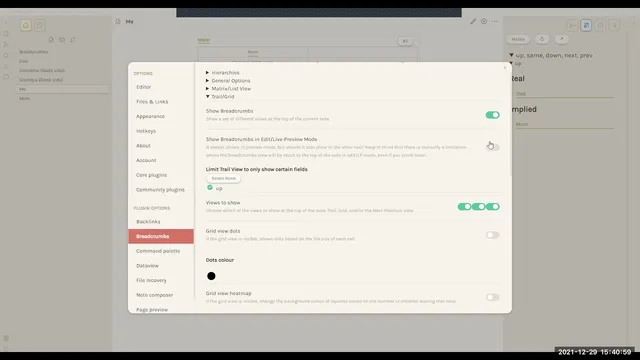
Setup starts with installing the Breadcrumbs community plugin and configuring hierarchy rules in the plugin settings. A hierarchy defines what fields mean which relationship directions. The default hierarchy uses fields such as “up” for parents, “down” for children, and “same,” “next,” and “previous” for lateral or sequential relationships. Users can also create multiple hierarchies from scratch (for example, using different field names like “dad,” “brother,” or “mom”), which matters because each hierarchy can be analyzed and navigated independently.
With the hierarchy configured, users add relationship fields in a note’s YAML. From there, Breadcrumbs builds an index that powers multiple views. In matrix/grid view, the plugin shows both real and implied relationships: if a note points upward to a parent, Breadcrumbs infers that the parent must point downward to the child. The same logic cascades through multiple generations—adding “grandpa,” “grandma,” and so on—so the structure grows as long as the upward links exist. Inline metadata via the Dataview plugin can also be used to store and display these relationships.
Beyond manual YAML, Breadcrumbs offers “alternative hierarchies” that generate structure automatically from existing note patterns. Tag notes treat notes with a chosen tag as belonging to a hierarchy node; link notes gather all outgoing links from the current note; folder notes pull in everything inside a folder. Traversal notes go further by performing a depth-first traversal through linked nodes, effectively turning a link graph into a tree rooted at a “traverse node.” Hierarchy notes externalize relationships into a single list-like note that defines parent/child structure, letting the hierarchy live separately from the notes it organizes.
Navigation and analysis come through several views: matrix/grid for relationship mapping, trail view for paths upward through the parent tree, down view for children, stats view for counts of nodes and edges per direction, and duck view to surface notes missing Breadcrumbs relationships. A visualization view (including a force-directed graph and arc diagrams) can render the structure, though some features are still experimental.
Finally, Breadcrumbs includes utilities to operationalize implied relationships. Commands like “write breadcrumbs to file” can convert inferred links into real YAML or Dataview inline fields (with MetaEdit as an option). Index tools can generate local or global relationship snapshots for copying or reuse. For day-to-day editing, commands support jumping between related nodes (including next/previous), and a “threading” feature can create new linked notes automatically—such as generating a 2023 “next” from 2022 while filling in reciprocal pointers. The result is a flexible, non-constraining hierarchy system that supports both manual modeling and automated structure extraction from tags, links, and folders.
Cornell Notes
Breadcrumbs for Obsidian creates hierarchical structure on top of note linking, letting users navigate relationships like parent/child, siblings, and next/previous. After defining a relationship in one direction (e.g., a note’s “up” field), Breadcrumbs infers the reverse relationship on the connected note (e.g., the parent is treated as having that note as a child). Multiple hierarchy definitions can coexist, each using configurable field names, and Breadcrumbs builds an index to power several views (matrix/grid, trail, down, stats, duck). Alternative hierarchy types—tag notes, link notes, folder notes, traversal notes, and hierarchy notes—generate structure automatically from tags, outgoing links, folders, depth-first traversals, or an external list note. Utilities can convert implied relationships into real metadata via commands like “write breadcrumbs to file.”
How does Breadcrumbs turn one declared link into a navigable hierarchy across multiple notes?
What’s the practical difference between manual YAML relationships and Breadcrumbs’ alternative hierarchy types?
Why do multiple hierarchies matter, and how are they configured?
How do the trail view and down view differ in what they show?
What does “write breadcrumbs to file” accomplish, and what does it require?
How does threading speed up creating linked notes like a timeline?
Review Questions
- If a note has an upward relationship to another note, what reverse relationship does Breadcrumbs infer, and how does that show up in the matrix/grid view?
- Which alternative hierarchy type would best model a structure derived from outgoing links as a tree, and what traversal strategy does it use?
- What’s the purpose of converting implied relationships into real ones using “write breadcrumbs to file,” and what plugin dependency is mentioned for that workflow?
Key Points
- 1
Breadcrumbs adds hierarchical navigation to Obsidian by defining relationship fields (up/down/sibling/next/previous) and inferring reverse links automatically.
- 2
Hierarchy configuration is customizable: multiple hierarchies can coexist, each mapping field names to relationship directions.
- 3
Matrix/grid, trail, down, stats, and duck views all draw from the Breadcrumbs index and help users navigate or audit relationships.
- 4
Alternative hierarchy types (tag notes, link notes, folder notes, traversal notes, hierarchy notes) generate structure automatically from tags, links, folders, depth-first traversal, or an external list note.
- 5
Implied relationships can be converted into explicit metadata using commands like “write breadcrumbs to file,” enabling real two-way structure.
- 6
Index tools (local/global index copying) and jump commands support fast movement through related notes.
- 7
Threading automates creation of linked notes (e.g., next/previous or parent/child) while filling reciprocal pointers.