Build a shopping chatbot in four minutes with GraphDB Talk to Your Graph 2.0
Based on Ontotext's video on YouTube. If you like this content, support the original creators by watching, liking and subscribing to their content.
Create a GraphDB 10.8 repository (e.g., “products”) with full-text search enabled to support natural-language retrieval over graph content.
Briefing
A fast path to a “shopping chatbot” is now practical with GraphDB’s Talk to Your Graph 2.0: load product data into a GraphDB 10.8 repository, then let a graph-augmented LLM answer plain-English questions by translating them into SPARQL (SPARQL is referenced as “Sparkle” in the transcript) over the graph. The key payoff is speed—setting up the repository, importing RDF/Trig data (including a named-graph ontology), creating an agent, and running real queries can be done in under four minutes.
The workflow starts with an RDF file in TriG syntax containing product descriptions, categories, and review/rating information on a 1–5 scale. The file also includes a small ontology stored in a named graph: it defines two classes and several properties, plus product categories modeled as subclasses of a broader Product class. That ontology placement matters because Talk to Your Graph uses it to understand what classes and properties exist when generating queries.
On the GraphDB side, a new repository named “products” is created with full-text search enabled. The RDF/Trig import is configured so that triples land in the correct named graphs: the ontology goes into the named graph specified in the source file, while the rest of the product data goes into the default graph. A quick SPARQL check confirms the data loaded correctly—for example, a query for products whose descriptions contain “mirror” returns two matching items (a makeup product and a sync product).
Next comes the agent setup in the GraphDB “Talk to Your Graph 2.0” interface. An OpenAI API key must be configured (the transcript notes it can be set in a GraphDB config file). The agent is created for the “products” repository with full-text search available and a cap of 10 results. Crucially, the agent is given the ontology’s named-graph identifier so it can generate accurate SPARQL queries aligned with the schema.
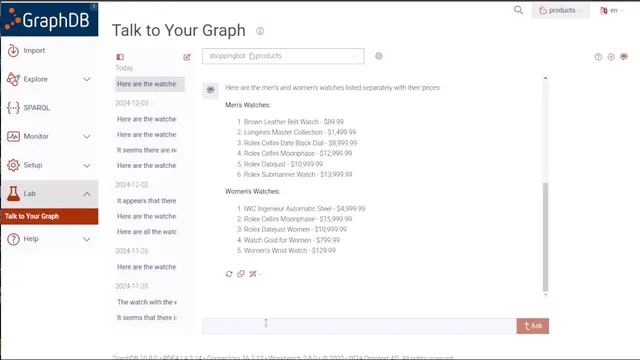
Once created, the shopping bot answers natural-language requests about the graph. For watch-related questions, response times are reported as roughly 8–13 seconds (with some wait time trimmed from the demonstration). It can list watches and prices, restructure results on demand (e.g., separate men’s and women’s watches), and work with review data—such as identifying a product with the most reviews (a Rolex) and producing a summary of those reviews instead of dumping the full text.
The system also supports transparency and learning: an “explain” option returns the reasoning behind the SPARQL query it ran and shows the generated query itself, helping users understand how plain-English prompts map to graph queries.
Finally, the bot handles more decision-oriented shopping questions. It finds the least expensive watch whose average review score exceeds 3, and it can compute sale pricing—turning an $89.99 price into a $53.99 cost under a 40% discount scenario. The overall message is that with minimal configuration—data import, ontology in a named graph, and an agent wired to an LLM—customers can query graph-backed product catalogs in plain English without learning query syntax.
Cornell Notes
GraphDB Talk to Your Graph 2.0 can turn a product knowledge graph into a plain-English shopping assistant. After loading TriG/RDF data into a GraphDB 10.8 repository (with the ontology kept in a named graph), an agent is created using an OpenAI API key and configured to use full-text search and an ontology-aware query strategy. The agent then generates SPARQL (“Sparkle”) queries behind the scenes to answer questions like listing watches and prices, splitting results by men’s vs. women’s categories, summarizing reviews, and computing sale prices. It can also explain the generated query logic, which helps users learn how natural language maps to graph queries. The setup is demonstrated as achievable in under four minutes.
Why does the ontology need to be stored in a named graph during import?
What does “retrieve-augmented generation” mean in this setup?
How does the bot handle different kinds of user requests—lists, categorization, and summaries?
What transparency features help users understand what query was run?
How are more analytical shopping questions answered using graph data?
Review Questions
- What configuration steps ensure the agent can generate correct SPARQL queries (including ontology handling and search settings)?
- How does the system produce both structured outputs (like grouped men’s vs. women’s watches) and unstructured outputs (like review summaries)?
- What does the “explain” feature reveal, and how could it help someone debug or learn SPARQL query generation?
Key Points
- 1
Create a GraphDB 10.8 repository (e.g., “products”) with full-text search enabled to support natural-language retrieval over graph content.
- 2
Import TriG/RDF data so the ontology lands in its specified named graph, while product triples go to the default graph.
- 3
Create a Talk to Your Graph 2.0 agent for the repository and provide an OpenAI API key for LLM-backed question answering.
- 4
Configure the agent to use the ontology named-graph identifier so generated SPARQL queries match the schema’s classes and properties.
- 5
Use the agent’s result limits (e.g., maximum 10 results) to control response size and relevance.
- 6
Leverage the explain option to see the generated SPARQL query and understand how plain-English prompts map to graph queries.
- 7
Ask graph-backed shopping questions that combine retrieval, filtering (e.g., average review > 3), and calculations (e.g., discount pricing).