Build Everything with AI Agents: Here's How
Based on David Ondrej's video on YouTube. If you like this content, support the original creators by watching, liking and subscribing to their content.
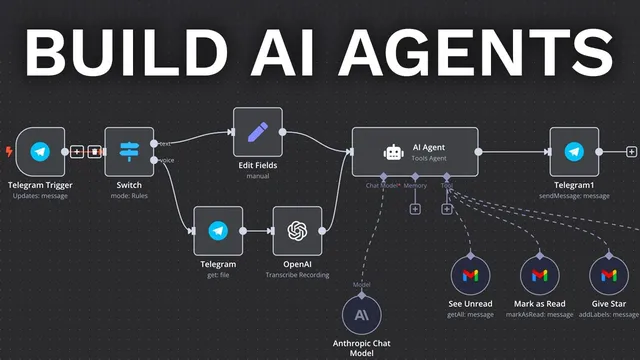
Start with a Telegram trigger in n8n, then use a Switch node to route text vs voice based on which fields exist.
Briefing
AI agents built with n8n can be deployed end-to-end—starting from a chat trigger, routing different input types, transcribing voice with OpenAI, and then using an LLM with tool access to take real actions like summarizing Gmail and creating Google Calendar events. The practical takeaway is that the “agent” becomes useful only after wiring tools (Gmail get/send, Calendar read/create) and testing each step until the data formats and prompts behave correctly.
The build starts in n8n with a new workflow and a trigger. A Telegram trigger is used first, because it’s a common entry point for automation. After connecting a Telegram account via an access token, the workflow is tested by sending a “hello world” message and confirming the incoming text appears in n8n’s output. Next comes a switch block that separates text messages from voice messages by checking which fields exist (text vs audio file ID). For voice, the workflow uses Telegram’s “get file” to retrieve the audio file ID, then passes that audio into OpenAI’s “transcribe a recording” step. A key debugging lesson appears immediately: silent or misconfigured audio leads to failed/incorrect transcriptions, so each step must be tested with real inputs.
Once both text and voice inputs produce usable text, the workflow connects to n8n’s “AI agent” module. The agent is configured with an Anthropic chat model (the transcript notes Sonnet, with a warning to select the newer Sonnet variant). The agent is also given a system prompt that instructs behavior (initially tested with “respond in full caps”). To make the agent do more than chat, the workflow adds tools and routes the agent’s output back to Telegram via “send a text message.” In testing mode, responses may not appear until the workflow is saved and activated, so the workflow must be toggled correctly during development.
The agent’s first major tool is Gmail. A “get many” Gmail tool is configured to fetch unread inbox messages (with a limit to control token cost). The system prompt is updated so the agent knows how to use the Gmail tool. Tests show the agent can summarize unread emails and select the relevant items from a larger set.
Next, Gmail “send” is added so the agent can draft and send emails. The transcript highlights a formatting pitfall: using the same placeholder expression for all fields caused an “invalid email address” error. Fixing it required giving each parameter a clear description (recipient email, subject, and body) so the LLM fills them correctly. After correcting the parameter descriptions and expressions, the agent successfully sends a properly formatted email.
Finally, Google Calendar is added with two tools: “get many” to read events for a time window, and “create” to schedule new events. Calendar creation initially fails due to date/time interpretation—specifically, the agent produced dates in the wrong year—so the system prompt must explicitly anchor “today” and enforce the correct date-time format. After adjusting the prompt and re-testing, the agent creates events with the intended start/end times.
By the end, the workflow is activated so it runs reliably from Telegram. The broader message is that n8n’s value comes from tool-augmented agents plus disciplined testing: every tool addition and prompt change requires step-by-step verification, because small data-format mistakes can break downstream actions. The result is an automation that can run indefinitely—summarizing emails and managing calendar tasks—without writing code.
Cornell Notes
The workflow builds an AI agent in n8n that can accept both Telegram text and Telegram voice messages, transcribe voice with OpenAI, and then use an Anthropic LLM to act using external tools. A Telegram switch routes inputs into text vs voice paths, and voice requires Telegram file retrieval followed by “transcribe a recording.” The agent becomes truly useful only after adding tools—first Gmail “get many” to summarize unread emails, then Gmail “send” to draft and send messages, and finally Google Calendar “get many” and “create” to read and schedule events. Reliability depends on testing every step and fixing parameter formatting and date/time interpretation issues in prompts.
How does the workflow handle both Telegram text and voice messages without confusing the agent?
Why does voice transcription sometimes fail even when the workflow is wired correctly?
What turns a chat model into an “agent” that can do real work?
What went wrong with Gmail “send,” and how was it fixed?
Why did Google Calendar event creation land in the wrong year, and what corrected it?
What development practice is emphasized for making the automation reliable?
Review Questions
- When routing Telegram inputs, what specific fields does the Switch node rely on to distinguish text from voice?
- What parameter-formatting mistake caused the Gmail “send” failure, and how did the fix change the LLM’s behavior?
- How did the system prompt need to change to prevent Google Calendar events from being created with the wrong year?
Key Points
- 1
Start with a Telegram trigger in n8n, then use a Switch node to route text vs voice based on which fields exist.
- 2
For voice messages, retrieve the Telegram file via “get file” and transcribe it with OpenAI before passing text to the AI agent.
- 3
Configure the AI agent with an LLM (Anthropic in the transcript) and a system prompt, but add tools to enable real actions.
- 4
Add Gmail tools in stages: first “get many” for unread summaries, then “send” for drafting and sending emails.
- 5
When Gmail “send” fails, fix parameter descriptions/expressions so the model fills recipient, subject, and body with the correct formats.
- 6
Add Google Calendar tools for both reading and creating events, and explicitly anchor “today” in the system prompt to avoid wrong-year scheduling.
- 7
Treat testing as part of the build: re-run “test workflow” after every tool or prompt change and only activate once outputs are verified.