Build with me: Notion's project management starter kit
Based on Notion's video on YouTube. If you like this content, support the original creators by watching, liking and subscribing to their content.
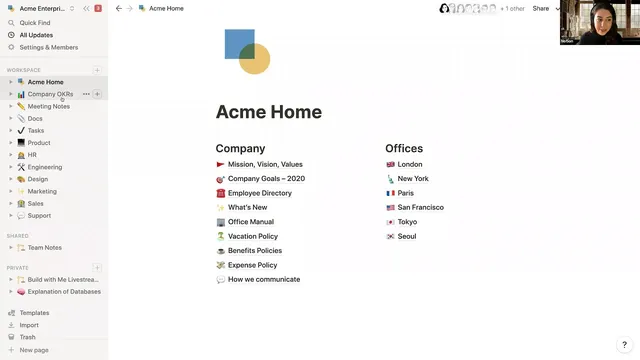
Organize the workspace with top-level pages by team or function so subpages and linked content stay easy to find.
Briefing
A Notion project-management starter kit centers on one idea: build project tracking from connected databases—then use views, filters, and rollups to keep teams aligned without duplicating work. The system starts with a workspace organized by top-level pages (by team or function), then moves into a project roadmap database where each project is a database entry with structured properties like status, launch date, priority, team, and owner. Because each row becomes its own full Notion page, teams can attach specs, links, images, and ongoing discussion directly to the project record—turning “tracking” into a living workspace rather than a static spreadsheet.
The core mechanics come from Notion databases and their building blocks: properties and views. Properties define the data model—text, dates, URLs, and especially select tags for initiatives—while views reshape the same underlying data for different workflows. The kit demonstrates five view types (table, board/kanban, calendar, list, and gallery) and shows how a board view can group projects by initiative or status, with card counts that make it easy to see what’s next. Views can also be filtered down to a specific person’s workload (e.g., “me”) and saved for quick reuse. Even the card content is customizable, letting teams decide which properties matter at a glance.
Where the system becomes truly project-management-grade is the relationship between projects and tasks. Instead of listing tasks as plain text inside a project page, the kit recommends a master tasks database with task-specific properties (type, assignee, priority, status, due date). Tasks then connect to projects through a relation property, creating a two-way link: selecting a project on a task automatically surfaces the task under that project, and vice versa. This keeps data sane—project tracking stays in the project database, task tracking stays in the task database—while still making them codependent through the relation.
Once relations exist, rollups provide the next layer of automation-like visibility. The kit shows rolling up task statuses onto the project roadmap so a project can display how many related tasks are “next up,” “in progress,” or “completed,” without manually updating anything. It also demonstrates rolling up other fields such as project launch dates and estimated time in hours derived from task properties. The same pattern extends beyond projects and tasks into OKRs: objectives relate to key results, key result statuses and numeric progress roll up into objective dashboards, and formulas (based on JavaScript) can calculate progress toward targets.
Finally, the starter kit emphasizes collaboration features that make the system operational: Notion’s updates feed logs changes and who made them, and pages can be followed so notifications appear in the updates area. Setup is framed as incremental—build the property “skeleton” first, then add relations and rollups as teams discover what needs to connect. The result is a flexible project-management system that supports multiple perspectives (by team, owner, initiative, or status) while keeping the underlying data connected rather than duplicated.
Cornell Notes
The starter kit builds project management in Notion by structuring work around connected databases. A project roadmap database stores each project as a page with properties like status, launch date, priority, team, and owner, plus room for specs and discussion. Teams then create multiple views (table, board/kanban, calendar, list, gallery) to group and filter the same data for different workflows, including saved “my projects” views. The system’s power comes from relating a master tasks database to the projects database, creating a two-way sync. With relations in place, rollups surface task status, launch dates, and time estimates back onto project records, and the same pattern extends to OKRs via relations and rollups.
Why treat each project row as a full Notion page instead of just a spreadsheet entry?
How do views change what teams see without changing the underlying data?
What’s the practical difference between listing tasks as text inside a project vs using a master tasks database?
How do relations create a two-way connection between tasks and projects?
What do rollups add after relations are established?
How does the same database pattern support OKRs?
Review Questions
- What properties would you choose for a project roadmap database to support your team’s day-to-day decisions (status, owner, dates, priority, initiative, etc.)?
- How would you design views and filters so different roles (engineers, designers, PMs) see the same project data in different ways?
- What information would you roll up from tasks to projects, and why would those rollups reduce manual work or errors?
Key Points
- 1
Organize the workspace with top-level pages by team or function so subpages and linked content stay easy to find.
- 2
Model projects as a dedicated database where each entry is a full page with structured properties plus a body for specs and collaboration.
- 3
Use database views (table, board/kanban, calendar, list, gallery) to group and filter the same project data for different workflows, and save the views you’ll reuse.
- 4
Track work in a master tasks database with task-specific properties, then connect tasks to projects using a relation property for two-way synchronization.
- 5
Use rollups to surface task-derived information (status, launch dates, estimated hours) back onto project records without manual updates.
- 6
Extend the same relation + rollup pattern to OKRs by linking objectives to key results and rolling up status and numeric progress.
- 7
Treat setup as incremental: build the property skeleton first, then add relations, rollups, and saved views as the system matures with team needs.