Building an Open Assistant API
Based on sentdex's video on YouTube. If you like this content, support the original creators by watching, liking and subscribing to their content.
Open Assistant Pythia 12B can be run locally with Hugging Face Transformers using AutoTokenizer and AutoModelForCausalLM, but GPU memory limits are tight.
Briefing
Open Assistant Pythia 12B is presented as a locally runnable, open-weight language model that can be turned into a usable chat system with a small amount of Python glue—first by generating responses directly with Hugging Face Transformers, then by wrapping the model in a Flask API, and finally by building a simple client that maintains conversation context. The practical takeaway is that a 12B-parameter model can run on a single workstation GPU (with careful precision and memory handling) and still behave like a chat assistant when prompts include the model’s required special tokens.
The walkthrough starts with setup decisions that determine whether the model will even fit. The model is loaded via Transformers’ AutoTokenizer and AutoModelForCausalLM, using half precision for speed and memory savings. The transcript stresses that hardware requirements are tight: the model may need roughly 24GB at half precision or 48GB at full precision, and even half precision can overflow if the GPU is also used for desktop tasks. GPU selection is handled through CUDA_VISIBLE_DEVICES, and the code is structured so tokens are moved to the same device as the model.
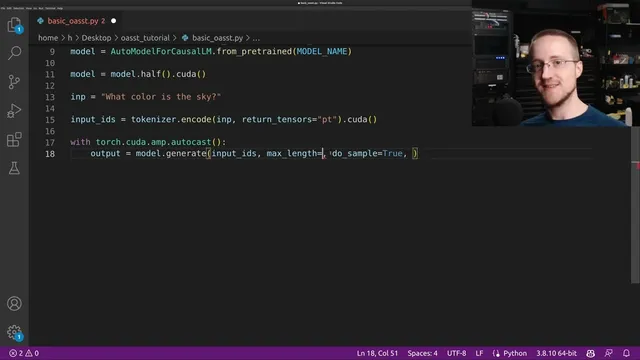
Generation logic then centers on two things: correct prompting format and stopping behavior. The model uses special tokens such as “prompter”, “assistant”, and an “end of text” token that marks the end of a turn. If the prompt omits these tags, the model may continue generating irrelevant text (the example returns something like a multiple-choice exam rather than answering “what color is the sky”). With the tags included, generation stops cleanly at the intended boundary by enabling early stopping and using the model’s EOS token ID. The transcript also notes the model’s context window is 2048 tokens, and it sets max length accordingly (initially smaller for testing, later using larger values for the API).
Once direct generation works, the model is packaged as a local HTTP service. A Flask app exposes a /generate endpoint that accepts JSON with a text field, tokenizes the input, runs model.generate under automatic mixed precision (torch.cuda.amp), decodes the output, and returns generated text as JSON. A separate client script then sends user messages to the API and constructs a running “history” string by concatenating prompter/end-of-text/assistant tokens so the model can continue the conversation.
The final engineering problem is context overflow. Because the model’s maximum input is 2048 tokens, long chats eventually exceed the limit. The solution implemented at the API level trims the encoded input IDs when they grow beyond (max context length minus a reserved “room for response” cushion). This keeps the system responsive over extended back-and-forth without needing a more complex summarization pipeline.
Overall, the transcript delivers a working blueprint: load Open Assistant Pythia 12B locally, enforce the model’s turn-taking tokens, serve it through Flask, and manage context length so the assistant remains usable as a real chat application.
Cornell Notes
Open Assistant Pythia 12B can be run locally by loading Hugging Face Transformers with AutoTokenizer and AutoModelForCausalLM, typically in half precision to fit GPU memory and improve speed. Correct chat behavior depends on using the model’s special turn tokens—“prompter”, “assistant”, and an “end of text” token—plus generation settings like early stopping using the EOS token ID. A Flask API wraps the model so clients can POST JSON text and receive generated output, enabling access from other machines on a network. A chat client maintains conversation history by concatenating prompter/end-of-text/assistant tags. To prevent failures during long chats, the API trims input IDs when the context approaches the model’s 2048-token limit, reserving space for the next response.
Why does the prompt need “prompter”, “assistant”, and “end of text” tokens for chat-like behavior?
What generation settings prevent the model from running past the end of an assistant reply?
How does the Flask API turn a local model into something other code can call?
How does the chat client maintain conversation continuity across requests?
What breaks during long conversations, and what trimming strategy fixes it?
Why reserve “room for response” when trimming context?
Review Questions
- What specific tokens and stopping mechanism are required to make Open Assistant Pythia 12B behave like a turn-based chat assistant?
- Describe the data flow from a client POST request to the Flask /generate endpoint and back to the client.
- How does the API decide when to trim conversation history, and what does it reserve to keep responses from being cut off?
Key Points
- 1
Open Assistant Pythia 12B can be run locally with Hugging Face Transformers using AutoTokenizer and AutoModelForCausalLM, but GPU memory limits are tight.
- 2
Half precision (and careful GPU selection via CUDA_VISIBLE_DEVICES) is used to reduce memory use and speed up inference, though overflow can still occur on smaller or shared GPUs.
- 3
Chat behavior depends on using the model’s special turn tokens: prompter, assistant, and end of text; omitting them can cause off-target continuations.
- 4
Generation should stop at the end of the assistant turn using early_stopping=True and eos_token_id from model.config.eos_token_id.
- 5
A Flask API can expose the model via a /generate endpoint that accepts JSON {"text": ...}, runs model.generate, decodes output, and returns JSON.
- 6
A simple client can maintain conversation by concatenating prompter/end-of-text/assistant tags into a running history string.
- 7
Long chats require context management: trim tokenized input IDs when approaching the model’s 2048-token limit while reserving space for the next response.