Cal Newport’s Time-block planner in Logseq
Based on Joshua Duffney's video on YouTube. If you like this content, support the original creators by watching, liking and subscribing to their content.
Logseq journal pages are treated as one-day planning surfaces, with each new day starting on a fresh date page to force daily re-prioritization.
Briefing
Logseq is used as a daily “clean slate” planner by structuring every entry around a three-part journal note: daily metrics, an “engineer’s book” for notes vs. tasks, and a time-block grid split into morning deep work and afternoon collaboration. The core idea is that each day opens on a fresh page with the date, forcing priorities to be re-anchored daily—then carried forward only when needed via templates and a weekly staging system.
The daily metrics section is adapted from Cal Newport’s time-blocking approach and turns goals into measurable, time-based habits. Three tracked targets anchor the day: one hour of writing improvement, 30 minutes of learning Go (a programming language), and reading 25 pages to build a consistent identity as a reader. The reading target is framed as a practical “velocity” method—25 pages a day can translate into finishing a book in roughly a week or a little over, depending on length. Checkboxes (via slash commands like “/to do”) make the habits actionable at a glance, while the author notes that reading is harder to time precisely during scattered moments, so page counts fit better than time tracking.
Beyond daily habits, the journal includes an “engineer’s book” section inspired by the Pragmatic Programmer’s idea of engineers keeping notebooks. It separates two streams: notes (things to remember) and tasks (things to act on). This keeps to-dos from mixing with ideas that may later become action items—such as updating agile sprint artifacts (e.g., task boards) or capturing meeting-derived action items.
Time blocking is implemented as a grid with morning and afternoon halves, with lunch as the divider. The morning is reserved for deep work—typically the first four hours—avoiding Teams, email, and other distractions. Afternoon time is left open for collaboration, meetings, and lighter work, with deep-work sessions broken into roughly one-hour to one-and-a-half-hour intervals to create mental “switch points.” The grid starts at 8 a.m., includes scheduled blocks for deep work and recovery-friendly shallow tasks, and uses the Outlook calendar to populate meeting times. A shutdown block near 4 or 4:30 is used to stage work for the next day.
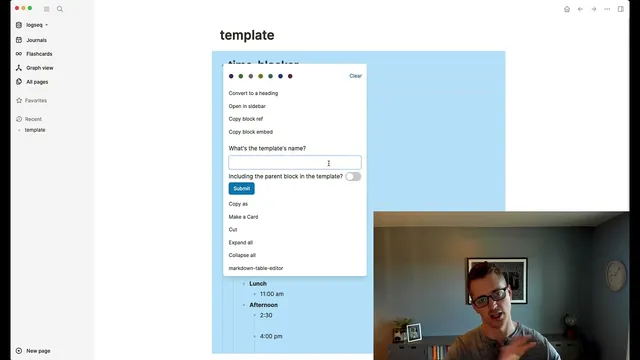
To avoid rebuilding this structure daily, templates are created inside Logseq. A “time blocker” template is attached to the journal entry so new daily pages automatically populate the same sections. Even the hour lines can be templated so the author can start with times when helpful, or omit them when the day’s schedule is uncertain.
Weekly planning adds a higher abstraction: a “week ahead” page with deadlines and day headings (Monday through Thursday/Friday as needed). Tasks can be scheduled for specific dates using a date picker, and those items automatically appear at the bottom of the corresponding daily journal entry. When planning a day, the author moves staged items into the time-block grid, eliminating duplication.
Finally, tags are used as dynamic “collections,” echoing Bullet Journal concepts. A “read later” tag creates a dedicated page that aggregates all tagged notes and supports filtering by additional tags like “writing.” Meeting notes are handled similarly: recurring meeting pages link to future dates via date picker entries, so a checkbox reminder appears in the correct day’s journal when the meeting arrives.
Cornell Notes
The system uses Logseq’s daily journal pages to enforce a fresh planning slate each day, then fills that slate with a consistent three-part structure: daily metrics (writing, Go learning, reading), an engineer’s book split into notes vs. tasks, and a time-block grid for deep work and collaboration. Templates automate the daily setup so the same layout appears automatically in new journal entries. A “week ahead” page stages deadlines and date-specific tasks, which then automatically surface in the correct day’s journal for easy time-blocking. Tags act as Bullet Journal-style collections, turning things like “read later” into dynamic lists with filtering. Meeting notes are also scheduled via date picker links so reminders land on the right day.
How does the daily journal structure in Logseq create a “clean slate” workflow, and why does that matter for planning?
What are the specific “daily metrics” targets, and how are they tracked?
What is the “engineer’s book” section, and how does it separate thinking from doing?
How does the time-block grid work, and what deep-work rule shapes its granularity?
How do templates and the “week ahead” page reduce daily planning overhead?
How do tags function as collections, and how are they used for reading and tutorials?
Review Questions
- If a task is meant for Wednesday, how does the system ensure it shows up on the correct daily page without manual re-entry?
- Why does the author track reading by pages instead of time, and how does that choice affect daily metrics?
- What practical benefit comes from splitting the day into morning deep-work blocks and afternoon collaboration time, and how does the shutdown block support it?
Key Points
- 1
Logseq journal pages are treated as one-day planning surfaces, with each new day starting on a fresh date page to force daily re-prioritization.
- 2
Daily metrics are implemented as measurable targets: one hour of writing, 30 minutes learning Go, and 25 pages of reading, with checkboxes for quick morning action.
- 3
An “engineer’s book” layout separates notes (remember/think) from tasks (act), preventing to-dos from drowning out ideas.
- 4
Time blocking reserves morning for deep work and uses roughly one-hour to one-and-a-half-hour intervals to create mental switching points.
- 5
Templates eliminate repetitive daily setup by auto-populating the time-block structure in each new journal entry.
- 6
A “week ahead” page stages deadlines and date-specific tasks, which automatically appear in the correct daily journal entry for easy time-blocking.
- 7
Tags are used as Bullet Journal-style collections (e.g., “read later”) that support filtering via additional tags like “writing.”