Calendar Time Blocking: a productivity method for your notes
Based on Reflect Notes's video on YouTube. If you like this content, support the original creators by watching, liking and subscribing to their content.
Assign each non-meeting task to a specific time block on the calendar rather than leaving it as an unscheduled to-do.
Briefing
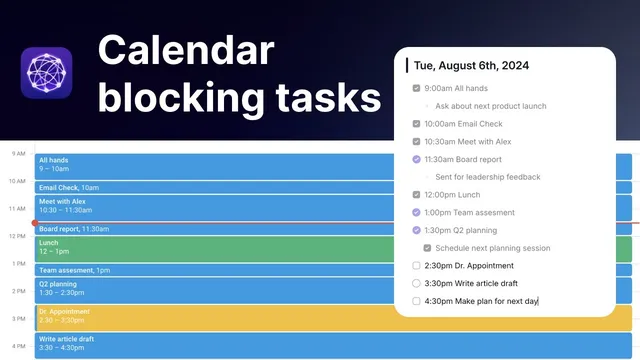
Calendar time blocking turns a daily task list into a scheduled plan by placing each non-meeting task directly onto a calendar at the time it will be done. The core move is straightforward: take what’s on the day’s list, decide when each item will happen, and “block” those time ranges on the calendar—whether the day starts with something like an all-hands meeting or with personal work such as a morning paragliding session. Color-coding helps sort work versus errands/admin, and the method becomes easier to manage when tasks are sized into practical chunks (the example uses 30-minute minimums, even though real schedules may include many shorter appointments).
Once the calendar is connected to Reflect, the scheduled blocks appear inside the notes workflow, letting each calendar item be converted into a checklist inside a daily note. Using Reflect’s Meeting Integration, most blocks are handled without creating backlinked notes; instead, they’re added directly to the daily note as actionable items. The result is a day view that functions like a standard checklist: tasks can include sub-bullets for quick notes, and items can be turned into checkboxes so progress is visible at a glance. People can batch-add everything for the day, but the workflow also supports incremental updates—adding items one by one and then reordering them when reality changes.
That reordering step matters. Drag-and-drop in the checklist doesn’t automatically update the underlying calendar order, so the user typically adjusts the real calendar when priorities shift. The friction is intentional: it forces more critical thinking about task duration and sequencing, rather than letting the day drift into vague “to-dos.”
There’s also an optional layer for prioritization. Marking certain tasks as “circular” makes them surface in a tasks tab, separating key items from the rest of the day’s operational checklist. Under each task, notes can be kept alongside the action, keeping planning and execution in one place.
A standout practice is adding a final daily task: “make a plan for the next day.” Doing this the evening before makes mornings less reactive and reduces distraction, because the next day’s blocks are already defined. The method’s productivity benefits align with time-boxing principles similar to Pomodoro: knowing there’s a fixed 15- or 30-minute window reduces the temptation to open social apps and lose hours. It can even create a personal “competition” to finish early—freeing extra time that might otherwise be consumed by scrolling—while preventing the common pattern of noticing the clock only after a distraction-heavy stretch has already passed.
Cornell Notes
Calendar time blocking schedules each daily task into specific calendar time slots, then converts those blocks into a checklist inside Reflect’s daily notes. After connecting the calendar to Reflect, tasks appear as non-meeting blocks that can be added directly to a daily note (usually without backlinked notes). Checkboxes and optional sub-bullets make the day’s plan actionable, while reordering tasks requires updating the calendar, encouraging better estimates of time and sequencing. A key habit is finishing each day by planning the next day, which reduces morning reactivity and distraction. Fixed time blocks also curb scrolling by limiting how long any single task can be “worked on” before switching.
How does calendar time blocking differ from a generic to-do list?
What role does Reflect play once the calendar is connected?
Why does the workflow encourage reordering tasks in the actual calendar rather than only in the checklist?
How can the system highlight priority tasks without cluttering everything?
Why is planning the next day treated as the last task of every day?
How does time blocking reduce distraction like social media scrolling?
Review Questions
- In what ways does converting calendar blocks into Reflect daily-note checkboxes change how a person executes tasks compared with using only a to-do list?
- What trade-off does the workflow introduce by requiring calendar reordering (instead of relying only on checklist drag-and-drop), and how does that affect task planning quality?
- Why does planning the next day the night before reduce distraction, and what specific mechanism in the workflow supports that outcome?
Key Points
- 1
Assign each non-meeting task to a specific time block on the calendar rather than leaving it as an unscheduled to-do.
- 2
Use color-coding to distinguish work tasks from errands/admin tasks for faster scanning.
- 3
Connect the calendar to Reflect so scheduled blocks can be converted into a daily-note checklist.
- 4
Prefer adding tasks directly to the daily note (often without backlinked notes) to keep the workflow lightweight.
- 5
Turn tasks into checkboxes and optionally keep sub-bullets for quick notes while executing the day.
- 6
When priorities shift, reorder tasks in the actual calendar to force better estimates of duration and sequencing.
- 7
End each day by planning the next day’s calendar blocks to reduce morning reactivity and limit distraction.