Capacities - Creating a Reading List / Book Library with Templates, Page Properties, Queries, AI
Based on Ed Nico's video on YouTube. If you like this content, support the original creators by watching, liking and subscribing to their content.
Create a custom “Books” object with structured properties: title, author, cover image, GoodReads link, pages, year, started, finished, and a read checkbox.
Briefing
Capacities can be turned into a practical book library by combining a custom “Books” object, structured page properties, and AI-generated summaries—then using queries to create fast, focused dashboards for “to read,” “currently reading,” and “read this year.” The core payoff is speed and organization: a single library can hold many entries, but filtered queries keep the interface responsive while still showing the right books in the right views (table, gallery, or wall).
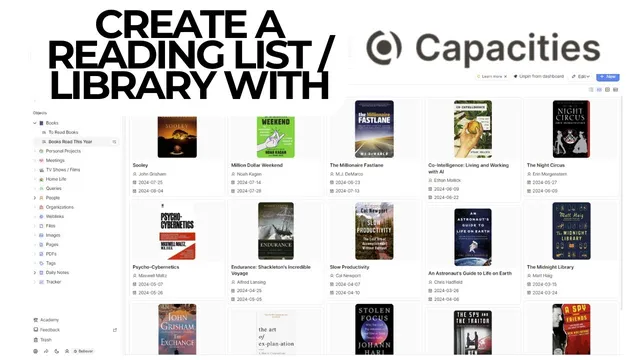
The setup starts with a reading list layout that includes core metadata: title, author, cover image, a link (for quick access to GoodReads reviews and comments), page count, year read, and dates for when reading started and finished. A key addition is an “AI summary” field that can be filled on demand to generate a short synopsis for quick review—without forcing a full note-taking workflow. The creator also emphasizes that Capacities’ database-like flexibility lets columns and card fields be rearranged, hidden, or removed, so the library can match personal preferences.
To build this, the process uses a template object (“book”) and then customizes object settings: removing fields that aren’t useful (like tags, recommended-by, or rating), keeping what matters (cover image, author, notes), and adding new properties. Two date-time properties—“started” and “finished”—track reading timelines. A numeric “pages” property stores page counts as integers (no decimals). A numeric “year” property supports sorting and filtering. A checkbox property (“read”) acts as a status flag, enabling easy separation between completed books and those still in progress.
The AI summary is configured with constraints so it stays short and doesn’t invent details. In practice, each book card can be populated with an AI blurb via a “fill” action, producing a quick, spoiler-safe synopsis when desired.
Once the library object is in place, queries become the dashboard engine. A “need to read” query filters the Books object by the checkbox status (read is not selected) and displays results in a gallery view. Another query, “books read in 2024,” filters by year equals 2024, sorts by finished date (nearest first), and pins the resulting gallery to a dashboard. This year-based filter is presented as a performance strategy: instead of loading a large library all at once (e.g., 136 items), the query limits results to a smaller subset (around a dozen or two), making the interface noticeably quicker.
The workflow also demonstrates how updating a single property—checking “read” after finishing—automatically removes the book from the “to read” query and places it into the “read this year” view. The end result is a visually scannable, cover-forward library that supports sorting, filtering, and lightweight AI-assisted summaries while still allowing manual notes and personal tracking.
Cornell Notes
A Capacities “Books” library can be built with custom properties (title, author, cover image, GoodReads link, pages, year, started/finished dates, and a read checkbox) plus an AI summary field that generates short blurbs on demand. The real advantage comes from queries that filter the library into fast dashboards such as “need to read” (read unchecked) and “books read in 2024” (year equals 2024, sorted by finished date). Using the year property reduces the number of items loaded at once, improving responsiveness compared with viewing a large unfiltered library. Updating the read checkbox after finishing a book automatically moves it between query views.
What properties make a book library in Capacities useful for tracking and sorting?
How does the AI summary field fit into the workflow?
Why use queries instead of relying on one big list?
How does the year property improve performance?
What happens when a book’s status changes after finishing?
How can the card layout be customized for better scanning?
Review Questions
- Which specific properties would you add to support both “to read” and “read this year” dashboards, and how would each property be used in filters?
- How would you design an AI summary instruction so it stays useful for quick review without creating long notes or hallucinated details?
- What sorting approach would you use for a “read this year” gallery, and why does sorting by finished date matter?
Key Points
- 1
Create a custom “Books” object with structured properties: title, author, cover image, GoodReads link, pages, year, started, finished, and a read checkbox.
- 2
Use an AI summary text property that generates short blurbs on demand, with constraints to keep output brief and factual.
- 3
Build a “need to read” query by filtering Books where read is not selected, and display it in a gallery view for quick scanning.
- 4
Build a “read this year” query by filtering year equals a chosen value (e.g., 2024) and sorting by finished date (nearest first).
- 5
Filter by year to reduce the number of loaded items and keep dashboards responsive as the library grows.
- 6
Update the read checkbox after finishing a book so it automatically moves from “to read” to “read this year” views.
- 7
Customize card fields in object settings so the dashboard shows only the most useful metadata (often cover, title/author, and key dates).