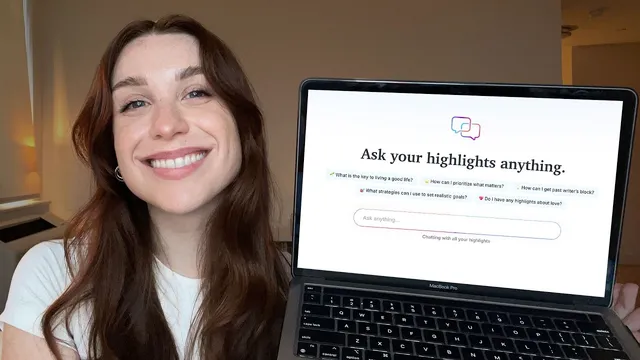
Chat with Your Highlights using Readwise
Based on Readwise's video on YouTube. If you like this content, support the original creators by watching, liking and subscribing to their content.
Readwise’s “chat with highlights” enables conversational Q&A grounded in a user’s own highlight library across books, articles, PDFs, and more.
Briefing
Readwise’s new “chat with highlights” feature turns a personal archive of reading notes into an interactive knowledge base, letting users chat back and forth with highlights from books, articles, PDFs, and more directly inside Readwise. The practical payoff is simple: instead of searching for a remembered idea or exporting notes to other tools, users can ask questions in natural language and get answers grounded in their own highlight history—complete with the source highlights that support the response.
Getting started hinges on importing highlights. For long-time users, existing connections may already be in place, but new users are guided to the Import page and “Connect in sync.” Readwise supports importing from 30+ sources, including Kindle, Pocket, Twitter, and Readwise’s own Reader app (included in a free trial and also available under a Readwise subscription). There’s also a “supplemental books” option for titles added later: when a book is selected this way, Readwise imports the book’s all-time most popular highlights into the user’s account. For people with paper notes, Readwise also offers a physical import tool in the mobile app.
Once highlights are in place, one of the most immediate uses is quote recovery. A user can describe an idea or paraphrase the gist of a remembered line—without knowing the exact wording—and ask Chat to reconstruct it. In the example, a vague memory of a Cheryl Strayed quote leads to Chat finding the originating book, providing the precise wording, and supplying the surrounding context needed to fully reassemble the original thought.
Beyond quote hunting, the feature supports higher-level synthesis across reading. Previously, users could export highlights to external AI tools like NotebookLM or Notion and then ask those models to compare, summarize, or spark new ideas. “Chat with highlights” brings much of that workflow into Readwise itself. For instance, users can ask for key takeaways from multiple documents and receive a synthesized set of conclusions drawn from highlights across different articles.
The interface also makes grounding visible. Responses include “reference highlights” in the sidebar—exact highlights and their sources that Chat used to build the answer. Users can then scroll to “relevant highlights,” which are closely related but not necessarily cited in the initial response, offering additional material for follow-up.
Readwise emphasizes that strong results don’t require specialized prompting tricks. Users can still steer output by requesting a specific structure—for example, step-by-step instructions—so the same underlying highlight archive can produce either quick answers or more “professional” formatted guidance.
Finally, Readwise expands access through the web app and the latest Readwise mobile app, adding buttons in the Daily Review and elsewhere to quickly surface similar highlights and start new chats. The overall message is that a reading habit can become more actionable: highlights stop being static notes and turn into a conversational system for recall, learning, and idea generation.
Cornell Notes
Readwise’s “chat with highlights” lets users converse with their own library of highlights from books, articles, PDFs, and more inside Readwise. After importing highlights from 30+ sources (including Kindle, Pocket, Twitter, and Readwise Reader), users can ask questions in natural language—such as recovering a quote from a vague memory—and get exact wording plus surrounding context. The feature also supports synthesis, like summarizing key takeaways across multiple documents, without exporting to other AI tools. Responses are grounded with “reference highlights” (exact cited notes and sources) and “relevant highlights” (closely related notes that may help further). Users can optionally request a preferred response structure, such as step-by-step instructions, without needing specialized prompting formulas.
What’s the fastest way to start using “chat with highlights,” and what must be done first?
How does the feature help when someone remembers an idea but not the exact quote?
What’s an example of using chat for synthesis rather than simple retrieval?
How does Readwise show what information the answer is based on?
Does getting good results require specialized prompting?
Where else can users access the feature besides the web app?
Review Questions
- What are the main steps to enable “chat with highlights,” and which import sources are explicitly supported?
- How do “reference highlights” and “relevant highlights” differ, and why does that distinction matter for trust in answers?
- Give one example of quote recovery and one example of synthesis, and explain what the user asked for in each case.
Key Points
- 1
Readwise’s “chat with highlights” enables conversational Q&A grounded in a user’s own highlight library across books, articles, PDFs, and more.
- 2
Importing highlights is the prerequisite; users connect sources via “Connect in sync,” including Kindle, Pocket, Twitter, and Readwise Reader.
- 3
Supplemental books can automatically import all-time popular highlights for newly added titles.
- 4
Users can import physical paper highlights using the Readwise mobile physical import tool.
- 5
Quote recovery works from vague memories: describing an idea can lead to exact wording plus surrounding context.
- 6
Synthesis tasks—like summarizing key takeaways across multiple documents—can be done inside Readwise without exporting to other AI tools.
- 7
Responses provide transparency through “reference highlights” (cited sources) and “relevant highlights” (closely related notes).