ChatGPT API in Python
Based on sentdex's video on YouTube. If you like this content, support the original creators by watching, liking and subscribing to their content.
OpenAI ChatGPT API calls require an API key plus billing setup, and the tutorial notes cost scales with token usage (about $0.002 per thousand tokens).
Briefing
ChatGPT’s paid API can be used in Python to build custom, stateful chat applications—by sending a growing list of prior “messages” (user and assistant turns) with every request. The core workflow is straightforward: create an OpenAI account, set up billing, install the updated OpenAI Python package, load an API key, then call a chat-completions endpoint using a chosen model such as gpt-3.5-turbo. Responses return structured fields, and the practical output is the assistant’s text inside completion.choices[0].message.content. The cost is low (described as about $0.002 per thousand tokens), but token limits matter because requests stop once they hit a maximum length (noted as 4096 tokens in the example).
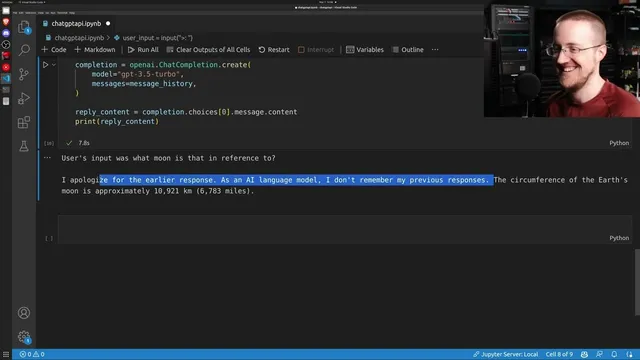
A key operational detail is that the API does not automatically remember conversation history. To get multi-turn behavior, developers must maintain message_history themselves: append each user input and each assistant reply, then resend the entire history list on the next call. The tutorial demonstrates this by first asking a factual question about the Moon’s circumference, then asking a follow-up that depends on context (“which moon is that in reference to?”). The follow-up produces inconsistent behavior—sometimes failing to use prior turns as expected—highlighting that model behavior can be finicky and may change across runs or model versions. The takeaway is less about “bugs” and more about the reality that prompt formatting, history handling, and model updates can affect reliability.
To make the pattern reusable, the tutorial refactors the repeated request logic into a chat function that takes user input, appends it to message_history, calls the API, extracts reply content, appends the assistant message back into history, and returns the reply. This same structure supports practical safety-oriented Q&A, such as asking whether water collected by a dehumidifier is safe to drink and then requesting ways to make it safer. The assistant provides guidance (e.g., boiling and filtration), while also noting limitations like boiling not removing certain chemicals that could leach from the device.
For a user-facing interface, the tutorial then integrates the API with Gradio to build a simple chat UI. It constructs a “joke bot” by adding a pre-prompt message that instructs the assistant to respond only with jokes related to the user’s subject. The Gradio app uses a predict function wired to a text box submit event, updates the conversation history, and returns the chat transcript in the format Gradio expects. In testing, the jokes vary in quality, but the interface demonstrates how easily the same API can power either constrained behavior (like joke-only responses) or general Q&A.
Overall, the central insight is that building with the ChatGPT API is mostly about managing messages, choosing models, and handling token limits—then layering on whatever UI or behavior constraints the application needs. Even with strong capabilities, factual accuracy can still fail, so outputs should be treated as fallible guidance rather than ground truth.
Cornell Notes
The ChatGPT API in Python works by sending a list of prior chat messages (roles and contents) on every request, then reading the assistant’s reply from completion.choices[0].message.content. Because the API does not retain history, multi-turn conversations require developers to maintain message_history and append both user inputs and assistant outputs each turn. The tutorial highlights practical constraints: requests can stop when they hit a token limit (noted as 4096), and cost scales with token usage (about $0.002 per thousand tokens). It also demonstrates packaging the logic into a chat function and building a Gradio web UI, including a “joke bot” controlled by a pre-prompt. The result is a reusable pattern for custom chat applications, with the caveat that answers can be wrong or inconsistent.
What is the minimum set of steps needed to call the ChatGPT API from Python?
How does the API produce the assistant’s text output in code?
Why is message history required for multi-turn chat behavior?
What practical constraints can interrupt or degrade responses?
How can behavior be customized beyond “normal chat”?
How is the API connected to a simple web chat interface?
Review Questions
- In a stateless API call, what must be stored and resent to preserve conversation context across turns?
- Where in the response object does the assistant’s actual text live, and how would you extract it?
- What happens when message_history grows beyond the model’s token limit, and what strategies can prevent that?
Key Points
- 1
OpenAI ChatGPT API calls require an API key plus billing setup, and the tutorial notes cost scales with token usage (about $0.002 per thousand tokens).
- 2
Chat completions are driven by a messages list containing role/content pairs, and the assistant reply is read from completion.choices[0].message.content.
- 3
The API is stateless, so multi-turn chat requires manually maintaining message_history and appending both user and assistant turns each request.
- 4
Token limits can stop responses (the example cites 4096 tokens), so long histories must be truncated or summarized.
- 5
Model choice matters: the tutorial uses gpt-3.5-turbo and mentions beta model variants, with behavior potentially changing as models update.
- 6
A reusable chat function can wrap the request/response logic and return reply content while updating message_history.
- 7
Gradio can turn the API into a working web chat UI, including constrained behavior like a joke-only assistant via pre-prompts.