Citing with Zettlr
Based on Zettlr's video on YouTube. If you like this content, support the original creators by watching, liking and subscribing to their content.
Install the Pandoc citation processor plugin so Zettlr can render citations during export.
Briefing
Zettlr can generate properly formatted academic citations in exports (PDF, Word, and other outputs) when it’s connected to a Zotero library through a citation pipeline: Zotero → Better BibTeX export (CSL JSON) → Zettlr’s citation engine via an external plugin (an “oxide proc”/Pandoc citation processor). The payoff is straightforward: once the library is loaded, citations can be inserted directly in the markdown text using bracket syntax, and page-level targeting (like citing page 10) can be handled without manual formatting.
The setup starts with enabling Zettlr’s citation support by installing the Pandoc citation processor plugin. On Windows it’s typically already present if Pandoc was installed, but on macOS it may need installation via Homebrew (using a brew install command). After that, Zettlr still needs a machine-readable citation database. That database comes from Zotero using the Better BibTeX add-on, which adds “cite key” identifiers and can export the library in a CSL JSON format that Zettlr can read.
With Better BibTeX installed in Zotero (download the .xpi file, install via Zotero’s add-on manager, then restart), the next step is exporting the Zotero library. The export must use the Better CSL JSON format (not a similarly named CSL JSON option), and it can be set to keep the exported file updated automatically so changes in Zotero propagate to Zettlr. The resulting file contains citation keys, reference types, titles, author lists, and other metadata—exactly what the citation processor needs to render in-text citations and reference lists.
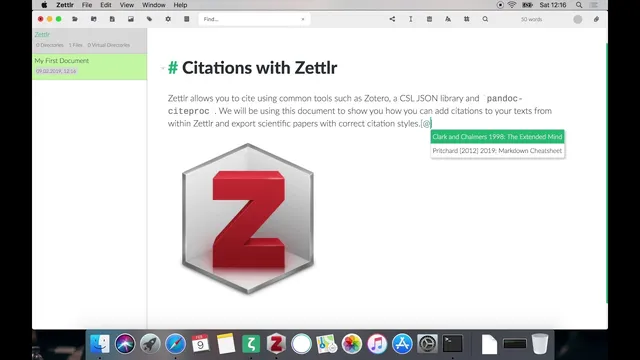
Back in Zettlr, the CSL JSON database file is loaded through the Settings → Export tab. Once loaded, Zettlr can suggest citations as soon as the user types square brackets in the document. Selecting an entry inserts the citation key automatically. For pinpoint citations, the user can add page numbers; Zettlr detects the page-specific intent and formats the citation accordingly. If the author name was already mentioned in the sentence, a hyphen can be used to omit the author name in the citation.
Export behavior depends on citation style. If no style is specified, APA is used by default, producing in-text citations and a reference list at the end of the document. However, the reference section heading may require manual insertion. The workflow recommended is to add a final “Literature” (or “References”) heading at the end of the document, because the citation processor appends the formatted bibliography after the last heading.
Finally, citation styles can be swapped by loading a CSL style file in Zettlr’s Settings → Export (for example, APA or the Chicago Manual of Style). Chicago’s style demonstrates the difference clearly: citations appear as footnotes rather than end-of-document author-date references. With access to thousands of CSL styles via Zotero’s style library, the system supports a wide range of academic formatting requirements, enabling consistent citation output across papers.
Cornell Notes
Connecting Zettlr to Zotero through Better BibTeX and a CSL JSON export lets users insert citations in markdown and get correctly formatted results in exports. The process is: install the Pandoc citation processor plugin, install Better BibTeX in Zotero, export the Zotero library as Better CSL JSON (with cite keys), then load that CSL JSON database in Zettlr’s Settings → Export. In Zettlr, citations are inserted using square brackets, and page-specific citations can be added (e.g., citing page 10). Citation formatting can be changed by loading different CSL styles, such as Chicago Manual of Style (footnotes) or APA (author-date). This matters because it automates both in-text citations and the bibliography/footnotes consistently.
Why does Zettlr need an exported Zotero library instead of citing directly from Zotero?
What role do “cite keys” play in the citation workflow?
How can a user cite a specific page rather than an entire source?
What’s the difference between default APA output and Chicago Manual of Style output?
Why might the bibliography heading need manual editing in Zettlr?
Review Questions
- What exact file format does Better BibTeX export that Zettlr can load, and where in Zettlr is it configured?
- How does Zettlr support page-level citations, and what syntax helps omit the author name when it’s already mentioned?
- How do APA and Chicago Manual of Style differ in where citations appear (in-text vs footnotes) and how the reference section is handled?
Key Points
- 1
Install the Pandoc citation processor plugin so Zettlr can render citations during export.
- 2
Use Zotero with the Better BibTeX add-on to generate cite keys and export a Better CSL JSON database.
- 3
Export the Zotero library as Better CSL JSON (not the similarly named CSL JSON option) and enable automatic updating if desired.
- 4
Load the exported CSL JSON file in Zettlr via Settings → Export → “CSL JSON database.”
- 5
Insert citations in Zettlr using square brackets, then select the citation from the suggestions list.
- 6
Add page numbers to citations for pinpoint referencing, and use a hyphen to omit the author name when appropriate.
- 7
Choose a CSL style in Zettlr (e.g., APA or Chicago Manual of Style) to control whether citations appear in-text or as footnotes and how the bibliography is formatted.