Consensus AI Step-By-Step: The Fastest Way To Do Evidence-Based Research
Based on Andy Stapleton's video on YouTube. If you like this content, support the original creators by watching, liking and subscribing to their content.
Enable institutional access in Consensus settings to pull full-text PDFs from a university library.
Briefing
Consensus AI is positioned as a research workflow engine that turns messy literature searching into fast, evidence-weighted answers—especially when paired with institutional full-text access and strong filtering. The core value is a “consensus meter” that converts results from multiple papers into a quick yes/no snapshot (e.g., 80% yes vs. 20% no), letting researchers gauge how much agreement exists in the literature before committing time to deeper reading. That matters because it cuts through marketing claims and scattered studies, replacing them with a structured view of what peer-reviewed evidence actually leans toward.
Getting started centers on two practical moves. First, users are urged to enable institutional access in settings so Consensus can retrieve full-text PDFs from a university library—an advantage framed as rare among AI research tools. Second, the search interface supports both question entry and a set of filters designed to reduce “noise” in academia. Filters include publication recency (past 5 or 10 years), journal ranking with an emphasis on Q1 journals, options to exclude preprints, restrict to open access, and narrow by methodology fields and countries. These controls are presented as the difference between getting useful, high-impact results and wading through low-signal material.
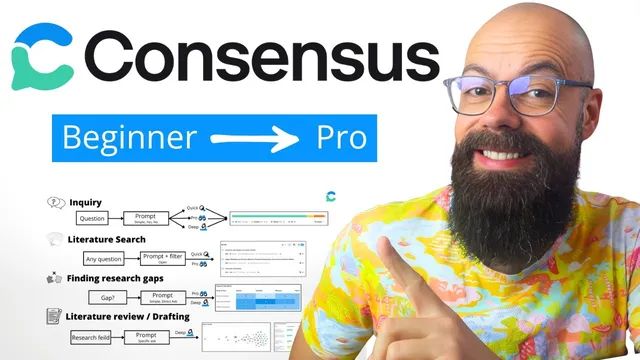
From there, Consensus is organized around step-by-step workflows. The first workflow, “inquiry,” is built for quick, yes/no questions. Users choose an output depth—Quick, Pro, or Deep—then receive a consensus meter plus a short, referenced summary. The example given is whether turmeric helps with weight loss: a Quick inquiry pulls 10 sources and reports an 80% yes consensus, with the underlying papers listed for follow-up.
The second workflow, “literature search,” shifts from a snapshot to field understanding. Here the prompt is meant to be broader and the output depth typically Pro (with Deep suggested as heavier). An example asks for the best nanomaterials for strength; the system returns a curated set of materials (e.g., graphene and graphene oxide), key insights, a summary table, and a list of papers to explore. The interface also supports follow-up interrogation of individual papers and, at higher tiers, extracting data from more sources.
A third workflow targets research gaps. Instead of manually hunting keywords and reading endlessly, Consensus can generate a “research gap matrix” in Pro or Deep. The example focuses on OPV devices, producing clearly labeled gaps such as device stability and degradation mechanisms and scalability—plus notes on where gaps appear for large-area versus small-area devices. The tool is described as explicitly flagging gaps and, in deeper searches, surfacing open questions.
Finally, Consensus supports literature review drafting and evidence synthesis. Using Deep, it can produce results timelines, claim-and-evidence matrices with citations, color-coded support levels (yes/mixed/no), research gaps, and open research questions. It can also generate an outline for a literature review (example: probiotics for irritable bowel syndrome) with suggested sections and references. The overall message is that Consensus doesn’t just summarize papers—it structures evidence, highlights where studies agree or conflict, and accelerates the path from question to review-ready output, with results tied back to cited sources and optional PDF access via institutional login.
Cornell Notes
Consensus AI is presented as a research assistant that converts literature into evidence-weighted answers and review-ready outputs. It starts with institutional full-text access and strong filters (recency, Q1 journals, exclude preprints, open access, methodology, country) to reduce low-signal noise. For quick yes/no questions, it generates a “consensus meter” (example: turmeric and weight loss shows 80% yes across 10 sources). For deeper work, Pro and Deep workflows support literature searches, research-gap matrices, and literature review drafting with evidence strength, results timelines, and claim-and-citation tables. The practical payoff is faster decisions about what the field agrees on, where gaps remain, and what to write next—while keeping outputs anchored to referenced papers.
How does the “consensus meter” help someone decide whether a claim is supported by the literature?
Why do filters matter as much as the question itself in Consensus?
What changes when moving from “inquiry” to “literature search”?
How does Consensus identify research gaps faster than traditional keyword-and-reading workflows?
What does Deep add for literature review drafting and evidence synthesis?
How does institutional access change the research workflow?
Review Questions
- When would a researcher choose Quick inquiry versus Pro or Deep, and what output differences should they expect?
- Which filters would most likely improve the quality of results for a systematic literature search, and why?
- How does a research gap matrix differ from a standard list of papers, and how could it influence next-step study design?
Key Points
- 1
Enable institutional access in Consensus settings to pull full-text PDFs from a university library.
- 2
Use filters (recency, Q1 journals, exclude preprints, open access, methodology, country) to reduce low-signal literature noise.
- 3
For fast evidence checks, ask direct yes/no questions and rely on the consensus meter to gauge agreement across sources.
- 4
Use Pro literature search for broader prompts when the goal is understanding a research field, not just a single answer.
- 5
Generate research gap matrices in Pro/Deep to identify where the field is underdeveloped and to surface open research questions.
- 6
Use Deep for literature review drafting and evidence synthesis, including claim-and-citation tables, evidence strength labels, and results timelines.
- 7
Treat Consensus outputs as research starting points by following the cited papers and verifying details in the underlying literature.