Cyber Python 2077 - Using computer vision to read and walk from Cyberpunk 2077 map
Based on sentdex's video on YouTube. If you like this content, support the original creators by watching, liking and subscribing to their content.
Capture frames from a fixed screen region and crop the minimap using trial-and-error coordinates tuned to resolution and window layout.
Briefing
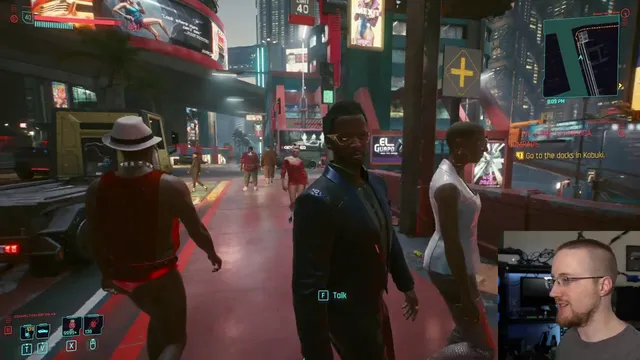
A practical computer-vision approach can drive on-foot navigation in Cyberpunk 2077 by reading the minimap, isolating the highlighted route, and steering the character to keep the route centered. The core idea is simple: grab the game screen, crop out the minimap region of interest, use OpenCV to mask the route color (yellow) in HSV space, then compute how far the detected route pixels drift from the minimap’s center. That “center error” becomes a control signal for mouse movement, while the W key handles forward motion.
The workflow starts with two technical requirements: fast screen capture and direct input. Instead of generic automation tools, the method relies on a screen-grab script to extract frames from a chosen region (tuned by trial and error for resolution and window layout) and a separate input controller that can send both keyboard presses and mouse movement in a way the game accepts. With frames flowing at a workable rate, the minimap is cropped from each frame using fixed pixel coordinates that the author adjusts for their setup.
From there, the route-following logic hinges on color segmentation. The minimap’s path is consistently marked in blue/white/yellow tones depending on the UI element, but the route itself is targeted by converting the minimap crop from BGR to RGB and then into HSV for masking. Because OpenCV’s HSV ranges don’t match common “color picker” expectations, the script uses iterative threshold tuning: it sweeps hue, saturation, and value ranges until the yellow path remains while most other minimap elements drop out. The result is a binary mask where matching pixels become 255 and everything else becomes 0.
Steering comes from geometry on that mask. All white (255) pixels are located with NumPy, producing coordinate lists (notably in y,x order). The script computes the mean x-position of the detected route pixels and compares it to the minimap’s horizontal center. The difference—negative when the route lies to one side and positive when it lies to the other—drives mouse movement direction. Forward motion is handled by holding W during the control loop; mouse adjustments rotate the character so the route drifts back toward center.
To avoid overreacting to distant parts of the route (which can cause the character to aim straight into obstacles), the method narrows the view further by using a “mini minimap” crop. This zoomed-in region contains only the near-term route dots ahead of the character, making turns more responsive. The author reports the system can follow turns and navigate around some objects, though it can fail when the mask loses the path (for example, due to transparency effects on the minimap) or when timing is off and the character overshoots.
The approach is intentionally rudimentary, but it demonstrates a complete loop—vision → route extraction → error computation → input control—that can achieve reliable on-foot movement for much of the map. The remaining gaps are practical: collision avoidance would likely require object detection (people, cars, obstacles), and some areas without sidewalks can force the path into the street, creating navigation problems. The next step proposed is layering object detection (e.g., TensorFlow-based) on top of the minimap steering so the agent can sidestep when pedestrians or other hazards appear.
Cornell Notes
The navigation system uses computer vision to follow Cyberpunk 2077’s minimap route while walking. Each loop grabs a frame, crops the minimap region, converts it to HSV, and masks the route color (yellow) to produce a binary image. NumPy finds the x-coordinates of the route pixels, computes their mean, and compares it to the minimap’s center to get an “error” value. Mouse movement is scaled from that error to steer the character, while the W key is held for forward motion. A tighter “mini minimap” crop improves turning by focusing on near-ahead route dots, though the method can break if the mask fails or if timing causes overshoot.
How does the system turn minimap pixels into steering commands?
Why does the method use HSV masking instead of direct RGB thresholding?
What problem does the “mini minimap” crop solve?
What are the main failure modes reported during testing?
Why can’t generic mouse/keyboard automation be used directly?
What upgrades are suggested to make navigation more robust?
Review Questions
- How would you modify the error calculation if the minimap crop is rotated or significantly distorted beyond a simple x-center comparison?
- What specific HSV thresholding steps would you take if the yellow route mask suddenly returns no pixels (all zeros) during a run?
- How could you incorporate obstacle detection outputs into the steering logic without abandoning the minimap-based route-following approach?
Key Points
- 1
Capture frames from a fixed screen region and crop the minimap using trial-and-error coordinates tuned to resolution and window layout.
- 2
Isolate the route by converting the minimap crop to HSV and iteratively tuning hue/saturation/value thresholds until yellow path pixels remain.
- 3
Convert the binary route mask into steering by finding all route pixel x-positions, computing their mean, and comparing it to the minimap center.
- 4
Hold W for forward motion while using mouse movement scaled from the center error to rotate the character back toward the route.
- 5
Use a smaller “mini minimap” crop ahead of the character to improve turn timing and reduce overcorrection toward distant path segments.
- 6
Expect failures when the route mask drops out (e.g., minimap transparency/HSV drift) or when control timing causes overshoot and the agent loses the intended path.
- 7
Add object detection (people/cars/obstacles) to sidestep hazards and increase navigation success beyond minimap-only guidance.