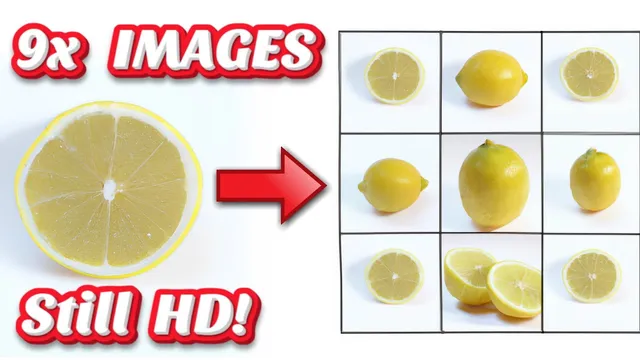
DALL E 2: FREE IMAGES! Make DALL-E Credits worth 9x More!
Based on MattVidPro's video on YouTube. If you like this content, support the original creators by watching, liking and subscribing to their content.
Prefix DALL·E 2 prompts with “a 3 by 3 array of” (or another grid size) to generate multiple variations per credit.
Briefing
DALL·E 2 credits can be stretched much further by forcing the model to generate a grid of variations in a single prompt—then cropping and upscaling the results. The practical takeaway: instead of spending credits to get only a handful of images per prompt, users can request a “3 by 3 array” (or larger) of outputs, producing up to 9 images per run, and then use an external super-resolution upscaler to restore detail. This approach doesn’t make DALL·E 2 free, but it can dramatically increase the number of usable images per credit.
The method is straightforward. Before or at the start of a prompt, the user adds a phrase like “a 3 by 3 array of” followed by the actual prompt text (e.g., “lemon photos”). The grid size matters: larger arrays such as 5 by 5 can reduce per-image resolution, which then requires more aggressive upscaling. In testing with a simple “lemon photos” prompt, the grid approach produced a 3×3 set—roughly 36 lemons after subsequent handling—where a standard prompt would have yielded only four images. Some outputs were cut off or imperfect, but the overall pool of choices increased enough to make the tradeoff worthwhile.
Once the grid images are generated, the workflow shifts to image selection and enhancement. The user downloads the generated images, opens them in a device editor (macOS, Windows, or phone cropping tools), and crops down to the specific image they want. Because the generated grid images are smaller, the cropped results are then upscaled.
For upscaling, the transcript recommends an “AI upscaler” available via replicate.com and also through Google Colab for free use (with a longer setup time). The Colab process is broken into steps: first run the environment setup (which takes about a minute), then upload the cropped images, then run the inference step, and finally choose among multiple super-resolution models. Options mentioned include BSRGAN, Real-ESRGAN, and SwinIR variants such as “swin ir” and “large swin ir output.” After inference, the user downloads all enhanced images at once as a ZIP file.
The creator also notes that the grid prompt hack isn’t perfectly reliable. A more complex prompt—“character art concept intelligent crab wearing a top hat and a monocle”—sometimes failed to produce the expected 3×3 array, returning fewer variations (e.g., a 2×2 or a smaller set). Still, even when the exact grid size didn’t land, the approach generally increased the number of distinct outputs available to choose from.
Overall, the strategy targets a core pain point: DALL·E 2 credits are expensive (roughly 13 cents per prompt in the transcript), and exploring creatively can burn through credits quickly. By generating more variations per prompt and then upscaling the smaller results, users can experiment more efficiently—getting more “shots on goal” without paying for entirely separate prompt runs each time.
Cornell Notes
A credits-saving workflow for DALL·E 2 uses a prompt “grid” to generate multiple variations in one run. Adding “a 3 by 3 array of” before the prompt can yield about nine images per prompt (and larger grids can increase the count further, at the cost of resolution). Because grid outputs are smaller and sometimes cut off, the workflow crops the chosen images and then upscales them using an external super-resolution tool. The transcript recommends an AI upscaler via replicate.com or a free Google Colab setup, with model choices like Real-ESRGAN and SwinIR variants. Results improve the number of usable images per credit, though the grid size isn’t guaranteed for every prompt.
How does the “array” prompt trick change what DALL·E 2 returns per credit?
Why does the grid size affect image quality, and what’s the workaround?
What’s the practical workflow after generating the grid images?
How does the free Google Colab upscaling process work at a high level?
Does the array prompt always produce the exact grid size?
Review Questions
- When would you choose a 3×3 array versus a 5×5 array, and how would you adjust your workflow afterward?
- What steps are required to upscale cropped DALL·E 2 outputs in the recommended Google Colab flow?
- Why might a grid prompt fail to produce the expected number of images for certain prompts?
Key Points
- 1
Prefix DALL·E 2 prompts with “a 3 by 3 array of” (or another grid size) to generate multiple variations per credit.
- 2
Larger grids can lower per-image resolution, so plan to crop and upscale the results.
- 3
A simple subject test (lemons) showed a major increase in the number of selectable outputs compared with a standard prompt.
- 4
Use an external super-resolution upscaler to restore detail; the transcript cites Real-ESRGAN and SwinIR options.
- 5
Google Colab can run the upscaler for free, but the environment setup takes time—batch your images to save effort.
- 6
The grid prompt trick isn’t guaranteed for every prompt; complex prompts may return fewer variations than requested.
- 7
Even when the exact grid size doesn’t land, the approach generally increases variation count and choice per prompt run.