DALLE 2 how to Create Better Prompts - Full Guide
Based on MattVidPro's video on YouTube. If you like this content, support the original creators by watching, liking and subscribing to their content.
A free “Dolly prompt book” can replace prompt purchases by providing structured, copyable prompt ingredients for DALL·E 2.
Briefing
DALL·E 2 prompt quality can be improved dramatically without buying prompts—by using a free, structured “prompt book” that breaks down composition, lighting, camera settings, and style tags into copyable templates. The practical payoff is clearer, more controllable generations: instead of vague outputs that drift toward generic stock imagery, prompts become specific enough to steer subject, mood, framing, and rendering style.
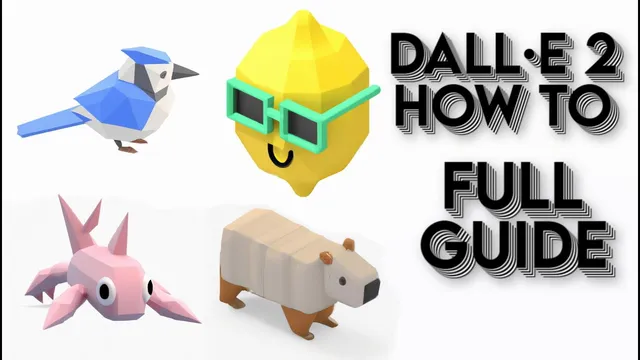
The walkthrough starts with a quick demonstration of DALL·E 2 generating a consistent set of low-polygon animal renders from a simple prompt (“low polygon render of [animal] on a white background… isometric 3d ultra hd”). That consistency becomes the jumping-off point for a broader critique: a marketplace called “Dolly Plus GPT3 Prompt Marketplace” that sells and buys prompts is framed as unnecessary gatekeeping. The argument is straightforward—if the key prompt ingredients can be learned and reused from free resources, paying for prompts doesn’t add real creative value.
To replace purchased prompts, the guide highlights a free resource inside the “Dolly Gallery” area: the “Dolly prompt book.” Labeled “version 1.01” and presented as an 82-page guide, it’s organized with a table of contents so users can jump directly to the style or technique they need—photography, illustration, background replacement, subject replacement, and even workflows inspired by “infinite zoom out” effects. The book also emphasizes that prompts don’t need every detail, but adding more of the right details generally increases alignment with the intended result.
A core section focuses on photo prompt structure through a checklist of questions: how the image is composed, the emotional vibe, subject distance and camera angle, depth of field, lighting type (natural vs artificial), brightness and color, time of day, and whether the output should resemble a digital image or an older film look (including the year and publication context). The guide then maps these ideas to concrete camera and lens concepts—extreme long shot through close-up, overhead vs low angle, shutter speed, bokeh, macro, wide angle, and fisheye—plus lighting scenarios like golden hour and overcast.
The guide tests the method by generating an “alien nature photography” prompt and comparing outcomes. When results drift toward stock-like imagery or fail to match the description, the suggested fix is to adjust phrasing—adding commas and refining wording (including adding “creature” after “alien”). The session also notes that DALL·E 2’s output cadence can be constrained (only a few images per generation), making prompt iteration more costly.
From there, the resource expands into style categories: 3D artwork (bronze, sand, ice, ceramics, glass), illustration styles (ballpoint pen, pencil sketch, political cartoon, watercolor, oil painting, sticker and layered paper), instructional visuals, and asset-focused 3D (isometric renders, Houdini, Octane, Cinema 4D, claymation, game screenshots). The video closes with hands-on examples using isometric 3D prompts for lemons, showing how adding “low polygon” and background color can steer the look toward the intended render style.
Overall, the central takeaway is that prompt engineering for DALL·E 2 is learnable: a free, structured prompt book plus targeted style tags can replace prompt purchases while giving users more control over composition, lighting, and rendering aesthetics.
Cornell Notes
A free “Dolly prompt book” inside the Dolly Gallery is presented as a complete alternative to buying prompts for DALL·E 2. The guide teaches prompt structure through a checklist covering composition, emotional vibe, framing distance and angle, depth of field, lighting (type, brightness, color, time of day), and even film-era context. It also provides style-specific templates for photography, illustration, and 3D rendering, including camera/lens concepts like bokeh, macro, wide angle, and fisheye. Practical tests show that when outputs drift toward generic stock imagery, refining wording and adding targeted descriptors (e.g., “creature” after “alien,” or commas to improve parsing) can bring results closer to the intended subject and look. The payoff is better control without paying for prompt marketplaces.
Why does the guide argue that buying prompts is unnecessary for DALL·E 2 users?
What checklist does the prompt book use to build stronger photography prompts?
How does the guide suggest troubleshooting when DALL·E 2 outputs don’t match the text description?
What kinds of style categories does the prompt book support beyond photography?
How does the lemon example demonstrate prompt control?
Review Questions
- What specific prompt elements (composition, lighting, camera/lens, film context) are most likely to change the visual outcome in DALL·E 2?
- Describe a troubleshooting workflow when a prompt produces stock-like results—what textual changes are suggested?
- How do style categories like illustration and isometric 3D differ from photography prompts in the kinds of details you would include?
Key Points
- 1
A free “Dolly prompt book” can replace prompt purchases by providing structured, copyable prompt ingredients for DALL·E 2.
- 2
Stronger prompts come from answering targeted questions about composition, emotional vibe, framing, depth of field, and lighting conditions.
- 3
Camera and lens concepts (shot distance, overhead/low angle, bokeh, macro, wide angle, fisheye) are treated as prompt-ready tags.
- 4
When outputs don’t match, refine wording—adding commas and missing descriptors (like “creature” after “alien”) can improve alignment.
- 5
Style control matters: the guide organizes prompts by photography, illustration, instructional visuals, and 3D asset/render styles.
- 6
Limited images per generation make prompt iteration more costly, so using a checklist can reduce wasted runs.
- 7
The Dolly Gallery also includes additional resources (prompt ideas, alternatives, dictionary tags, and prompt engineering documents) to keep improving prompt quality.