Day 3 - VIBE CODING A GAME IN 7 DAYS
Based on The PrimeTime's video on YouTube. If you like this content, support the original creators by watching, liking and subscribing to their content.
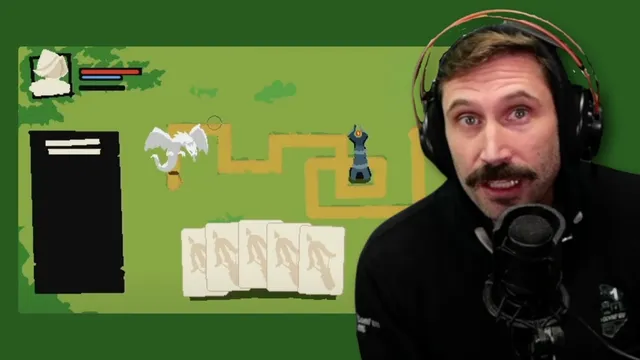
The roguelike tower defense is built around class selection, card modifiers, and wave-based enemy spawning with tower placement during matches.
Briefing
A week-long game jam is turning into a real-time stress test of “vibe coding,” where an AI is prompted to generate game features while the team simultaneously untangles a messy codebase. By Day 3, most of the core gameplay plumbing is working—enemy spawning, tower placement, card modifiers, and wave progression—after earlier days focused on getting the project into a state where new features could actually be built.
The game itself is a roguelike tower defense with a Slay the Spire–style layer of cards and modifiers. Players select classes, then fight through waves as balloons (the team’s recurring mascot) move along a rendered path. Towers can be placed during a match, and each wave can introduce new conditions. The team says it has already worked through major “kinks,” leaving only a few remaining tasks around levels and finishing the UI flow.
The biggest technical breakthrough on Day 3 is how the game renders at a fixed 720p scale while still supporting a resizable browser window and interactive UI. Two separate 720p canvases are used: one for the outer UI layer (cards, selection indicators, etc.) and another for the inner game/map layer. Mouse input is translated through multiple coordinate systems—first mapping outer mouse coordinates into the inner UI canvas, then applying scaling/translation so UI elements and the map stay aligned as the window size changes. The team describes this as “double translation” and compares the effect to recreating CSS-style layout behavior, but inside a canvas-based setup.
That rendering architecture grew out of a level-editor mindset: the level size is effectively tied to the window size, so the team had to figure out how to down-render the level into a canvas while also drawing UI on top without breaking alignment. Once those coordinate transforms were in place, other systems snapped into place quickly. The team credits a handful of lines of code—relative translations and state updates—for accelerating the day, turning yesterday’s “pontificating” into working gameplay.
On the AI side, the team leans into a chaotic prompting strategy: “offer something, then escalate.” Early iterations used “chaos orbs” to drive rapid feature generation—enemy behavior, assets, projectile logic, and drawing—while the team plays the game to validate changes instead of reading every line of code. The group also shares prompting tactics like presenting a choice to the model, rescinding offers when it makes mistakes, and escalating from smaller rewards to bigger ones (including an “obelisk”) to keep the AI producing.
Art and UI progress runs in parallel. Adam C. Ununice is credited with building tile sets, enemy and character visuals, and work-in-progress sprites for the class selection screen. A shop system is present in the flow (tower packs, magic packs, defense packs), though it lacks final content. The day ends with the team feeling on track—pacing is good, the game is moving, and the remaining work is framed as finishing touches rather than rebuilding fundamentals.
Cornell Notes
By Day 3 of a 7-day game jam, the team has a playable roguelike tower defense framework: class selection, card modifiers, wave-based enemy spawning, and tower placement. The key technical win is a two-canvas 720p rendering setup with multiple coordinate translations, keeping UI and the map aligned even when the browser window resizes. Mouse input is remapped through the outer UI layer and then into the scaled inner game layer, preventing the “absolute coordinate” problems that would otherwise break interactions. On the content side, AI-assisted “vibe coding” accelerates feature creation—especially enemy/projectile behavior—while human playtesting checks whether changes actually work. Art production and UI systems (including a shop flow) progress alongside the core mechanics.
What rendering approach keeps the game’s UI and map aligned at a fixed resolution while the browser window changes size?
Why did the team need coordinate translation instead of drawing everything at absolute positions?
What gameplay systems were prioritized after the codebase became understandable?
How did “vibe coding” with an LLM accelerate development on Day 3?
What role did playtesting play in the AI-assisted workflow?
What art and UI elements were progressing alongside the mechanics?
Review Questions
- How does the two-canvas 720p design change the way mouse input must be handled compared with a single-canvas approach?
- What specific gameplay loop components (cards, towers, waves, pathing) became functional after the team resolved the rendering and codebase understanding issues?
- Which prompting tactics (choices, rescinding offers, escalation) were described as helping the LLM produce useful game features faster?
Key Points
- 1
The roguelike tower defense is built around class selection, card modifiers, and wave-based enemy spawning with tower placement during matches.
- 2
Day 3’s major technical breakthrough is a two-canvas 720p rendering system (outer UI + inner game/map) with layered coordinate translations.
- 3
Mouse input must be remapped through multiple coordinate spaces so UI clicks and in-game interactions stay aligned during window resizing.
- 4
Once the rendering and coordinate transforms worked, enemy spawning along a rendered path and tower placement became straightforward to implement.
- 5
AI-assisted “vibe coding” accelerated feature creation by using escalating reward-style prompts and validating results through playtesting.
- 6
Art and UI systems progressed in parallel, including tile sets, character sprites, class selection visuals, and a shop flow that still needs final content.