Different ways to take Literature Notes in Obsidian
Based on Joshua Duffney's video on YouTube. If you like this content, support the original creators by watching, liking and subscribing to their content.
Treat literature notes as an index of ideas—record key phrases or brief personal reflections, not full-sentence rewrites.
Briefing
Literature notes in Obsidian work best when they function as a fast “index of ideas,” not a second draft of the original reading. The core shift is away from trying to capture every highlight in full sentences and toward recording only key phrases or brief, personal takeaways—so the notes can be processed into permanent notes without burning out.
The smart-notes workflow starts with fleeting notes, then moves to literature notes, then to permanent notes, and finally project notes. New users often assume the workflow should be followed in a neat, linear way and also fall into a second trap: treating note-taking like transcription. That approach feels productive while reading, but it becomes painful later because the volume of material makes processing into permanent notes slow and exhausting. Over time, the backlog becomes obvious—literature notes turn into permanent notes in disguise, meaning the “processing” step never really happens.
A personal example illustrates the failure mode. After building an Obsidian vault with heavy metadata and importing book highlights via Readwise and OCR scans (including a markdown export), the literature notes ballooned into an overwhelming wall of text. The attempt to group related snippets with bullets still left too much to sort and rewrite. The result wasn’t a clean pipeline; it was sunk cost. Permanent notes became rare because converting long, polished literature excerpts felt like rewriting work from scratch.
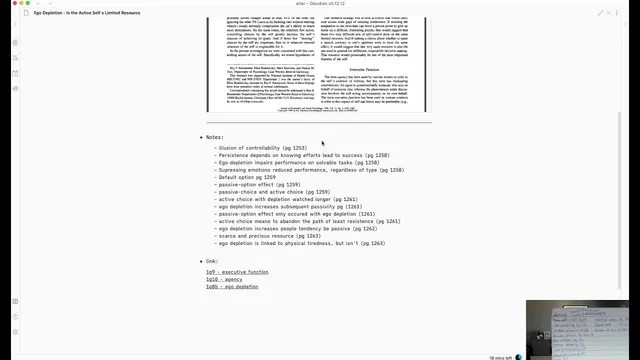
The fix comes from redefining the purpose of literature notes: they should preserve relevant information from long-form content so the reader can quickly locate what mattered. Instead of copying passages, the new method records short phrases or the reader’s own reflections, paired with a page number (for books) or a module/section reference (for courses). For example, after reading an article on “ego depletion” and whether the active self is a limited resource, the literature note becomes a compact index entry—like “persistence depends on knowing effort leads to success”—rather than a rewritten summary. Those keywords then guide a short re-immersion: the reader jumps back to the exact page, scans for context, and only then writes the permanent note.
This approach also shortens the knowledge cycle. Permanent notes remain the priority, so friction is reduced by not interrupting reading with elaborate highlighting and by limiting how long literature processing lasts. For video courses, the method is adapted with headings for each module and collapsible sections for literature notes. When binge-watching creates too much material to convert, the workflow is tightened: about 30 minutes of watching followed by 30 minutes of processing into permanent notes, then back to watching. The goal is not to “finish the progress bar,” but to keep digestion happening.
Finally, literature notes aren’t always worth it. Very short pieces like tweets or tweet storms may skip directly to permanent or fleeting notes. The guiding rule is relevance: only create permanent notes for what matters right now, while leaving unfamiliar terms captured in the literature index so they can be found later when they become useful.
Cornell Notes
Literature notes should act as an index of ideas, not a transcript of what was read. Overstuffed literature notes make it hard to convert content into permanent notes, leading to burnout and “sunk cost.” A better workflow records key phrases or brief personal reflections with page numbers (for books) or module headings (for courses), then uses those entries to quickly re-find context and write permanent notes. The process works best when the knowledge cycle is short—roughly 30 minutes of watching followed by 30 minutes of processing—so digestion stays manageable. Literature notes are most valuable for long-form content; short items may skip straight to permanent or fleeting notes.
Why do literature notes often become overwhelming, and what mistake causes that?
What is the purpose of a literature note in this workflow?
How does the workflow change for books versus video courses?
How does the workflow reduce friction between reading and writing permanent notes?
Why limit processing time (e.g., 30 minutes) for video courses?
When should someone skip literature notes entirely?
Review Questions
- What specific behaviors turn literature notes into an unmanageable backlog, and how does the “index of ideas” approach prevent that?
- Describe the step-by-step process for converting a literature note into a permanent note for a book and for a video course.
- Why does shortening the knowledge cycle matter, and what practical time split is used to keep processing sustainable?
Key Points
- 1
Treat literature notes as an index of ideas—record key phrases or brief personal reflections, not full-sentence rewrites.
- 2
Avoid note-taking as transcription; capturing everything creates a conversion bottleneck when permanent notes are due.
- 3
Don’t let literature notes become permanent notes in disguise; keep them atomic and easy to scan.
- 4
Use page numbers (books) or module headings (courses) so permanent-note writing starts with quick context re-finding.
- 5
Shorten the knowledge cycle for long video sessions—about 30 minutes watching followed by about 30 minutes processing into permanent notes.
- 6
Create permanent notes only for what’s most relevant right now; unfamiliar terms can remain indexed for later retrieval.
- 7
Skip literature notes for very short content like tweets when direct permanent or fleeting notes are more efficient.