Docker (4) - Testing & Deployment - Full Stack Deep Learning
Based on The Full Stack's video on YouTube. If you like this content, support the original creators by watching, liking and subscribing to their content.
Docker containers are lightweight because they omit a guest operating system, unlike virtual machines that bundle their own OS and drivers.
Briefing
Docker’s core value is that it packages an application with only the binaries and libraries it needs—no guest operating system—making deployments smaller, faster to start, and easier to scale across many independent tasks. That design choice is the reason containers have largely displaced virtual machines for day-to-day application delivery: a virtual machine bundles its own operating system and drivers, while Docker runs on top of a host OS with a Docker engine, then launches containers that omit the extra OS layer.
The practical difference shows up in how teams structure services. Instead of stuffing multiple components into one heavyweight VM, Docker encourages splitting workloads into separate containers: a web server container (e.g., PHP and MySQL on a lightweight Linux base), an image-processing container for thumbnail generation, and additional containers for job queues and workers. The result is a modular deployment model where each task can be spun up independently, reducing the temptation to over-consolidate services just because a VM already “pays” for an OS.
A Dockerfile is the blueprint for building a Docker image, and an image is what Docker uses to start a container. The Dockerfile typically begins with a base image (the transcript mentions a Python 2.7 base image), then sets a working directory, copies files into the image, installs dependencies (for example via package installation commands), exposes ports, defines environment variables, and specifies the default command to run when the container starts. The key performance detail is layer-based caching: each instruction in the Dockerfile becomes a layer, so when only the final line changes, Docker can reuse earlier cached layers and rebuild only what’s necessary. This speeds up both docker build and docker run workflows.
Docker’s ecosystem is built around sharing and reusing images. Docker Hub functions like a repository for Docker images—similar to how GitHub hosts code—making images easy to find, modify, and contribute. It also supports private images, stored alongside public ones, so teams can rely on public base images while keeping their own derived artifacts private for continuous integration, local development, or training pipelines.
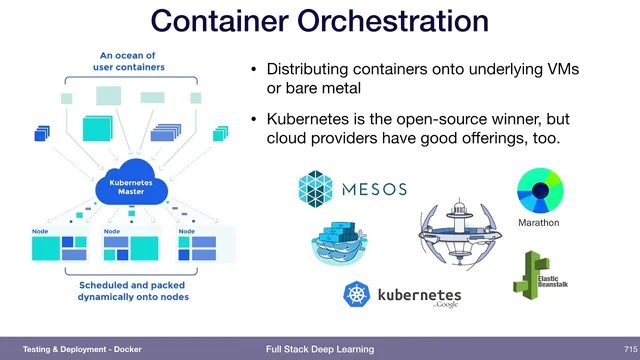
Once containers are easy to build and distribute, the next challenge becomes orchestration: coordinating many containers across the machines that will run them. Multiple approaches exist (including Mesos and AWS Fargate), but Kubernetes is presented as the open-source frontrunner, with cloud providers offering managed Kubernetes options as well.
The transcript also ties Docker versioning directly to machine learning deployment. When each ML model is shipped as a container artifact and versioned as part of the production workflow, it becomes the deployable unit—an approach described as natural and recommended when the container is the artifact that actually reaches production.
Finally, it connects deployment to monitoring: “loose thresholds” for model monitoring can miss critical shifts. For instance, if prediction confidence in validation typically stays between 0.5 and 0.8 but production suddenly produces 1.0, that’s a red flag. Similar checks can be applied to input statistics—like average pixel intensity in image data—where values outside the observed training range (e.g., an average intensity far beyond prior bounds) can indicate invalid or corrupted inputs.
Cornell Notes
Docker replaces virtual machines for many workloads by omitting the guest operating system inside each container. Instead, containers include only the application’s binaries, libraries, and code, running on top of a host OS via the Docker engine. A Dockerfile defines how to build a Docker image, and each instruction becomes a cached layer, so small changes (like the final command) trigger minimal rebuilds. Docker Hub acts as a shared registry for images, enabling reuse of base images and private storage of team artifacts. As container counts grow, orchestration becomes the next problem, with Kubernetes highlighted as a leading open-source solution. For ML, versioning the container artifact that gets deployed is treated as the right production practice, and monitoring should avoid overly permissive thresholds by checking for out-of-range confidence or input statistics.
How does a Docker container differ from a virtual machine in what it packages?
What role does a Dockerfile play, and why does layer-based caching matter?
Why do teams often split services into multiple containers rather than one VM?
What is Docker Hub’s function in the Docker ecosystem?
Why does orchestration become necessary after adopting containers?
How does container versioning relate to ML model deployment, and what monitoring pitfall is warned about?
Review Questions
- When would layer-based caching reduce rebuild time in a Docker workflow, and what part of the Dockerfile change triggers minimal rebuilding?
- Why is versioning the deployed ML container considered important, and what does it mean for the “artifact” of a build system?
- Give one example of a monitoring threshold that could be too loose for an ML model, and describe what out-of-range behavior would indicate a problem.
Key Points
- 1
Docker containers are lightweight because they omit a guest operating system, unlike virtual machines that bundle their own OS and drivers.
- 2
Dockerfile instructions build Docker images layer-by-layer, enabling cached rebuilds when only a small part of the configuration changes.
- 3
Splitting workloads into separate containers (web, database, job queue, job worker, image processing) is often cleaner than consolidating everything into one VM.
- 4
Docker Hub functions as an image registry for sharing and reusing images, including support for private images alongside public ones.
- 5
Container orchestration is required to distribute and manage many running containers; Kubernetes is presented as a leading open-source option.
- 6
For ML deployments, versioning the container artifact that actually gets deployed is recommended when the container is the production unit.
- 7
Monitoring should use thresholds that catch distribution shifts, such as sudden changes in prediction confidence or input statistics outside the training/validation ranges.