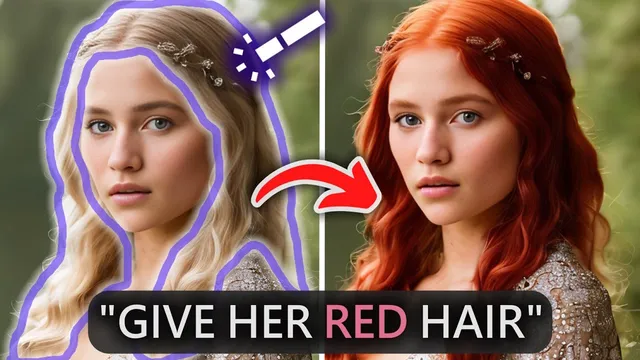
Don't Bother Learning Photoshop, AI Does it For You
Based on MattVidPro's video on YouTube. If you like this content, support the original creators by watching, liking and subscribing to their content.
Playground AI’s new inpainting is positioned as a major improvement for targeted AI image edits, especially compared with earlier Stable Diffusion inpainting quality.
Briefing
AI image generation has moved past messy, uncontrolled outputs—yet fine-grained edits still frustrate creators. Playground AI’s newly released inpainting aims to close that gap, delivering results that feel closer to Dolly 2–style control while staying accessible: it’s free to try and offers up to 1,000 generations per day (or 60,000+ per month on a $15 plan).
The core shift is inpainting quality. Earlier workflows in this space relied on “painting” (masking and regenerating parts of an image). Dolly 2’s inpainting was widely praised because it could erase a small region and regenerate it coherently. Stable Diffusion–based inpainting existed too, but it often lagged in fidelity. Playground AI’s update changes that comparison by producing cleaner, more usable edits—especially when the user combines text instructions with targeted masks.
Playground AI’s interface supports multiple model choices, but the workflow centers on stable diffusion 1.5 for its custom filters. Users can set aspect ratios and resolution, adjust prompt guidance, and generate multiple images per prompt. Negative prompts help steer outputs away from unwanted artifacts. The platform also includes image-to-image options (drawing or uploading an image as a starting point) plus variations, downloads, face restoration, and upscaling.
The inpainting workflow is where the “game changer” claim lands. For broad changes that don’t fit simple masking—like turning a sunny scene into night with fireworks—Playground AI uses an “edit instruction” approach. A key control is edit instruction strength: too low yields nearly identical results, too high can distort the subject (even adding unintended elements). A mid-range “sweet spot” value produced the best balance in the example, preserving the character while adding fireworks.
For precise fixes, the editor adds an “add mask” step that switches into inpainting. Users can erase or “heal” areas by painting over regions, then regenerate only the selected parts. The transcript walks through iterative tuning: a lemon character’s ears are removed by prompting for a “perfectly circular” form; later, lemon texture is applied selectively by masking only part of the face and adjusting instruction strength to avoid turning the entire character into an over-saturated lemon. Other edits show how loose masking can still work—highlighting around an object can be enough for the model to understand what to replace.
Real-world photo editing is demonstrated with a dog image: a top hat is added by masking above the head, followed by a tie edit with instruction strength adjustments to avoid duplicating accessories. A more cinematic “movie scene” transformation also succeeds. After editing, the platform allows downloads (with resolution constraints tied to stable diffusion sizes) and then upscaling and optional face restoration, though some quality loss is acknowledged as an unavoidable tradeoff.
Overall, the takeaway is practical: creators may not need to “learn Photoshop” for many common fixes anymore. With strong inpainting, prompt-guided editing, and iterative masking, small details—ears, textures, accessories, even facial elements—become editable in a way that’s fast enough to feel like creative control rather than a reroll lottery. The transcript closes by framing this as a back-and-forth with Dolly 2: Dolly still has strengths like outpainting, while Playground’s inpainting quality is positioned as a major advantage for detail work.
Cornell Notes
Playground AI’s new inpainting is presented as a major step toward controllable image editing, reducing the need for traditional Photoshop-style workflows. The platform combines text-based “edit instructions” for broad scene changes with masked inpainting for targeted fixes. A crucial parameter—edit instruction strength—determines whether changes appear, distort the subject, or do nothing; mid-range values often work best. The transcript demonstrates iterative edits on a stylized lemon character and a real dog photo, including removing ears, adding lemon texture, and placing a top hat and tie. After edits, users can download images, then upscale and optionally run face restoration, accepting some quality loss from the editing pipeline.
What makes Playground AI’s inpainting feel different from earlier AI editing approaches?
How does “edit instruction strength” affect outcomes in Playground AI’s editor?
When should a user use edit instructions versus inpainting masks?
What iterative technique is used to get the “right” lemon texture on the character?
How does the editor handle accessory placement on a real photo (the dog example)?
What post-processing options are available after editing, and what tradeoff is mentioned?
Review Questions
- How would you decide whether to use an edit instruction or a mask-based inpainting step for a specific change (e.g., changing the sky vs. fixing an ear)?
- Why does edit instruction strength need to be tuned rather than set once, and what symptoms indicate values that are too high or too low?
- What workflow steps would you use to add a new accessory to a photo while minimizing unintended changes elsewhere in the image?
Key Points
- 1
Playground AI’s new inpainting is positioned as a major improvement for targeted AI image edits, especially compared with earlier Stable Diffusion inpainting quality.
- 2
The editor supports both broad text-driven changes (edit instructions) and localized regeneration (mask-based inpainting).
- 3
Edit instruction strength is a critical control: mid-range values often preserve the subject while applying the requested change; extremes can cause distortion or no change.
- 4
Custom stable diffusion filters and negative prompts help steer generation, but inpainting is the main tool for fixing specific details.
- 5
Mask-based inpainting can be surprisingly forgiving—highlighting the right region can be enough for the model to understand what to replace.
- 6
Post-edit downloads follow stable diffusion resolution limits, and upscaling/face restoration can help but may not fully recover original quality.