ER 25: Free Training of Mendeley Class - Part 1 (17 May 2022) by Dr. Raymond Chew
Based on E-Research Skills's video on YouTube. If you like this content, support the original creators by watching, liking and subscribing to their content.
Mendeley is presented as the central tool for importing PDFs, organizing a library, annotating papers, and preparing citations, with later sessions handling deeper citation workflows.
Briefing
Mendeley is positioned as the single reference-management hub researchers can rely on to import papers, organize PDFs, add annotations, and generate citations in common styles—while a broader “research workflow” framework ties those tasks to publishing, journal matching, and visibility. The training runs as a three-part sequence (Part 1 today, Part 2 next Tuesday, Part 3 the following Monday), with the emphasis on learning Mendeley’s interface and core functions first, then moving into citation matching and editing later.
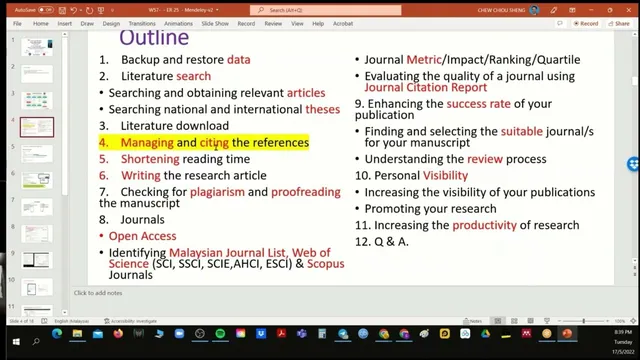
The session frames research productivity as more than citation formatting. Before touching Mendeley, participants are urged to understand how to search literature effectively, download articles, manage references, and then handle writing tasks such as reading, writing, paraphrasing, and proofreading. Publishing readiness is treated as a pipeline: selecting appropriate journals (journal matching), navigating the review process, building collaborative strategies when a strong manuscript still stalls, and increasing visibility after publication. Tools like Google Scholar, Scopus, and journal databases are mentioned as part of that larger ecosystem, but Mendeley is presented as the central organizer for the reference side.
A major portion of Part 1 focuses on choosing the right reference manager version and avoiding common setup pitfalls. The instructor contrasts multiple tools (EndNote, Zotero, Paperpile, Mendeley, and others) and recommends Mendeley for its ease of use and offline/online accessibility. He also warns against installing multiple Mendeley desktop/reference-manager variants on the same computer because version clashes can occur. Within Mendeley, the training highlights the importance of understanding the interface and functions before using advanced features.
Hands-on demonstrations cover importing and organizing PDFs into Mendeley Desktop, including drag-and-drop into a chosen folder (e.g., “p1”), and the difference between removing a document from a folder versus deleting it entirely. Cloud synchronization is treated as critical: deletions and changes only propagate after using the Sync button. The session also explains Mendeley’s “watch folder” feature—auto-importing files downloaded into a specific directory—but the instructor discourages using it for his own workflow, arguing that downloading everything before reading can lead to citing irrelevant sources.
Participants then learn how to organize libraries using Mendeley’s “organize folders” options, such as renaming and sorting files by metadata fields (author, year, journal, title). The training also covers reading-state management (e.g., marking as read/unread), viewing PDF availability, and using annotations without altering the original PDF file. A key concept is export behavior: annotations and notes can be exported as a new version (with annotations embedded) while the original remains unchanged.
Finally, the session introduces Microsoft Word integration via the Mendeley Word plugin (and troubleshooting steps like re-enabling COM add-ins when citations don’t appear). It also previews an additional tool for literature review and text extraction, where documents are uploaded and analyzed under a project concept structure (e.g., “PhD,” “concept” tags), though the live demonstration is limited by processing time. The overall takeaway: master Mendeley’s library management and citation-prep mechanics first, then build toward literature review and writing workflows in later sessions.
Cornell Notes
The training centers on using Mendeley as the core system for managing PDFs and producing citations, starting with interface basics and ending with annotation, export, and Word-plugin setup. It situates Mendeley inside a wider research workflow that includes literature searching, journal matching, review navigation, collaboration, and post-publication visibility. Participants learn how to import papers into Mendeley Desktop, organize them into folders, and rely on Sync so changes and deletions propagate to the cloud. The session also distinguishes between editing/annotating inside Mendeley versus changing the original PDF, and explains how exporting with annotations creates a separate annotated version. Word integration is treated as essential, with troubleshooting guidance when the citation plugin fails to appear.
Why does the session treat Mendeley as “only one software you need to know,” and what tasks are prioritized in Part 1?
What is the practical difference between “remove from folder” and “delete document” in Mendeley Desktop?
Why does the instructor discourage using Mendeley’s “watch folder” feature?
How does Mendeley handle annotations—do they overwrite the original PDF?
What does “export with annotation” accomplish compared with exporting the original file?
What Word-plugin setup and troubleshooting steps are emphasized?
Review Questions
- When syncing is delayed, how can deletion or annotation changes appear inconsistent between Mendeley Desktop and the cloud?
- What workflow does the instructor recommend to avoid citing irrelevant papers, and how does that relate to watch folder auto-import?
- Explain how exporting with annotations differs from leaving the original PDF untouched in Mendeley’s library.
Key Points
- 1
Mendeley is presented as the central tool for importing PDFs, organizing a library, annotating papers, and preparing citations, with later sessions handling deeper citation workflows.
- 2
Sync is essential: deletions and changes only propagate to the cloud after using the Sync button.
- 3
“Remove from folder” keeps items in All Documents, while “Delete document” removes them from the library and requires permanent deletion via the trash.
- 4
Watch folder can auto-import downloads, but the instructor discourages it to prevent importing papers before reading and filtering for relevance.
- 5
Mendeley annotations don’t overwrite the original PDF; exporting with annotations creates a separate annotated version for sharing.
- 6
Microsoft Word citation support depends on installing and enabling the Mendeley Word plugin, with COM add-in troubleshooting if it doesn’t appear.