ExcaliAI Enhanced: More Visual Thinking Power
Based on Zsolt's Visual Personal Knowledge Management's video on YouTube. If you like this content, support the original creators by watching, liking and subscribing to their content.
ExcalAI Enhanced connects Excalidraw sketches to OpenAI vision and DALL·E so drawings can be transformed into new illustrations or edits.
Briefing
ExcalAI Enhanced turns Obsidian’s Excalidraw workflow into a visual “thinking” engine by chaining OpenAI vision, prompt generation, and image or diagram creation directly from selected sketches and elements. The most practical takeaway is that users can start with a hand-drawn image on a phone or tablet, send it through ExcalAI, and get back styled or transformed outputs—often with a detailed intermediate prompt—while controlling what gets sent via selection, masks, and task-specific inputs.
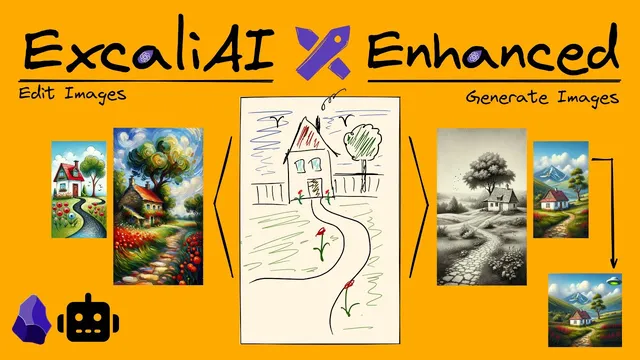
A first example shows image generation from an existing drawing: a horror prompt produces a new portrait scene that preserves recognizable structure from the original sketch (tree, house with a red roof, road, flowers). Under the hood, ExcalAI sends the source image to OpenAI’s vision interface to generate a detailed prompt, then uses that prompt to drive DALL·E image generation. A key operational detail matters for anyone saving results: generated images come back as URLs that expire after 30 minutes, so keeping an output requires right-clicking the image and saving it locally.
Beyond “generate an image,” ExcalAI adds editing workflows. The image-edit use case uses masks and the DALL·E constraint that edits operate on square images. Users can place gray/black mask regions to indicate where new content should be created, then supply a text instruction such as “busy City street” or “City Beach with lots of people.” Results vary: some prompts produce awkward artifacts, while others work well—like a beach scene that continues the original image composition. The script also supports generating illustrations from text alone, such as turning a quote into a surreal, hopeful “collidoscope” landscape with a figure at crossroads, using ExcalAI’s prompt and system-prompt controls.
For knowledge work, ExcalAI includes diagram generation. A “challenge my thinking” task produces a mind map that summarizes, adds ideas, and pushes back on assumptions. When Mermaid formatting comes back imperfect, the workflow includes a manual “clean up” step and editing the Mermaid code (e.g., fixing subgraph syntax) before inserting it back into Excalidraw. The tool also supports sketch-noting via a “brick road approach” style: users can reflect on an analysis of their drawing and then connect it to expanded concepts.
There’s also a “wireframe to code” path aimed at web development. Users describe the app in a separate prompt, and the tool generates a functional UI (demonstrated with a calculator that correctly evaluates expressions like 12 + 5 * 6 and 2/1). For visual brainstorming, ExcalAI can generate an image that resonates with a whiteboard sketch, helping spark additional links and ideas.
Finally, the transcript lays out how to get started: install ExcalAI from the Excalidraw script store inside Obsidian, create an OpenAI account and add funds, wait for access activation if needed, generate an OpenAI API key, and paste it into Excalidraw’s ExcalAI settings. The creator notes image generation costs are relatively low for typical usage, but the workflow intentionally avoids auto-saving to the Obsidian vault to prevent clutter—requiring deliberate local saves when an output is worth keeping.
Cornell Notes
ExcalAI Enhanced integrates OpenAI vision and DALL·E image generation into an Obsidian + Excalidraw workflow. Users can start from a sketch or selected elements, choose a task (image generation, masked image edit, wireframe-to-code, mind map via Mermaid, or visual brainstorming), and optionally customize system prompts. A crucial operational detail is that generated images return as expiring URLs—saving locally is required to keep them. Under the hood, ExcalAI typically uses GPT Vision to turn an input image into a detailed image prompt, then sends that prompt to DALL·E. The tool also supports post-processing when Mermaid diagrams need formatting fixes before insertion.
How does ExcalAI turn a hand-drawn image into a new styled image?
Why do generated images sometimes “disappear,” and what should users do to keep them?
What’s the practical limitation of image editing, and how do masks work?
How does ExcalAI generate mind maps, and what happens when Mermaid formatting is wrong?
How does “wireframe to code” differ from illustration tasks?
What steps are required to set up ExcalAI in Obsidian?
Review Questions
- When ExcalAI generates an image from a sketch, what intermediate output is created before DALL·E runs, and why does that matter for controlling results?
- What does the mask indicate in ExcalAI’s image-edit workflow, and how does the square-image requirement affect editing?
- If a Mermaid mind map fails to insert correctly, what specific troubleshooting steps are recommended in the workflow?
Key Points
- 1
ExcalAI Enhanced connects Excalidraw sketches to OpenAI vision and DALL·E so drawings can be transformed into new illustrations or edits.
- 2
Generated images come back as expiring URLs; saving locally via right-click is required to keep outputs beyond 30 minutes.
- 3
Masked image editing uses black regions to define where DALL·E should generate new pixels, but results depend heavily on prompt compatibility.
- 4
System prompts and task-specific dropdown actions let users steer outputs, including quote-to-illustration and mind-map generation.
- 5
Mermaid diagrams may require manual cleanup when formatting is imperfect; fixing syntax (e.g., subgraph structure) enables successful insertion.
- 6
Wireframe-to-code uses a textual app description to generate functional web UI components, demonstrated with a working calculator.
- 7
Setup requires installing the script in Obsidian, creating an OpenAI account with funds, generating an API key, and configuring it in Excalidraw settings.