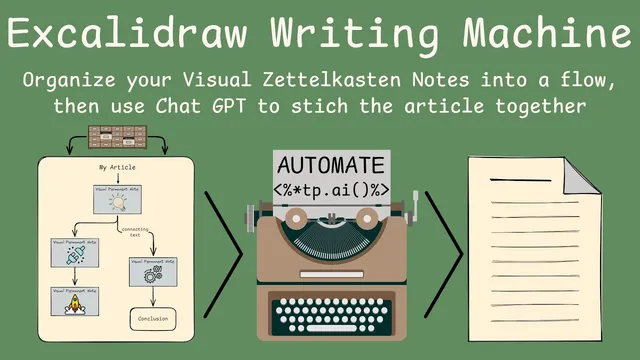
Excalidraw Writing Machine: Generate articles from your Visual Zettelkasten cards in Obsidian
Based on Zsolt's Visual Personal Knowledge Management's video on YouTube. If you like this content, support the original creators by watching, liking and subscribing to their content.
Visual Zettelkasten cards combine a drawing front with markdown back content (idea, sources, related notes), enabling structured drafting from visuals.
Briefing
A workflow built around Visual Zettelkasten cards in Obsidian can turn a visual article layout into a clean, publication-ready PDF draft—complete with section structure, embedded images, and source citations. The core idea is to treat each visual card as a Zettelkasten note (front: drawing/summary; back: markdown text, sources, and supporting notes), then use an “Excalidraw Writing Machine” script to read the card sequence and automatically “stitch” the content into a structured document.
The promise behind Zettelkasten is familiar: once a system has accumulated notes, new writing shouldn’t start from scratch. Instead, writers should be able to assemble existing notes into a first draft and then refine. This approach adds a visual layer to that promise. The framework described breaks personal knowledge management into dimensions: linear text (read top-left to bottom-right), separate documents, links between notes, and—crucially—illustrations reused across notes. Visual processing is treated as parallel rather than linear, with icons and image fragments acting as connective tissue between ideas.
Visual Zettelkasten operationalizes that by giving each note two sides. The front side is the visual representation (drawings in Excalidraw), while the back side holds markdown content such as the idea summary, related notes, and sources. When organizing ideas, the system doesn’t just shuffle bullet points; it organizes at the card level. That card-level structure is what the writing machine script translates into an article draft.
Technically, the script walks through an Excalidraw “arrow sequence.” It captures the main title, then paragraphs until it hits a branch point. At each “fork in the road,” the first text element becomes a section heading, followed by the paragraphs that flow linearly from that point. When a Zettelkasten node appears in the layout, the script pulls the card’s back-side markdown (including the source reference) and places it under the corresponding image in the generated output. The result is a document with headings, paragraphs, images, and citations formatted into a coherent draft.
From there, the workflow offers two automation levels. In the lighter mode, the generated markdown can be copied into ChatGPT with a prompt to rewrite and expand it into a full article. In the heavier mode, AI4 Templator and Templator are used to run ChatGPT queries automatically inside Obsidian. The script passes generated text via a window variable (window.wm), supports debugging by storing responses back onto the window object, and uses a placeholder in the template so the original extracted text can be injected into the AI prompt.
Installation is handled through Obsidian’s “install/update scripts” flow for Excalidraw scripts, and the script’s settings allow customization such as renaming the summary section, selecting where sources live, and choosing whether to embed images. Because the solution is a prototype, it’s designed to be edited: the arrow interpretation depends on drawing order, and misordered connections can reorder sections in the output. The practical takeaway is that visual organization becomes a structured drafting engine—turning a visual knowledge map into a readable document that still requires human polishing before publication.
Cornell Notes
The workflow turns Visual Zettelkasten cards in Obsidian into structured article drafts by reading an Excalidraw layout. Each card has a visual front and a markdown back (idea, sources, supporting notes). The Excalidraw Writing Machine script follows the arrow sequence: it extracts a main title, paragraphs, and—at branch points—creates section headings and assigns the following text to those sections. Zettelkasten nodes contribute their back-side markdown under the corresponding image, including source citations. The draft can be used directly or fed into ChatGPT, either manually (copy/paste) or automatically via AI4 Templator and Templator templates, with configurable settings like image embedding and section naming.
How does the Excalidraw Writing Machine decide what becomes a title, section heading, and paragraph?
What exactly is pulled from a Visual Zettelkasten card when generating the draft?
What are the two main ways AI is used after the draft is generated?
Why does arrow drawing order matter for the final article structure?
What settings can be customized in the script after installation?
How does the templating system support debugging and template reuse?
Review Questions
- In what specific ways does the script’s handling of “forks in the road” differ from its handling of the main linear path?
- Describe how a Visual Zettelkasten note’s front and back sides contribute differently to the generated article draft.
- What practical steps can prevent section order mistakes when arrows are drawn in Excalidraw?
Key Points
- 1
Visual Zettelkasten cards combine a drawing front with markdown back content (idea, sources, related notes), enabling structured drafting from visuals.
- 2
The Excalidraw Writing Machine script builds an article by traversing an arrow sequence: title first, then paragraphs, then section headings at branch points.
- 3
Zettelkasten nodes contribute their back-side markdown under the corresponding image, including source citations formatted in the output.
- 4
AI can be applied either by manual copy/paste into ChatGPT or automatically via AI4 Templator and Templator templates using window.wm and placeholder replacement.
- 5
Script settings let users rename the summary section, configure where sources are stored, and choose whether to embed images.
- 6
Section order in the generated document depends on how arrows are drawn and connected; misordered traversal can swap sections, requiring redraws to fix it.
- 7
Because the solution is a prototype, editing the script (with scripting skill) is encouraged to match different Zettelkasten layouts and naming conventions.