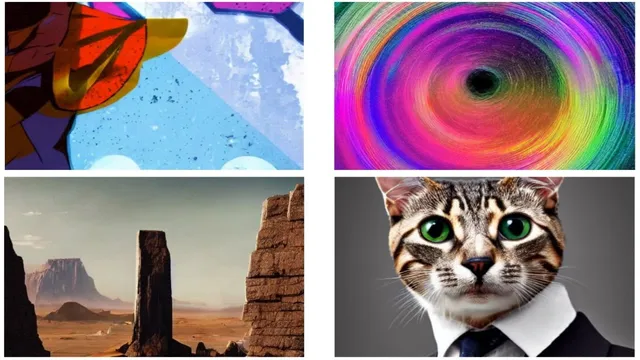
Four Stable Diffusion based AI from one of my Favorite AI sites!
Based on MattVidPro's video on YouTube. If you like this content, support the original creators by watching, liking and subscribing to their content.
Replicate.com’s base Stable Diffusion workflow adds variations and mask-based inpainting, plus more granular controls like prompt strength and decimal classifier-free guidance values.
Briefing
Stable Diffusion is getting a major boost on Replicate.com, where multiple Stable Diffusion–based apps add features beyond the usual “Dream Studio” workflow—especially image variation, inpainting, and animation—at costs that range from pennies to over a dollar per generated sequence. The most attention-grabbing part is how Replicate’s base Stable Diffusion setup expands controls: users can generate variations down to 128×128, apply inpainting with a mask, adjust prompt strength tied to the initial image, set output counts up to four, and fine-tune sampling and guidance parameters (including decimal values). That extra control is paired with a practical reality check: during testing, the NSFW filter began flagging even harmless prompts like “lemon,” suggesting a temporary malfunction that blocks normal usage until it’s fixed.
Beyond the core Stable Diffusion run, the standout tool is an image-to-prompt generator optimized for Stable Diffusion. Instead of starting from text, users upload an image and receive a text prompt describing it—often with useful keywords that can be reused to generate new art. In demos, a cat-in-a-suit image produced a prompt describing a cartoon character with sunglasses on a beach, complete with 3D-render and rendering-style terms. Even when the generated prompt misses a detail (like the lemon character), it still tends to preserve the overall visual “vibe” and supplies concrete descriptors—styles, materials, lighting, software, and rendering engines—that can steer Stable Diffusion outputs. The prompts also transfer surprisingly well to other models like DALL·E 2, producing consistent results even though the prompt generator is tuned for Stable Diffusion.
The animation section shows two distinct approaches, both expensive enough to matter. The first, “Deforum” prompt animation, turns a single prompt into motion by using parameters for camera-like behavior (angle/zoom), translation in X and Y, and “color coherence,” while selecting a Stable Diffusion sampler and setting frame rate. The cost is steep: about $0.0023 per second, with a typical run taking around 10 minutes—roughly $1.46 per prompt in the example. The payoff is an “infinite zoom” style sequence that stays anchored to the same prompt, starting from a lemon character and progressively zooming in.
The second animation tool blends two prompts, transforming one concept into another over time. It’s cheaper—about 37 cents per prompt in the walkthrough—but still designed for experimentation. Examples include shifting a monolith from a desert scene into a white-room monolith, morphing between paintings, traveling from older cityscapes to futuristic neon skylines, and even attempting character emotion changes (angry Tom Cruise to smiling Tom Cruise) or growth (a dead tree gradually gaining leaves). Across both animation modes, the common theme is creative control: abstract transformations, consistent seeds, and prompt-to-prompt transitions that make Stable Diffusion feel less like a still-image generator and more like a tool for motion-based concept art.
Overall, the Replicate.com Stable Diffusion ecosystem is positioned as a playground: more knobs than Dream Studio, a practical image-to-prompt workflow for generating better prompts, and animation experiments that range from “infinite zoom” to prompt morphing—tempered by real compute costs and occasional service hiccups like the NSFW filter issue.
Cornell Notes
Replicate.com hosts multiple Stable Diffusion–based apps that expand what users can do beyond basic text-to-image. The base Stable Diffusion workflow adds practical controls like image variations (down to 128×128), inpainting via masks, prompt-strength tuning tied to the initial image, and more granular sampling settings. A key productivity tool is an image-to-prompt generator optimized for Stable Diffusion: upload an image and receive a prompt with reusable keywords, which can also work well in DALL·E 2. For motion, Deforum prompt animation creates camera-like sequences (often expensive and slow), while a prompt-morphing app transforms one prompt into another over time at a lower cost. Together, these tools turn prompt engineering into a repeatable pipeline for both concept art and animation.
What extra capabilities does Replicate’s base Stable Diffusion setup add compared with the “Dream Studio” experience mentioned in the walkthrough?
Why does the NSFW filter issue matter for practical use, and what was observed?
How does the image-to-prompt generator change the prompt-writing workflow?
How well do Stable Diffusion–optimized prompts transfer to DALL·E 2?
What distinguishes the two animation approaches shown, and what are their cost/effort tradeoffs?
Review Questions
- When using Replicate’s base Stable Diffusion, which settings help control how strongly the prompt influences variations relative to the initial image?
- What kinds of keywords does the image-to-prompt generator tend to produce, and how can those keywords improve later generations?
- Compare the motion mechanics and typical runtime costs of Deforum prompt animation versus prompt-morphing animation.
Key Points
- 1
Replicate.com’s base Stable Diffusion workflow adds variations and mask-based inpainting, plus more granular controls like prompt strength and decimal classifier-free guidance values.
- 2
Generation can be blocked by an NSFW filter malfunction that flagged even benign prompts during testing (e.g., “lemon”).
- 3
An image-to-prompt generator optimized for Stable Diffusion turns uploaded images into reusable text prompts containing style and rendering keywords.
- 4
Stable Diffusion–optimized prompts can still produce coherent results in DALL·E 2, even if some details shift.
- 5
Deforum prompt animation creates motion by controlling camera-like parameters (angle/zoom and X/Y translation) and can take about 10 minutes per run at roughly $1.46 per prompt.
- 6
Prompt-morphing animation transitions between two concepts over time (e.g., desert monolith to white-room monolith) and was priced around 37 cents per prompt in the walkthrough.