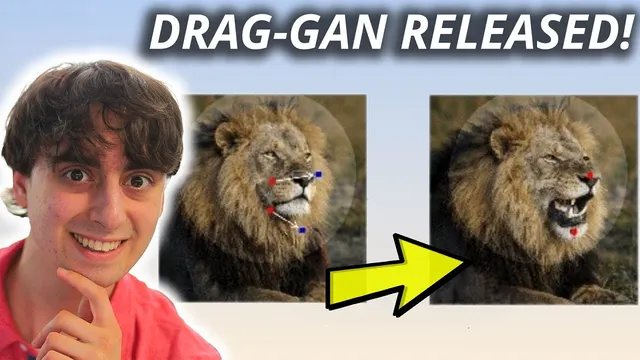
Free & Open Source AI Photo Manipulation!
Based on MattVidPro's video on YouTube. If you like this content, support the original creators by watching, liking and subscribing to their content.
Drag Your GAN control relies on a drawn mask plus two handle points (start and destination) to define what region should move and where it should go.
Briefing
Free, open-source “Drag Your GAN” style tools are now letting people reposition specific parts of AI-generated images—often with surprising stability—using a simple mask plus two “handle points.” A Google Colab and Hugging Face demos make the workflow accessible: users draw a mask over the target region (like a mouth or face area), place an initial point and a destination point, then press “drag it” to generate an animation across dozens of interpolation steps. The most striking results come from small, careful point movements, where the model tends to follow the intended deformation rather than rewriting the entire scene.
In the mouth-drag test, the system produces a step-by-step sequence (e.g., 20 iterations) that visibly moves the selected feature over time, effectively creating a slow “dragged” motion. Side effects show up too: glasses can morph into nearby facial regions during the transformation, and the final outcome may not perfectly match the destination point. When the same approach is pushed harder—such as trying to rotate a cat’s head by increasing iterations (up to around 150)—the model sometimes “gives up” on the exact geometry and instead performs a related but different transformation. In one cat experiment, the face appears to pinch and zoom outward as the system tries to reconcile the requested point movement with what it can plausibly generate.
Other trials highlight the limits of controllability. A horse-head drag largely fails to move the selected point as requested, with changes reduced to smaller artifacts like a longer nose. Attempts to operate without a mask don’t work, reinforcing that the mask is central to the control mechanism. Even with a mask, the model may prioritize safety or coherence—preventing extreme outcomes like “eyeballs flying” even when the user’s destination point is far away.
To improve usability, the transcript contrasts “Drag Your GAN” with a sister project: User Controllable Latent Transformer (also available via Hugging Face). This version emphasizes ergonomics: users can generate samples, change styles, and add points that “hold” parts of the image (like ears) while dragging. Results can be more intuitive and sometimes more consistent for certain categories (cars, anime characters, churches), though the tradeoff is that it may be less technically dramatic than the original. Locking behavior varies by model and subject; adding too many points can also degrade coherence.
Across categories—cats, cars, anime characters, churches—the demos suggest a near-term path toward controllable image and even character animation. The controls aren’t perfect yet, but the ability to maintain identity cues (eyes, nose, mouth) and produce smooth, frame-like transitions hints at workflows for animation and design iteration. The practical takeaway is clear: start with lower-resolution or smaller point distances for speed and stability, expect occasional “creative reinterpretations” when demands are too large, and watch for rapid updates as code matures and more models become available for local use.
Cornell Notes
Drag-style GAN tools let users control where an AI image feature moves by drawing a mask over the target area and setting two handle points (start and destination). Pressing “drag it” generates an interpolation sequence that can look like a slow deformation or zoom as the model tries to satisfy the constraint. Results are strongest when point distances are small and the mask is precise; large moves can trigger alternative transformations or ignored requests. A sister project, User Controllable Latent Transformer, focuses on easier interaction with point “locking” and style changes, though coherence can drop when too many points are added. These demos matter because they turn image editing into interactive, frame-like motion—an early step toward controllable character animation and design iteration.
How does the “drag” control work in Drag Your GAN, and what inputs does it require?
Why do small point distances and careful masking tend to produce better results?
What kinds of failure modes appear when the request is too extreme?
What role does the mask play, and what happens if it’s omitted?
How does User Controllable Latent Transformer differ in interaction and control behavior?
What do the demos suggest about future uses like animation or design?
Review Questions
- What specific steps (mask, handle points, iterations) are required to perform a drag in Drag Your GAN, and how do iterations affect the output?
- Give one example of a transformation that occurred when the model couldn’t satisfy the exact destination point, and explain what that implies about constraint handling.
- Compare the interaction style of Drag Your GAN versus User Controllable Latent Transformer: which one feels more intuitive, and what tradeoffs show up in coherence or control?
Key Points
- 1
Drag Your GAN control relies on a drawn mask plus two handle points (start and destination) to define what region should move and where it should go.
- 2
Pressing “drag it” generates intermediate frames across a chosen number of iterations; more steps can slow the process and sometimes increase divergence from the intended geometry.
- 3
Small point movements and precise masks produce the most reliable feature-following behavior; large moves often trigger alternative transformations or partial compliance.
- 4
The mask is not optional—attempts to drag without a mask fail, indicating the model needs the masked region to apply constraints.
- 5
Some transformations can unintentionally alter nearby elements (e.g., glasses morphing during a mouth drag), showing that control is not perfectly localized.
- 6
User Controllable Latent Transformer offers a more ergonomic workflow with random sampling, style changes, and point locking, but coherence can degrade when too many points are added.
- 7
Subject and model choice strongly affect locking and controllability (cars, anime, churches, and cats behave differently).