GPT-4 & LangChain Tutorial: How to Chat With A 56-Page PDF Document (w/Pinecone)
Based on Chat with data's video on YouTube. If you like this content, support the original creators by watching, liking and subscribing to their content.
Convert PDF text into overlapping chunks to avoid context-window limits and preserve meaning across boundaries.
Briefing
A practical architecture for turning a long PDF into a chat-ready assistant hinges on two phases: ingest the document into a vector database, then retrieve the most relevant chunks at question time. The workflow is built around LangChain and GPT-4, with Pinecone storing embeddings so the system can answer questions while also citing specific passages from the PDF—an essential feature for legal documents where users need traceable sources.
The process starts with a 56-page Supreme Court legal case PDF that contains dense, hard-to-copy text. To make it usable, the PDF is loaded and converted into raw text via LangChain’s PDF loader. Because large documents exceed model context limits, the text is split into overlapping chunks (for example, around 1,000 characters per chunk with overlap such as 200). Each chunk is then transformed into an embedding—numerical vectors that represent the semantic meaning of the text. Those vectors are stored in Pinecone under a named index (and optionally a namespace) so different document sets can be organized without overwriting each other. In the example, the ingestion run produces a Pinecone index containing 178 vectors, corresponding to the number of chunks created from the PDF.
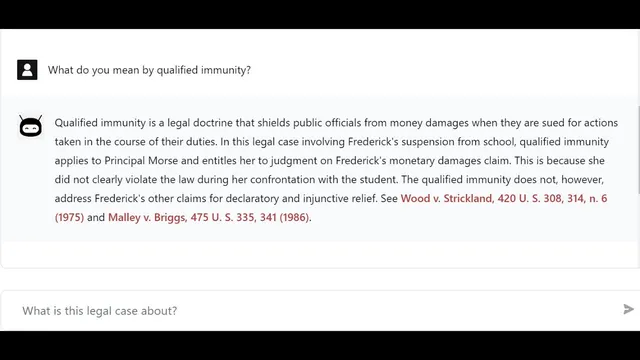
At query time, the assistant takes a user question and uses chat history to form a “standalone question” so follow-ups remain coherent. That standalone question is embedded into the same vector space as the stored chunks. Pinecone then performs similarity search (using cosine similarity) to find the most relevant chunks. LangChain retrieves those matching sections and uses them as context for GPT-4, prompting it to generate an answer grounded in the retrieved text. The system can also return the source documents (the exact chunks) so users can verify definitions or claims—such as asking what “qualified immunity” means and receiving both an explanation and pointers back to the PDF.
The tutorial also walks through implementation details. In code, an ingestion script (run via an npm command like “npm run ingest”) loads the PDF, splits it, creates embeddings using LangChain’s OpenAI embeddings function, and writes vectors into Pinecone. Pinecone’s dashboard is used to confirm the index contents, including vector IDs, embedding values, and metadata that stores the chunk text. For answering, a LangChain chain such as a chat-based Vector DB QA chain is configured with parameters like k (how many source chunks to retrieve), temperature set to 0 for more deterministic responses (important for legal contexts), and streaming enabled so tokens arrive incrementally.
On the front end, the app maintains chat state (messages, pending output, and history), sanitizes the user query, calls an API endpoint, and streams the model’s output token-by-token to the UI. When the chain completes, the returned source documents are saved into state so the interface can display citations alongside the generated response. The overall takeaway is that reliable PDF chat requires chunking + embeddings + vector search + grounded prompting, not simply pasting a whole document into a model.
Cornell Notes
The system turns a long PDF into a chat assistant by storing semantic chunks in Pinecone and retrieving the most relevant ones for each question. First, LangChain loads the PDF, splits it into overlapping chunks (e.g., ~1,000 characters with overlap), and converts each chunk into an embedding vector. Those vectors are written to a Pinecone index (optionally using a namespace) along with metadata that includes the chunk text. When a user asks a question, the app uses chat history to create a standalone question, embeds it, and runs similarity search in Pinecone to fetch the top-k chunks. GPT-4 then answers using those retrieved chunks as context, and the app can return the source chunks for citation.
Why can’t the assistant just paste the entire PDF into GPT-4 each time?
What does “embedding” mean in this architecture, and what is stored in Pinecone?
How does the system handle follow-up questions that depend on earlier chat?
How does Pinecone decide which PDF chunks are relevant to a user question?
Why set temperature to 0 for legal Q&A?
How does streaming change the user experience?
Review Questions
- Describe the two-phase pipeline (ingestion vs. question answering) and name the components used in each phase.
- What problem does chunk overlap solve, and how does overlap affect retrieval quality?
- Walk through what happens from a user’s follow-up question to the final answer with citations.
Key Points
- 1
Convert PDF text into overlapping chunks to avoid context-window limits and preserve meaning across boundaries.
- 2
Create embeddings for each chunk and store them in a Pinecone index so semantic search can find relevant passages.
- 3
Use chat history to generate a standalone question, keeping follow-up queries aligned with earlier context.
- 4
Run similarity search in Pinecone (cosine similarity) to retrieve top-k chunks, then feed those chunks to GPT-4 as grounded context.
- 5
Configure the QA chain to return source documents so answers can be verified against the original PDF text.
- 6
Enable streaming and use callback handling to deliver tokens incrementally while the model generates a response.
- 7
Use Pinecone namespaces (and separate index names) to organize embeddings by document set and prevent accidental overwrites.