Hands On With Google Gemini 1.5 Pro- Is this the Best LLM Model?
Based on Krish Naik's video on YouTube. If you like this content, support the original creators by watching, liking and subscribing to their content.
Gemini 1.5 Pro is presented as a single multimodal model that accepts both text and images, reducing the need for separate vision routing.
Briefing
Google Gemini 1.5 Pro is positioned as a major step up for building generative AI apps because it can handle extremely long context—up to about 1 million multimodal tokens—and can work directly with both text and images in a single model. That combination matters because it enables workflows like reading and reasoning over very large documents (hundreds of pages) and extracting specific details, without forcing developers to split content into smaller chunks or juggle separate vision and text models.
A demo of long-context understanding illustrates the practical payoff. Using a 402-page Apollo 11 transcript (roughly 330,000 tokens), the model is prompted to find comedic moments, list quotes, and identify them in the source text. It returns quotes attributed to Michael Collins and correctly matches the comedic moment back to the transcript. The demo then switches to multimodal testing: a simple drawing is provided and the model identifies the moment as Neil’s first steps on the moon, even without detailed instructions about what the sketch represents. Finally, the model is asked to cite the time code for the moment; the response is reported as accurate, with the caveat that generative outputs can sometimes be off by a digit or two.
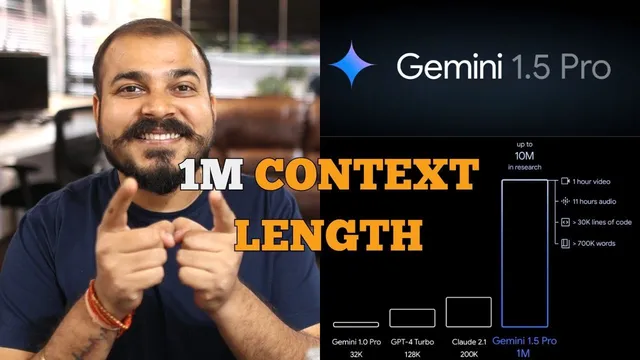
The transcript also frames Gemini 1.5 Pro’s context length as a clear jump from earlier generations. Gemini 1.0 Pro is described with a 32k context window, GPT-4 Turbo is cited around 128k, and Gemini 1.5 Pro is described as reaching roughly 1 million tokens. The practical implication is that developers can build applications that ingest and reason over inputs on the scale of an hour of video, 11 hours of audio, or very large text corpora—enough to support document-heavy assistants, retrieval-free analysis, and richer multimodal experiences.
On the implementation side, the walkthrough shows how to get an API key from ai.google.com (via an “API key” flow) and then use Google’s generative AI Python package by installing “google-generativeai.” The code pattern uses Colab-style secure storage for the API key, configures the client, lists available models, and selects “models/gemini-1.5-pro-latest” for the longest-context use case. Calls are made through a “generate_content” method, with examples for text questions like “What is the meaning of life?” and “What is machine learning?” The workflow includes options for streaming responses so output can arrive in chunks rather than waiting for the full completion.
For images, the key change is that Gemini 1.5 Pro is used directly for multimodal input—removing the need to route image understanding through a separate “Vision” model. The example loads an image (a page from API documentation, then a sample image of meal prep containers), sends it alongside a prompt, and receives a descriptive response. The overall takeaway is that Gemini 1.5 Pro simplifies multimodal app development while expanding what can fit into a single prompt, making it more feasible to build end-to-end applications like PDF query and RAG-style systems on top of long-context reasoning.
Cornell Notes
Gemini 1.5 Pro is presented as a single multimodal model that can process both text and images while supporting an extremely large context window—described as up to about 1 million multimodal tokens. A demo with a 402-page Apollo 11 transcript shows the model extracting comedic moments and quotes and matching them back to the source, then identifying a moon-landing moment from a simple drawing and returning the correct time code. The implementation walkthrough shows how to create a Google AI Studio API key, install the “google-generativeai” library, configure the client, and call “generate_content” with streaming options. For images, the workflow uses Gemini 1.5 Pro directly, avoiding separate “Pro Vision” routing and enabling prompt + image generation in one step.
What does “long context” enable in Gemini 1.5 Pro, and how is it demonstrated?
How does Gemini 1.5 Pro handle multimodal tasks compared with older setups?
Why is the context window size a practical engineering advantage?
What are the key steps to call Gemini 1.5 Pro via API in the provided workflow?
How do streaming responses change the developer experience?
What does the image example show about prompt design with Gemini 1.5 Pro?
Review Questions
- How does Gemini 1.5 Pro’s long-context capability affect strategies for handling large documents in generative AI applications?
- What changes in the API workflow when moving from separate text/vision models to using Gemini 1.5 Pro as a single multimodal model?
- In the provided code approach, where do streaming and model selection fit, and what user-facing benefit does streaming provide?
Key Points
- 1
Gemini 1.5 Pro is presented as a single multimodal model that accepts both text and images, reducing the need for separate vision routing.
- 2
The model’s context window is described as reaching roughly 1 million multimodal tokens, enabling reasoning over very large inputs in one request.
- 3
A demo with a 402-page Apollo 11 transcript shows extraction of comedic moments and quotes, plus multimodal identification from a drawing and time-code citation.
- 4
API access starts with creating a Google AI Studio API key, then using the “google-generativeai” Python library to configure and call the model.
- 5
Model calls use “generate_content,” and streaming output can be enabled to receive responses in chunks for faster perceived responsiveness.
- 6
The implementation selects “models/gemini-1.5-pro-latest” to target the longest-context behavior described in the walkthrough.