How a GTD Master Trainer Uses PARA
Based on Tiago Forte's video on YouTube. If you like this content, support the original creators by watching, liking and subscribing to their content.
Incoming notes are funneled into an inbox stack for processing, described as holding about a week’s worth at a time.
Briefing
A GTD-style “second brain” setup is being tailored for flexibility by splitting notes into dedicated stacks for capture, action, projects, and priorities—then extending PARA with tagging to keep reference material usable as it grows. The core move is operational: incoming notes land in an inbox, actionable items get separated into an action-focused stack, ongoing work sits in a project stack, and anything not currently active is pushed into “someday/maybe” or archive. That structure is meant to keep attention aligned with what matters now, while still allowing quick reshuffling when priorities change.
The system’s stacks start with an inbox for unprocessed notes, described as roughly a week’s worth at a time. From there, “action support” holds single notes tied to an action rather than mixing them into project notebooks. Ongoing work lives in “project support,” organized by life areas using prefixes—so projects are grouped in a way that matches how the user mentally sorts responsibilities. When projects are not active but still potentially useful, they move into “someday/maybe.” Unlike the classic PARA approach where someday/maybe can become buried or “out of sight,” this separate stack is treated as a visible holding area that supports agility: projects can be pulled back into active circulation or swapped out quickly as circumstances shift.
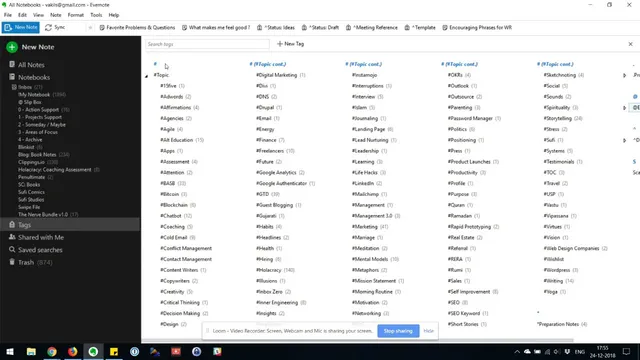
Archive is reserved for completed projects that no longer demand attention. Two additional reference-oriented notebooks fill gaps in the PARA model. “Resources” is a catch-all for material that doesn’t currently receive attention, while a “notebook” is for research and reference collected over time, including content that benefits from progressive summarization. The key difference from a classic PARA implementation is how this reference layer is categorized. Instead of relying on a single stack limitation, the setup uses hash-prefixed tags to organize the resources notebook by “topic types” (mirroring PARA-style categories) and also adds entity tags for people, plus optional document-type tags (e.g., receipts or questions). This lets the same note be retrievable through multiple lenses—by author (such as Thiago Forte), by subject, or by the kind of artifact it represents.
Finally, a “slip box” is layered on top for writing support, drawing on the smart node system associated with Lumen. Insights pulled from reading are added into the slip box using a numbering hierarchy that builds relationships between nodes. The payoff is downstream: when writing time arrives, the network of linked insights is already assembled, reducing the upfront work of searching, organizing, and reconnecting ideas.
Overall, the system is presented as a stable, months-long workflow that has evolved from earlier versions—keeping PARA’s attention logic while adding tagging and a node-based slip box to make reference material and writing inputs more flexible and easier to reuse.
Cornell Notes
The setup adapts PARA for a “second brain” by using separate stacks for inbox, action support, projects, someday/maybe, and archive—so attention stays aligned with what’s active. It also adds two reference layers: “resources” for material with no current attention and a “notebook” for research/reference that benefits from progressive summarization. The biggest departure from classic PARA is categorizing the resources/notebook layer with hash-prefixed tags, including topic types, person/entity tags (e.g., Thiago Forte), and document-type tags (like receipts or questions). For writing, a slip box (smart node system from Lumen) stores insights in a linked hierarchy so drafting can reuse an already-built network of ideas.
How does the system keep “what needs attention” separate from “everything else”?
Why is “someday/maybe” treated as its own stack rather than a tag inside a general area?
What problem does tagging solve in the reference layer?
How does the system organize ongoing projects in a way that matches personal mental models?
What role does the slip box play compared with the PARA stacks?
Review Questions
- Which stack(s) in this system are meant to support quick re-prioritization when circumstances change, and what specific behavior makes that possible?
- How does hash-tagging with topic types, entity tags (people), and document-type tags improve retrieval compared with a purely stack-based PARA reference setup?
- What is the division of labor between PARA stacks and the slip box when the goal is writing?
Key Points
- 1
Incoming notes are funneled into an inbox stack for processing, described as holding about a week’s worth at a time.
- 2
Action-related notes are separated into an “action support” stack to avoid mixing them with project notes.
- 3
Ongoing projects are stored in “project support,” organized using prefixes that reflect life areas.
- 4
A dedicated “someday/maybe” stack prevents inactive items from becoming invisible and supports fast movement back into active work.
- 5
Archive is reserved for completed projects with no current attention needs.
- 6
Reference material is split into “resources” (no current attention) and a “notebook” (research/reference with progressive summarization), organized via hash-prefixed tags for topic types, people, and document types.
- 7
A slip box (smart node system from Lumen) stores reading-derived insights in a linked hierarchy to speed up writing by reusing connected ideas.