How I animate 3Blue1Brown | A Manim demo with Ben Sparks
Based on 3Blue1Brown's video on YouTube. If you like this content, support the original creators by watching, liking and subscribing to their content.
Manim animations are built as Python scene classes where construct defines objects and play-driven animations.
Briefing
Manim—3Blue1Brown’s custom Python animation library—turns mathematical ideas into smooth, controllable visuals through a workflow that blends “notebook-like” iteration with fully scripted scenes. The core message is practical: the animations aren’t made by hand in a graphics tool, but by writing Python classes that define objects, transformations, and timing, then rendering them to MP4 once the scene looks right. That programmatic approach matters because it lets the same underlying math drive both the geometry and the motion, down to easing curves, transformation rules, and camera movement.
The behind-the-scenes walkthrough starts with the simplest unit: a Manim “scene” is a Python class with a construct method where objects (like circles and squares) get created and animated. A key productivity trick is an interactive loop between the text editor and a Python terminal tied to the scene. Instead of copy-pasting code into a separate environment, the workflow uses Sublime shortcuts to run selected lines immediately, giving fast visual feedback while editing.
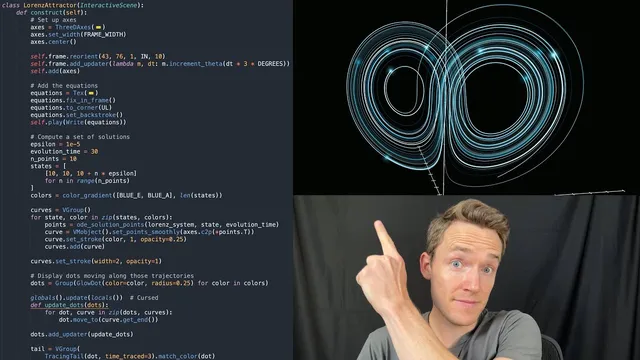
For longer scenes—like a multi-minute Lorenz Attractor animation—iteration becomes harder because the code is a large block with shared local state. To address that, the workflow uses a “checkpoint paste” mechanism: when a copied snippet begins with a special comment marker, Manim caches the scene state at that point and replays only the relevant section. This makes the editing experience feel closer to Jupyter notebooks while keeping everything in a single text file.
The tutorial then demonstrates Manim’s animation primitives. Objects can be introduced with effects like “write,” and text can transform into other shapes using “transform” and related helpers. Transformations are built to handle smoothing via rate functions (e.g., smooth vs linear), and the motion can be tuned so it looks mathematically faithful rather than merely pretty. When transforming text into geometry, the code can extract specific subcomponents (like a single character’s points) so the transformation targets the right level of detail.
Next comes the Lorenz Attractor, a classic system from chaos theory defined by three coupled differential equations. The scene computes trajectories by numerically solving the Lorenz equations using SciPy’s ODE solver, then converts the resulting (x, y, z) points into Manim coordinates using the axes’ coordinate-to-point mapping. The animation draws each trajectory over time with a linear rate function so the visual evolution matches the underlying dynamics rather than being smoothed away.
To highlight chaos, the scene generates multiple curves from nearly identical initial conditions (varying the z coordinate by a small epsilon). As time progresses, the trajectories remain close briefly, then diverge sharply—illustrating the “strange attractor” idea: points are drawn toward a fractal-like set in space even though nearby starting points lead to unpredictable separation.
Finally, the workflow covers finishing touches and rendering. The scene can be exported to MP4 via command-line Manim calls with options like pre-run checks. Visual polish includes camera panning/rotation over the animation, equation rendering with LaTeX (including variable-level styling), and optional effects like fading curves or adding “Tracing Tail” style trails that follow moving points while gradually disappearing. The result is a repeatable pipeline: compute from math, animate from code, iterate interactively, then render clean output for editing.
Cornell Notes
Manim is 3Blue1Brown’s custom Python library for building math animations as scripted scenes. A scene is a Python class whose construct method creates objects and uses animation primitives like play, write, transform, and rate functions to control timing and motion. The workflow emphasizes fast iteration: a Sublime shortcut runs selected code against a live scene, and “checkpoint paste” lets developers rerun only a section by restoring cached scene state—making large scenes feel notebook-like without abandoning a single-file script. The Lorenz Attractor demo computes trajectories with SciPy’s ODE solver, maps solution points into Manim coordinates, then animates multiple nearly identical initial conditions to show chaotic divergence on a strange attractor. Finishing steps include camera motion, LaTeX equation overlays, and rendering to MP4 for post-production editing.
What does a Manim “scene” look like in code, and where does rendering logic live?
How does the workflow enable rapid testing while editing long scenes?
Why do rate functions matter when animating math-driven motion?
How is the Lorenz Attractor computed and turned into an animated curve?
How does the animation demonstrate chaos rather than just plotting one trajectory?
What techniques add visual polish after the core motion is correct?
Review Questions
- When editing a large Manim scene, what problem does “checkpoint paste” solve, and how does it preserve context?
- In the Lorenz Attractor animation, why might using the default smoothing rate function be undesirable?
- What role does the axes coordinate-to-point mapping play when converting numerical (x, y, z) solutions into Manim geometry?
Key Points
- 1
Manim animations are built as Python scene classes where construct defines objects and play-driven animations.
- 2
Fast iteration comes from running selected code directly against a live scene via editor shortcuts, avoiding slow render cycles.
- 3
For long scenes, checkpoint-based execution restores cached scene state so mid-file edits can be tested like notebook cells.
- 4
Transformations in Manim can target specific subcomponents (like a single character’s points) and can be tuned with rate functions for faithful motion.
- 5
The Lorenz Attractor demo computes trajectories with SciPy’s ODE solver and maps solution points into Manim coordinates using axes coordinate-to-point conversion.
- 6
Chaos is illustrated by animating multiple trajectories from nearly identical initial conditions and showing their eventual divergence on a strange attractor.
- 7
Final output is rendered to MP4 from the command line, with optional camera motion, LaTeX overlays, and tail/trailing effects for polish.