How I Automate ⚙️ My Periodic Notes using Obsidian (Daily, Weekly, Monthly Reviews and Planning)
Based on John Mavrick Ch.'s video on YouTube. If you like this content, support the original creators by watching, liking and subscribing to their content.
Use a hierarchy of linked templates (daily → weekly → monthly → quarterly → yearly) so each review cadence builds on the last.
Briefing
An Obsidian-based “periodic notes” system turns daily reflection, weekly planning, and longer-horizon reviews into an automated workflow—so tasks, metrics, and focus areas surface automatically instead of being manually reassembled. The core idea is a hierarchy of notes (daily → weekly → monthly → quarterly → yearly) linked through templates, inline metadata, and Dataview queries, with Templater handling date logic so the right content appears at the right time.
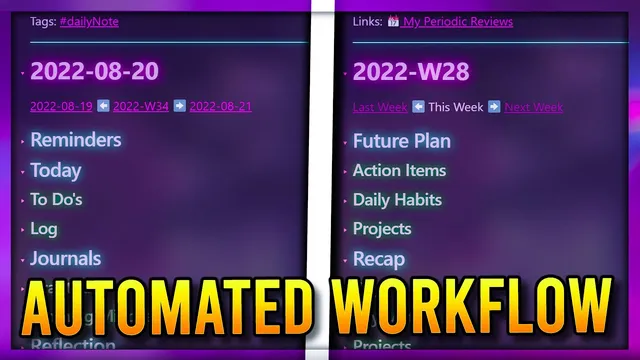
The daily note is built to work from the smallest time frame upward. It uses a template with linked sections such as accomplishments, gratitude, and a reflection area. Templater generates the note title in a year-month-date format and automatically creates navigation links (back/forward) plus a link to the weekly note. A “today’s focus” section borrows the concept of a single daily highlight from productivity books, while the “top three tasks” are tracked with simple Markdown checkboxes.
Automation becomes more concrete in the task and log sections. A “to-dos query” pulls in Kanban tasks due on that specific day by using Dataview: it searches for notes tagged for Kanban, extracts tasks that aren’t completed, and limits results to avoid endless lists. The query also preserves context by linking tasks back to their source notes and sorting them so the daily view stays actionable. The daily log supports recurring habits and reminders, and Templater can filter which habit blocks appear based on the day of the week (e.g., work-related habits show Monday–Friday, while weekend entries stay separate). The note also includes gratitude and a “morning mindset” journal with prompts from High Performance Habits, plus a structured rating (1–10) and a short story or lesson learned.
The weekly note aggregates the daily data and drives planning. It starts with a recap, then builds a “future plan” from the previous week’s outcomes. Dataview tables pull in daily highlights, obstacles, content log thoughts, and energy metrics—using inline fields (like energy rated 1–10) and date ranges computed via Templater. A tracker plugin renders a line graph of energy over the week, with a prompt to improve the worst-performing day. The weekly review also surfaces project tasks: project notes carry a project tag and deadlines, and a weekly query lists tasks across all days in that week, again using the same task-query logic as the daily view.
Beyond weekly planning, the monthly note shifts from projects to focus areas using an OKR-style structure: objectives, key results, and a mix of habit-based and project-convertible outcomes. Quarterly and yearly notes reuse the same template pattern, swapping links to quarter/year “higher order” notes and adding a yearly resolution. Quick Add and template settings standardize creation so new notes land in the correct folders with the right date formatting.
Overall, the system matters because it reduces the friction of review and planning: the right tasks, metrics, and reflections appear automatically at each cadence, while longer-horizon goals remain connected to day-to-day execution through consistent linking and metadata.
Cornell Notes
The system builds a linked set of Obsidian notes—daily, weekly, monthly, quarterly, and yearly—so planning and reflection happen on schedule with minimal manual work. Daily notes use Templater for date-based structure and navigation, while Dataview queries pull in Kanban tasks due on that day and summarize daily metrics like energy. Weekly notes aggregate those daily entries into recap and “future plan” sections, including a line graph of energy and a query that lists project tasks due across the week. Monthly notes use an OKR framework with focus areas instead of tracking every project. Quarterly and yearly templates reuse the same structure, keeping higher-order goals connected to daily execution.
How does the daily note automatically stay aligned with the correct date and review cadence?
What mechanism brings Kanban tasks into the daily view without clutter?
How are recurring habits handled differently on weekdays versus weekends?
What does the weekly note aggregate, and how does it turn daily data into decisions?
Why does the monthly note switch from projects to focus areas, and how are those structured?
Review Questions
- How do Templater and Dataview each contribute to automation in the daily note? Give one concrete example of each.
- What data fields are used to build weekly metrics like the energy graph, and where do those values originate?
- How does the system decide what tasks appear in the daily versus weekly task queries?
Key Points
- 1
Use a hierarchy of linked templates (daily → weekly → monthly → quarterly → yearly) so each review cadence builds on the last.
- 2
Let Templater generate date-based note titles and navigation links, including automatic links to the weekly note.
- 3
Pull day-specific Kanban tasks into the daily note with Dataview queries that filter by due date, exclude completed tasks, and limit results.
- 4
Use conditional templating to show weekday-only versus weekend-only habit blocks in the daily log.
- 5
Aggregate daily metadata into weekly recap and planning using Dataview tables and inline fields (such as energy ratings).
- 6
Render weekly trends (like energy over time) with a tracker plugin and pair them with prompts to improve weak areas.
- 7
Adopt OKRs for monthly focus areas to reduce project-management overhead, then reuse the same template pattern for quarterly and yearly reviews.