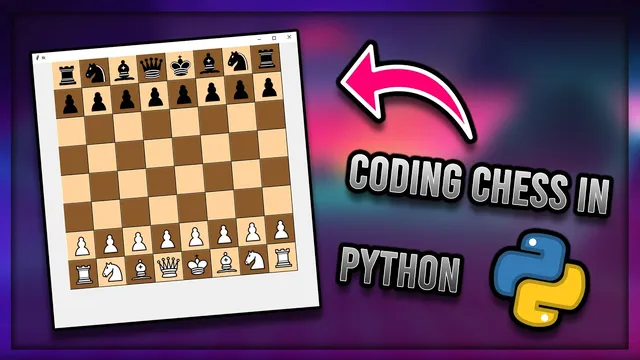
How I Coded a Python Chess Program From Scratch in Under Two Weeks
Based on John Mavrick Ch.'s video on YouTube. If you like this content, support the original creators by watching, liking and subscribing to their content.
Represent the chessboard as an 8x8 Tkinter grid of buttons and treat each click pair as a from-square and to-square selection.
Briefing
A Python chess program built from scratch in under two weeks becomes a practical showcase of how to turn chess rules into working UI logic: clickable Tkinter buttons, piece-specific movement rules, move validation, check detection, castling, and pawn promotion. The core achievement isn’t just drawing an 8x8 board—it’s enforcing legal moves by combining turn tracking, path-blocking logic, and a “don’t leave your king in check” rule that can undo illegal moves.
The build starts with an 8x8 grid rendered as Tkinter buttons. Each square is clickable, and the program tracks selections as “square 1” (the piece’s current location) and “square 2” (the destination). Turn order is enforced using a simple turn counter: white moves on even-numbered turns and black on odd-numbered turns. Move attempts then run through a validation pipeline that checks whether the selected piece can legally reach the destination according to its movement rules.
Movement rules are implemented piece-by-piece. Pawns can capture diagonally, kings are limited to one-square moves, knights can jump, and rooks are constrained by straight-line movement. A key early bug—pieces “teleporting” through intervening squares—drives the introduction of path checking. The author implements this first for rook vertical movement using loops that verify intermediate squares are empty before allowing the move. Diagonal movement for bishops is handled with four separate directional checks (northwest, northeast, southwest, southeast), each adjusting file and rank values step-by-step.
The legality layer deepens with check detection. After a move is tentatively applied, the program determines whether the moving side’s king is in check by scanning the board for opponent pieces that could attack the king on their next move. It does this by temporarily setting the “from” square to each opposing piece and the “to” square to the king’s position, then reusing the same move-authorization logic used for normal movement. If any opponent piece can capture the king, the move is rejected and the board state is reverted. To avoid corrupting the user’s selection state, the implementation stores the user-selected square coordinates, runs the check logic using temporary values, and restores the originals afterward.
Once the foundation works, the remaining chess mechanics are added. Castling is implemented by checking whether the king and the relevant rook have moved before, then verifying that the squares between them are empty; if conditions are met, the rook is repositioned and the king is allowed to move two squares. Pawn promotion triggers when a pawn reaches the far rank, opening a Tkinter menu that lets the player choose the new piece; selecting an option swaps the pawn’s image to the chosen piece type.
Underneath the gameplay, the program is organized around a Tkinter “frame” class that stores shared state and functions. Image assets are loaded from files, mapped to starting positions, and updated on each move. The result is a complete, interactive chess engine with rule enforcement—built through iterative debugging, frequent troubleshooting, and repeated reuse of the same movement-validation logic across both normal play and check legality.
Cornell Notes
The project turns chess rules into an interactive Python/Tkinter application by representing the board as an 8x8 grid of clickable buttons and enforcing legality through move validation. Each click pair becomes a “from” square and “to” square, and a turn counter restricts moves to the correct color. Piece movement is implemented per piece type, including path-blocking for rooks and diagonal scanning for bishops. After a tentative move, the program checks whether the player’s king is attacked by any opponent piece; if so, it reverts the move. The build finishes with castling (king/rook unmoved + empty squares) and pawn promotion via a Tkinter selection menu.
How does the program decide whether a move is allowed before changing the board?
What problem forces the author to implement “path checking,” and how is it handled for different pieces?
How does the check system work, and why does it reuse movement logic?
What conditions must be satisfied for castling to occur?
How is pawn promotion implemented in the UI?
Review Questions
- Which data structures and variables track user selections and turn order, and how do they interact with move validation?
- How does the check routine avoid corrupting the user’s selected squares while still testing hypothetical captures?
- What specific rule differences require separate movement logic for rooks, bishops, kings, knights, and pawns?
Key Points
- 1
Represent the chessboard as an 8x8 Tkinter grid of buttons and treat each click pair as a from-square and to-square selection.
- 2
Enforce turn order with a simple counter (white on even turns, black on odd turns) and reject moves that don’t match the active color.
- 3
Implement piece movement rules per piece type, including diagonal pawn captures and king one-square movement.
- 4
Prevent illegal “jumping” by adding path-blocking checks for sliding pieces—loops for rooks and directional stepping for bishops.
- 5
Add a legality check that tests whether the moving side’s king is attacked after the tentative move; revert the move if any opponent piece can capture the king.
- 6
Finish core chess mechanics by enforcing castling constraints (king/rook unmoved + empty intermediate squares) and handling pawn promotion through a Tkinter selection menu.