How I Decide My Priorities for the Week
Based on Tiago Forte's video on YouTube. If you like this content, support the original creators by watching, liking and subscribing to their content.
Use only two priority levels—high for this week and medium for after—to keep decisions fast and consistent.
Briefing
The weekly review culminates in a practical system for turning a cluttered “inbox” of tasks and information into a single, prioritized action list—so the rest of the week runs on clarity instead of constant re-checking. After capturing and processing everything, the key move is to funnel each item into the “language of action” (clear tasks), then sort them by when they must happen and where they belong.
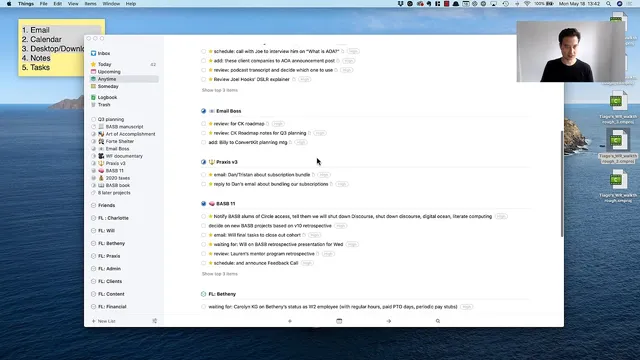
Instead of treating every item as equally urgent, the system uses only two priority levels: **high** for work that needs to happen within the current week, and **medium** for work that can wait until after. That binary choice is deliberate: adding more priority tiers makes decision-making harder. High-priority items are tied to concrete deadlines and commitments already on the calendar—like a Thursday meeting to plan Q3, which includes upgrading an email marketing system (ConvertKit). Other high items include closing out a cohort that ended Wednesday, finishing course-related notes and retrospectives scheduled for Wednesday, and handling time-sensitive follow-ups (such as getting feedback to Joe).
Each task then gets filed into a project or “area of responsibility,” so the task list becomes navigable rather than just long. The transcript shows a heavy emphasis on avoiding the “vortex” of staying in email or messages: tasks are labeled with keyboard shortcuts (Command 1 for high, Command 2 for medium), then moved out of the inbox into the right project buckets. Medium-priority items still matter, but they’re explicitly deferred—like a birthday present planned weeks out, reading or sharing content that isn’t urgent, and various school or admin tasks that can be scheduled later.
Once the inbox is cleared and everything is tagged and filed, the system shifts from sorting to execution. A “Today” list acts as the weekly execution dashboard: tasks are pulled from the full “Anytime” pool by filtering for high and medium priority, then starring items to add them to Today. The Today list is treated as a “this week” list, not a strict daily list—some tasks may roll over, but the goal is to know what’s actionable now.
To prevent overwhelm, tasks are grouped under headings that signal timing and context: items for specific colleagues, manuscripts, course work (including “Art of Accomplishment”), errands “around town,” quick/easy tasks, evening tasks, “friends,” and “heavy lifts” that require more time and energy. This grouping also creates useful overlap: tasks that share the same context (like reviewing a home-loan email thread alongside mortgage documents) end up together, reducing friction and searching.
The payoff is psychological and operational. With incoming communication channels effectively “shut off” for a few days, the person can focus without distraction because the complete set of obligations has already been distilled into one prioritized dashboard. The weekly review takes roughly 30 minutes to an hour, but it’s framed as high ROI: it reduces procrastination, supports consistent progress, and makes it easier to complete most (if not all) items by week’s end.
Cornell Notes
A weekly review turns scattered inputs—email, messages, notes, calendar items—into a single action dashboard. Tasks are prioritized using only two levels: **high** for work due this week and **medium** for work that can wait. After tagging and filing items into projects or areas of responsibility, the system builds a “Today” list by filtering starred tasks from an “Anytime” pool. To keep the list usable, tasks are grouped into headings by context and timing (colleagues, manuscripts, course work, quick/easy, evening, friends, and heavy lifts). The result is fewer distractions: communication channels can be ignored briefly because the next steps are already organized and visible.
Why does the system restrict priorities to only two levels (high and medium)?
How does the workflow prevent getting pulled back into email and messages?
What does “Today” mean in this system, and how is it built?
How do headings improve task management compared with one long list?
What role do projects and “areas of responsibility” play after tagging?
Why does the system claim a high return on time invested?
Review Questions
- If a task is not required before the Thursday Q3 planning meeting, how should it be prioritized and where should it be filed?
- What steps convert an inbox item into something actionable, and how do priority tags change what ends up on the Today list?
- How would you decide whether a task belongs under “quick and easy,” “evening,” or “heavy lifts” when building your weekly headings?
Key Points
- 1
Use only two priority levels—high for this week and medium for after—to keep decisions fast and consistent.
- 2
Convert every inbox item into a clear action task before filing it; avoid leaving vague items in email or messages.
- 3
Tag tasks with keyboard shortcuts (Command 1 for high, Command 2 for medium) to speed up the weekly review.
- 4
Clear the inbox in one pass by moving tasks into projects or areas of responsibility, so the rest of the week doesn’t require constant re-checking.
- 5
Build a “Today” list by filtering starred tasks from an “Anytime” pool, treating Today as a this-week execution plan.
- 6
Group tasks under context/timing headings (colleagues, manuscripts, course work, around town, quick/easy, evening, friends, heavy lifts) to reduce overwhelm and improve batching.
- 7
Once tasks are organized, temporarily ignore incoming communication channels because the next steps are already visible on a single dashboard.