How I plan my day in Craft (daily notes)
Based on Greg Wheeler's video on YouTube. If you like this content, support the original creators by watching, liking and subscribing to their content.
Use Craft’s Daily Notes with calendar integration so event context and planning stay on the same date-specific page.
Briefing
Craft’s Daily Notes feature becomes a daily planning system when it’s paired with templates and calendar integration—so the day’s priorities, habits, and reflections all live in one place and stay easy to revisit. The core idea is simple: design each day as a “masterpiece” by starting with a repeatable structure, then using quick navigation to keep that structure in view throughout the day.
Daily Notes can serve as both a scratch pad and an event companion. Calendar integration adds event notes directly onto the relevant daily note page, letting planning and context stay together. Instead of storing a template in a folder and losing easy access, the workflow inserts a template into each day’s note so it’s always one click away. Calendar navigation matters here: selecting a date brings up that day’s note without leaving the app, which makes reviewing past plans practical.
Templates are created in Craft via the “my templates” area. A new template note can be made quickly (using Command N), designed with whatever layout is needed, and saved inside the templates folder. Templates can also be created by placing a document into that folder, turning it into a reusable template. To apply a template to a specific day, the user opens the calendar, chooses a date, and inserts the template using a slash command (“/template”) followed by “insert from template,” then selects the desired template—such as a “daily planner” template.
The daily planner template is built around a few guiding sections. Some items are intentionally “not needed to work on” but included for inspiration—like weekly goals and quarterly goals—while action items get checkboxes. Those checkboxes automatically roll up into a visible to-do count in the top-right corner, updating as tasks are completed, giving a quick at-a-glance sense of progress.
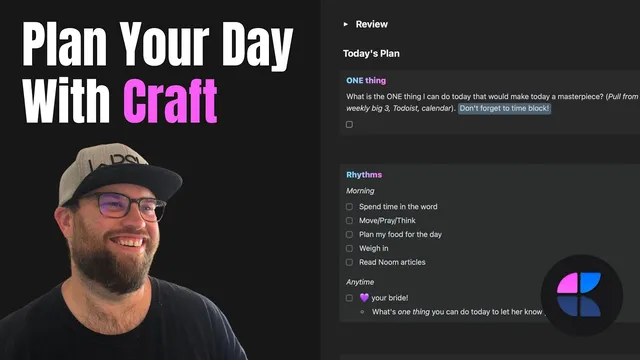
Before planning the day itself, the template forces a review loop: quarterly goals and weekly “Big Three” goals sit under a toggle-based review section. The point is to prevent “out of sight, out of mind” forgetting; reviewing keeps the end goal present so today’s actions connect to longer-term direction. From there comes “the one thing”—the single most meaningful action for the day. Often it’s drawn from the weekly Big Three, but it can also come from pressing calendar or task items when urgency demands it.
The plan then includes “rhythms,” described as the habit scaffolding that makes days feel coherent. Examples include a morning routine framed as “move, pray, think, walk,” planning food for health, and a daily keystone habit to love his wife at least once. A daily highlight is chosen at the start of the day—based on the calendar, the one thing, or what’s already scheduled—so the day becomes proactive rather than reactive. If something spontaneous becomes more meaningful, additional highlights can be added.
Finally, anything else that doesn’t fit the one thing goes into an “everything else” list, ensuring the system stays flexible without losing focus. The result is a repeatable daily note that supports planning, execution, and weekly review of highlights—turning routine check-ins into a structured way to keep priorities aligned.
Cornell Notes
Craft’s Daily Notes can be turned into a full daily planning system by inserting a reusable template into each day’s note and using calendar integration for quick access. The template is organized around a review-first workflow: quarterly goals and weekly Big Three sit in a toggleable section to keep long-term direction visible. Planning then narrows to “the one thing,” the single action that would make the day a “masterpiece,” usually tied to the Big Three but sometimes driven by urgent calendar items. The plan also includes checkbox-based to-dos with an auto-updating count, daily “rhythms” (habits), and a daily highlight chosen at the start of the day for proactive reflection. Weekly review becomes easier because highlights from each daily note can be scanned together.
How does calendar integration change the usefulness of Daily Notes for day-to-day planning?
What’s the practical difference between keeping a template in a folder versus inserting it into each daily note?
Why does the template separate “review” from “today’s plan,” and what does that prevent?
How does “the one thing” work inside this system?
What role do checkboxes and the to-do counter play in daily execution?
How does choosing a daily highlight at the start of the day affect reflection?
Review Questions
- What are the main sections of the daily planner template, and how do they work together from review to execution?
- How does the system decide “the one thing” on days when urgency conflicts with weekly Big Three goals?
- What mechanisms in the template (toggles, checkboxes, highlight selection) support weekly review and reduce forgetting?
Key Points
- 1
Use Craft’s Daily Notes with calendar integration so event context and planning stay on the same date-specific page.
- 2
Create a reusable template in “my templates,” then insert it into each day’s Daily Note using the calendar and the “/template” → “insert from template” shortcut.
- 3
Run a review-first workflow: quarterly goals and weekly Big Three appear in a toggleable section to keep long-term direction visible.
- 4
Choose “the one thing” as the single highest-impact action for the day, typically tied to the weekly Big Three but adjustable for urgent calendar items.
- 5
Track actionable tasks with checkboxes that automatically update a daily to-do count, giving immediate progress feedback.
- 6
Build daily consistency through “rhythms” (keystone habits) such as a morning routine and a daily relationship habit.
- 7
Select a daily highlight at the start of the day to make reflection proactive, then scan highlights during weekly review.