How I use Logseq Daily - A Roam Research Alternative for Notes / PKM / To Do / Journal
Based on Ed Nico's video on YouTube. If you like this content, support the original creators by watching, liking and subscribing to their content.
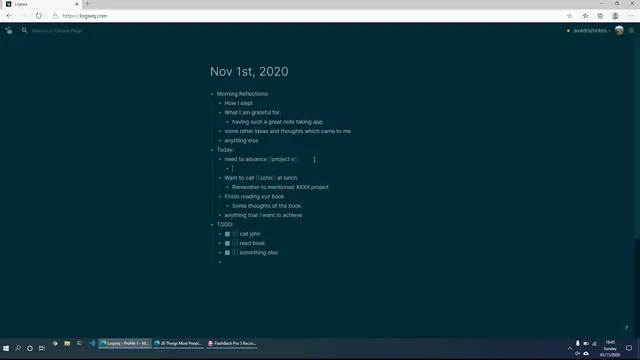
Use the Daily Journal page as the first step each morning to capture reflections, gratitude, and overnight thoughts before planning actions.
Briefing
Logseq Daily anchors a simple daily workflow that turns scattered thoughts into structured notes, actionable tasks, and trackable project context. Each morning starts with the Daily Journal page—an inbox for whatever is on the mind—then branches into reflections, gratitude, and overnight ideas before shifting into concrete goals for the day. That same page becomes the day’s command center: it holds “aims of today,” a practical to-do list, and quick reminders so key actions don’t get lost.
From there, the system stays lightweight but connected. Tasks are reviewed and broken down into what needs to be done (for example, calling someone or advancing a project). When a task requires context, the workflow links out to a dedicated project page rather than burying everything under the day’s entry. Project pages act as living summaries: they include key people, milestones, and status updates, and they keep call notes from turning the daily reminder into a long, messy document. When a meeting happens, a new page is created for that specific call (e.g., “Call with John…”) with next steps and takeaways, while the project page remains the stable reference point for what the project is and where it stands.
The approach also handles recurring “who/what” memory. For example, prior calls can be revisited by jumping to a date-specific page, and brief call summaries capture the essentials without reproducing the entire conversation. Logseq’s autocorrect and backlinking features reduce friction: autocorrect helps clean up quick entries, while backlinks automatically connect related notes so a user can trace thoughts back to the original date and context.
Outside daily planning, the workflow extends to reading and research. When consuming an article, the user creates a new page for the piece, then records key takeaways in their own words alongside the source link. This keeps ideas searchable and reusable later, and it supports revisiting “a moment in time” when the same topic resurfaces. Evening reflections close the loop: the Daily Journal page is used to review how the day went, what could improve, and what to prepare for next.
Overall, the core insight is that Logseq’s daily page works best when it functions as a hub—capturing thoughts, goals, and tasks—while deeper context lives in separate, purpose-built pages (projects, specific calls, and reading notes). The result is a system that stays organized without becoming cumbersome, making it easier to act during the day and review later with clear historical links.
Cornell Notes
Logseq Daily is used as a morning-to-evening hub for capturing thoughts, planning actions, and preserving context. Each day begins with the Daily Journal page for reflections and gratitude, then shifts into “aims of today” and a to-do list that turns intentions into concrete tasks. When tasks require background, the workflow links to dedicated project pages containing key people, milestones, and status updates, while individual meetings get their own dated pages with next steps and takeaways. Reading notes follow a similar pattern: create a page for an article, write key takeaways in one’s own words, and store the source link. Evening entries wrap up with reflection and preparation for tomorrow, supported by Logseq’s autocorrect and backlinking.
Why start with the Daily Journal page instead of jumping straight to tasks?
How does the workflow keep daily entries from becoming too long?
What’s the role of date-specific pages for calls?
How are reading and research notes organized for later retrieval?
What features make the system feel low-friction?
How does the evening routine complement the morning planning?
Review Questions
- How does separating project pages from daily call notes improve the usefulness of the Daily Journal page?
- Describe the steps used to turn an article into a Logseq page that remains useful later.
- What information is stored on a call page, and how does that help when scheduling future calls?
Key Points
- 1
Use the Daily Journal page as the first step each morning to capture reflections, gratitude, and overnight thoughts before planning actions.
- 2
Write “aims of today” and convert them into a to-do list so goals become trackable tasks.
- 3
Link tasks that need context to dedicated project pages rather than embedding full project history in daily entries.
- 4
Create separate, dated pages for meetings that record participants, key takeaways, and next steps without reproducing the entire conversation.
- 5
Store reading notes as article-specific pages with key takeaways written in your own words plus the source link.
- 6
Use evening reflections to review performance, identify improvements, and set up preparation for the next day.
- 7
Rely on Logseq’s autocorrect and backlinking to reduce manual cleanup and make related notes easy to trace.