"How I Use Roam to Write a Weekly Newsletter" feat. Nat Eliason | Second Brain
Based on Tiago Forte's video on YouTube. If you like this content, support the original creators by watching, liking and subscribing to their content.
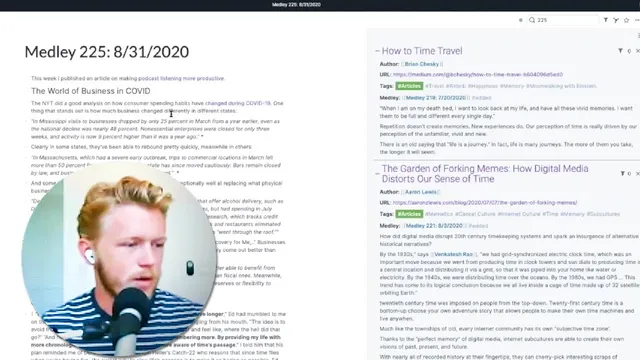
Use a dedicated Roam page for each newsletter issue (e.g., “Medley 225”) and rely on bi-directional links to surface candidate sources.
Briefing
A practical workflow for writing a weekly newsletter in Roam hinges on one idea: treat Roam as a linked “workspace” where every piece of reading becomes either (1) a candidate for the current newsletter or (2) an inbox item to process later. Nat Eliason demonstrates this by building “Monday Medley” live—starting from an empty draft page for the upcoming issue and then pulling in links, highlights, and references from across his knowledge base.
The process begins with Roam’s bi-directional linking. Each newsletter issue is a dedicated page (e.g., “Medley 225”), and related items—articles, tweets, and notes—are linked to it. When Eliason opens a candidate reference in a sidebar (via shift-click), he can copy the relevant link and draft the newsletter text without bouncing between pages. Roam’s sidebar keeps the newsletter draft and the source material visible at the same time, which reduces the friction of turning research into writing.
To manage what still needs to be included, Eliason uses an “added” tag as a lightweight state marker. On the Medley page, references appear as linked items; once a reference is incorporated, he tags it “added,” then filters it out so only unprocessed candidates remain. This effectively turns the Medley page into a checklist: linked references are the queue, and the “added” tag marks completion.
For incoming material, Eliason relies on an “inbox” tag. New items are tagged “inbox” when they need follow-up—adding context, updating notes, or deciding whether they belong in a future newsletter. He prefers this over scrolling through daily notes because it creates a single processing queue. He also draws a boundary between “information to process” and “tasks to do,” avoiding mixing knowledge-management work with project execution.
A key pipeline feeds the inbox: Readwise’s Roam integration. Readwise pulls highlights from many sources (Instapaper, Kindle, Pocket, Twitter, Hypothesis, Air, and more) and auto-populates metadata like authors, URLs, and whether the item is an article, book, or tweet. That automation means Eliason can focus on tagging and deciding what to use, rather than manually organizing every highlight.
When it’s time to draft, Eliason doesn’t just paste text—he reuses blocks. He drags in passages from source pages using Roam’s “text and alias” approach, preserving references while allowing edits. He then uses Roam’s reference indicators to track where a quote has been used across different newsletters. This creates a feedback loop: revisiting a source later reveals exactly which medleys referenced specific passages.
Beyond newsletter writing, Eliason frames Roam as an all-in-one system for personal operations: project planning, journaling prompts, and task management via Roam queries. He also addresses practical concerns—offline use via downloaded Roam, mobile quick capture, importing images and PDFs, and how to handle citations/footnotes using block references. The overall takeaway is that Roam’s power comes from linking and tagging at the block level, not from filing content into rigid categories.
Cornell Notes
Nat Eliason’s Roam workflow for “Monday Medley” treats each newsletter issue as a dedicated Roam page (e.g., “Medley 225”) and uses bi-directional links to connect sources to that page. Reading highlights flow into a tagged “inbox,” where items are processed and either added to the current medley or left in a backlog for later. On the medley page, an “added” tag marks which linked references have already been incorporated, letting him filter the page down to what’s still pending. When drafting, he reuses source blocks via “text and alias,” preserving references while editing formatting, so future revisits show where quotes were used. The result is a repeatable system that turns scattered reading into a structured, searchable writing pipeline.
How does Eliason turn scattered research into a newsletter draft without losing track of what’s been used?
What role does the “inbox” tag play, and why not just use daily notes as the queue?
How does Readwise integration change the amount of manual work required before writing?
What does “text and alias” accomplish when drafting, and why does it matter later?
Why does Eliason avoid the PARA method (Areas/Resources/Archives) in Roam?
How does Eliason handle citations and footnotes in a way that stays reusable?
Review Questions
- When would Eliason tag a linked reference as “added,” and how does that change what appears on the medley page?
- Describe the pipeline from reading highlights to the newsletter draft: where do items enter, how are they processed, and how do they get assigned to a specific medley issue?
- What is the difference between copying text and using “text and alias” in Roam, and how does that affect future editing or reuse?
Key Points
- 1
Use a dedicated Roam page for each newsletter issue (e.g., “Medley 225”) and rely on bi-directional links to surface candidate sources.
- 2
Tag incorporated items with “added,” then filter them out so the medley page becomes a live checklist of what’s still missing.
- 3
Route new reading into an “inbox” tag for processing, keeping knowledge-management work separate from project task lists.
- 4
Let Readwise populate Roam with highlights and metadata across many reading platforms, then focus on tagging and deciding what belongs in the current medley.
- 5
Draft by reusing source blocks with “text and alias” to preserve provenance while allowing edits and formatting changes.
- 6
Use block references (not just pasted text) to make quotes and citations reusable across future drafts and newsletters.
- 7
Treat Roam as a linked personal operating system—journaling, planning, and task queries—rather than a rigid filing cabinet.