How to build a go to market (GTM) plan
Based on Notion's video on YouTube. If you like this content, support the original creators by watching, liking and subscribing to their content.
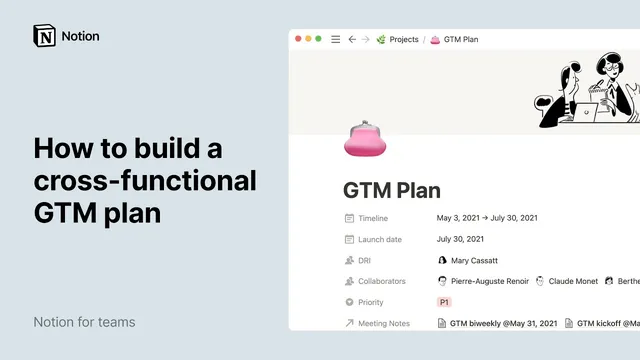
Create a GTM page inside a projects database and define core properties like timeline, launch date, DRI, collaborators, and priority so every launch entry stays consistent.
Briefing
A go-to-market (GTM) plan becomes far easier to execute when it’s built as a single, structured workspace—complete with launch context, deliverables, meeting links, and date-driven checklists. Instead of scattering planning across docs, spreadsheets, and chat threads, the approach uses Notion pages and databases to keep cross-functional teams aligned from the first draft to the post-launch review.
The process starts by creating a dedicated GTM page inside a projects database. The plan is given a timeline (start and end dates) plus a single launch date, and it’s tied to people through “person” properties for the directly responsible individual (DRI) and collaborators. A “priority” property helps teams gauge how important the work is to the company. Notion’s database properties are treated as the backbone of consistency: once the team defines the properties, every new GTM entry must fill in the same core fields.
The page body is then organized into three major sections—About, Execution, and Launch Day—using large headers. The About section is where launch-critical context lives: a product summary, the team involved, the target audience, and a general breakdown of the product. This section can also link out to supporting documents using Notion backlinks, so partners don’t have to hunt for requirements, research, or assets across the workspace.
To manage execution, an inline table is added to hold launch deliverables. Each deliverable becomes a row with structured fields such as DRI (person), status (select), and team (select). Deliverables can store rich content—Figma files, PDFs, images, or even GitHub gists—directly within the database pages, keeping artifacts and ownership together. Status and team options are defined up front by typing the allowed values, and colors can be customized to make progress visually scannable.
Because launches generate meeting notes, the plan also connects the GTM page to a separate meeting-notes database using a relation property. That creates a live set of links on the GTM page, so anyone can jump to the relevant notes without navigating back to the database.
Finally, the plan handles action items with checklists rather than more databases. A pre-launch checklist and a “last day run of show” list tasks with owners and dynamic dates. Team members can be tagged directly in checklist items, and dates can be made relative (e.g., “Friday 10 am”), so the displayed deadline updates based on when the page is viewed. After launch, a postmortem section captures results and customer feedback, including synced blocks from metrics or qualitative notes.
With colors, images, and a table of contents for fast navigation, the GTM document becomes a centralized operating system for launch work—turning planning into a trackable workflow with clear ownership, deadlines, and follow-through.
Cornell Notes
The GTM plan is built as a structured Notion page that centralizes launch strategy, ownership, deliverables, meeting context, and execution checklists. It starts with a projects database entry that defines timeline, launch date, DRI, collaborators, and priority. The page’s About section captures product and audience context, while an inline deliverables table tracks each asset with a DRI, status, and team, plus links to rich files. A relation property connects the GTM page to meeting notes stored in a separate database. Pre-launch and launch-day tasks are managed with checklists that support tagging owners and using dynamic dates, then a postmortem section records outcomes and feedback.
Why define properties (timeline, launch date, DRI, collaborators, priority) at the database level instead of writing everything in free text?
How does the deliverables table turn a launch plan into an execution system?
What’s the benefit of linking meeting notes via a relation property?
Why use checklists (with tags and dynamic dates) for pre-launch and launch-day tasks?
What should go into the About section to align cross-functional partners early?
How does the postmortem section close the loop after launch?
Review Questions
- What database properties would you include for a GTM entry to ensure ownership and scheduling are captured consistently?
- How would you structure deliverables so that each asset has a DRI, a status, and a team assignment?
- What’s the difference between using an inline deliverables table and using checklist items for tasks?
Key Points
- 1
Create a GTM page inside a projects database and define core properties like timeline, launch date, DRI, collaborators, and priority so every launch entry stays consistent.
- 2
Use an About section to capture product context—summary, audience, goals, and team involvement—so cross-functional partners start aligned.
- 3
Track launch assets in an inline deliverables table with structured fields for DRI (person), status (select), and team (select), and store rich artifacts directly in each deliverable.
- 4
Connect the GTM page to meeting notes using a relation property to keep relevant discussions one click away.
- 5
Manage pre-launch and launch-day execution with checklist items that tag owners and support dynamic dates for deadlines.
- 6
Add a postmortem section to record outcomes, customer feedback, and metrics, using synced blocks when possible.
- 7
Use a table of contents and visual styling (colors/images) to make the GTM page easy to navigate under time pressure.