how to build a killer team of AI Agents (n8n masterclass)
Based on David Ondrej's video on YouTube. If you like this content, support the original creators by watching, liking and subscribing to their content.
Define automation scope first, then split the job into 3–5 stages and build one specialized workflow per stage.
Briefing
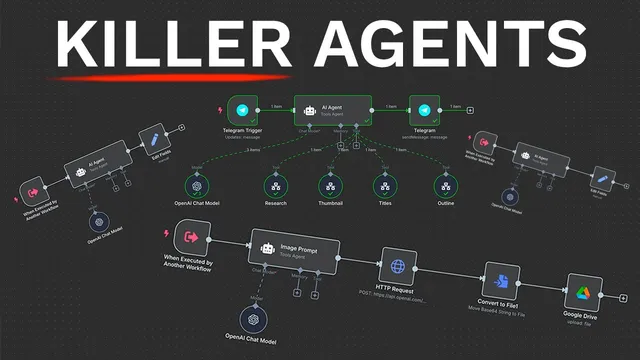
Building a “killer team” of AI agents for YouTube pre-production comes down to one practical idea: split the work into specialized stages, then orchestrate them from a single main agent that delegates to tool-enabled sub-agents. In this walkthrough, the workflow starts when a Telegram message hits n8n, and the system returns a full pre-production package—research summary, generated thumbnail, 10 SEO-optimized title options, and a script outline—without manual back-and-forth. The payoff is time: the creator frames the setup as a way to save 10+ hours per week by automating repetitive planning tasks.
The process begins with scope definition: decide what to automate and break it into 3–5 stages. For YouTube, the example scope becomes four workflows: (1) a research agent that performs web research on the video idea, (2) a thumbnail agent that turns an idea into an image-generation prompt and then generates the thumbnail via OpenAI’s image API, (3) a title agent that outputs 10 clickable, SEO-optimized title variations using proven formats, and (4) a script agent that produces an intro, outline, and talking points. This staged approach keeps the “main” agent focused—its job is orchestration, not doing every task itself.
Implementation in n8n follows a consistent pattern. A main workflow is created with a Telegram trigger (“message” event). Credentials are set up by creating a Telegram bot through BotFather (including a bot name, unique username, and token), then connecting that token to n8n and testing the trigger step. Next, the main workflow adds an AI agent node configured with an OpenAI model (the walkthrough favors GPT 4.1 over weaker defaults) and a system prompt that defines the agent’s role: helping automate YouTube pre-production. To make the agent actually respond in Telegram, the workflow connects the AI output to a Telegram “send message” step using the chat ID and the generated text.
A key operational requirement appears next: AI agents must be hosted to run reliably. The walkthrough uses a Hostinger VPS with a pre-built n8n template, selecting a server region and deploying the n8n environment so the automation runs continuously.
From there, the main agent gains “tools” by calling sub-workflows. Each specialized workflow is triggered “when executed by another workflow,” accepts specific inputs (like search query or idea), and returns structured results. The research agent uses a web-browsing tool (Google SER via a SER API) to gather up-to-date information, then formats findings into four detailed paragraphs. The thumbnail workflow generates an image prompt with an AI agent, calls OpenAI’s image generation endpoint (GPT-image-1), converts the returned base64 payload into a file, and uploads it to Google Drive. The title and script workflows similarly use dedicated AI prompts and models to produce structured outputs (10 titles; intro + outline + talking points).
Finally, the system is tested end-to-end: sending a Telegram message with a fresh topic triggers the main agent, which delegates to research, thumbnail generation, title creation, and script writing. The result is a complete pre-production bundle delivered back through Telegram, with the thumbnail saved to a Drive folder. The walkthrough also notes practical tuning—thumbnail sizing can affect cropping, and repeating thumbnail generation can yield better variations—while emphasizing that the core architecture (scope → stages → delegated workflows → hosted orchestration) is the reusable blueprint for other automation needs beyond YouTube.
Cornell Notes
The walkthrough builds an n8n “team” of AI agents that automates YouTube pre-production from a single Telegram message. A main agent orchestrates four specialized sub-workflows: web research (using Google SER), thumbnail creation (AI prompt + OpenAI image generation + base64-to-file + Google Drive upload), title generation (10 SEO-optimized options), and script drafting (intro, outline, talking points). Hosting is treated as essential: the agents run on a Hostinger VPS with a pre-built n8n template so the automation stays online. The key learning is architectural—split tasks into stages, give each stage its own workflow and tools, and keep the main agent focused on delegation and final assembly.
Why does the walkthrough insist on defining scope and splitting work into stages before building agents?
How does the system start, and what does the main workflow need to receive from Telegram?
What makes these agents more than a chat bot, according to the build?
How does the research agent get current information and format it for YouTube use?
How is a thumbnail actually produced and saved?
What is the end-to-end output the user receives, and how is it delivered?
Review Questions
- If you wanted to automate a different business process, what would you choose as the 3–5 stages and how would that map to separate n8n workflows?
- In this architecture, what specific responsibilities should stay in the main agent versus what should be delegated to sub-agents?
- Why is hosting (e.g., a VPS running n8n) treated as necessary for the agents to work reliably?
Key Points
- 1
Define automation scope first, then split the job into 3–5 stages and build one specialized workflow per stage.
- 2
Use a single main agent as an orchestrator that delegates to sub-workflows via n8n “workflow tool” calls.
- 3
Start with a Telegram trigger and map incoming message text into the AI agent as the user message.
- 4
Configure each AI agent with an appropriate OpenAI model (the walkthrough favors GPT 4.1) and a stage-specific system prompt.
- 5
Add external capability through tools: web search via SER API, image generation via OpenAI image API, and storage via Google Drive.
- 6
Host n8n on a VPS (Hostinger VPS in the walkthrough) so the automation runs continuously and can be called reliably.
- 7
Expect to iterate on practical details like thumbnail sizing/cropping and file naming, and consider generating multiple thumbnail variations when needed.