How to Build a Notion ChatBot For Your Knowledge Base Using LangChain (Code Template Included)
Based on Chat with data's video on YouTube. If you like this content, support the original creators by watching, liking and subscribing to their content.
Export Notion content as Markdown/CSV, then convert it into chunked documents suitable for embedding.
Briefing
A practical pipeline turns Notion pages into a searchable “chatbot” knowledge base by combining text chunking, vector embeddings, and a retrieval-augmented generation step. The payoff is a ChatGPT-like experience over your own documents: user questions get matched to the most relevant Notion sections, then a language model drafts an answer grounded in that retrieved context—ideal for support docs, FAQs, and internal knowledge.
The workflow starts with ingestion. Notion content is exported as Markdown and/or CSV, then converted into a format LangChain can work with. Because large language models have limits on how much text they can process at once, the exported text is split into manageable chunks (the template uses chunk sizes of 1,000). Each chunk is transformed into embeddings—numerical vector representations of the text—so similarity search can happen efficiently. Those vectors are stored in a vector database; the template uses Pinecone, though the approach can be adapted to other storage options (including local storage).
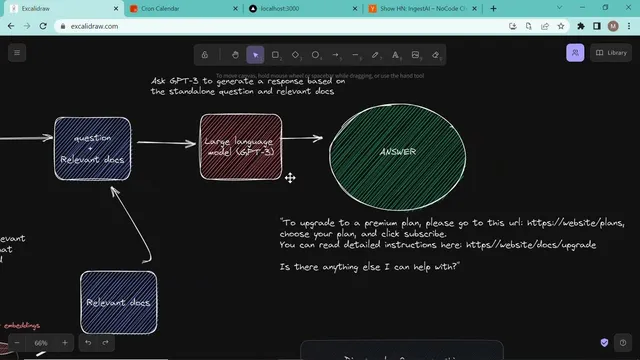
Once embeddings are stored, the system shifts to question answering. A user query is converted into embeddings as well, producing a vector that can be compared against the Pinecone index. Similarity search retrieves the most relevant chunks from the vector store. Those retrieved documents become the “context,” paired with the user’s question, and sent to a language model (the template references OpenAI, including “gpt3” in the description). The model generates a response that is not necessarily verbatim from the source text; instead, it uses the retrieved chunks to produce an answer such as “how does Kron work” or “how do I download Kron,” with guidance drawn from the underlying Notion documentation.
The tutorial’s concrete example uses Kron’s documentation structure (folders for sign-in, Google Meet connections, security settings, FAQs, and more) to demonstrate how queries return relevant snippets. It also shows what to expect in Pinecone after ingestion: an index name, a namespace representing a grouped set of embeddings for a specific use case, and similarity settings (including the embedding dimensionality, described as 1536 dimensions).
Implementation details focus on configuration and repeatable setup. Users provide API keys for Pinecone and OpenAI, set the Pinecone index name and namespace, then run an ingestion command (npm run ingest) after unzipping exported Notion content into the repo’s data folder. For the chat experience, a front end sends queries to a backend endpoint (API/chat). The backend sanitizes the question, queries Pinecone, and uses LangChain’s VectorDBQA chain to abstract the retrieval-and-generation steps—searching for similar documents, combining them with the question, and producing the final answer. The result is a template that supports support-document Q&A well, with an optional next step of building multi-turn conversational Q&A rather than single-shot retrieval.
Cornell Notes
The core idea is to build a Notion-powered chatbot by turning exported Notion content into vector embeddings, storing them in Pinecone, and using retrieval-augmented generation to answer questions. During ingestion, Markdown/CSV exports are split into chunks (1,000-sized chunks in the template), embedded via OpenAI, and inserted into a Pinecone index under a chosen namespace. During chat, user questions are embedded, similarity search retrieves the most relevant chunks from Pinecone, and LangChain’s VectorDBQA chain combines the retrieved context with the question to generate an answer. This matters because it enables fast, grounded answers over your own knowledge base instead of relying on the model’s general training data.
Why split Notion documents into chunks before embedding them?
What exactly are embeddings in this setup, and how are they used?
What role does Pinecone play, and what are index and namespace?
How does the system turn retrieved documents into an answer?
What are the key steps to run the template end-to-end?
Review Questions
- How does converting both documents and user queries into embeddings enable similarity-based retrieval?
- What changes between ingestion and chat in terms of data flow and processing steps?
- Why might answers be non-verbatim even when the system retrieves relevant Notion chunks?
Key Points
- 1
Export Notion content as Markdown/CSV, then convert it into chunked documents suitable for embedding.
- 2
Split documents into fixed-size chunks (the template uses 1,000) to respect model input limits and improve retrieval granularity.
- 3
Generate embeddings for each chunk with OpenAI and store them in Pinecone under a configured index and namespace.
- 4
At question time, embed the user query, run similarity search in Pinecone, and retrieve the most relevant chunks as context.
- 5
Use LangChain’s VectorDBQA chain to combine retrieved context with the question and produce grounded answers.
- 6
Set up API keys (Pinecone and OpenAI), then run ingestion via npm run ingest before using the chat endpoint.
- 7
A single-turn retrieval-and-answer flow works well for support-document Q&A; multi-turn Q&A is a separate extension.