How to Build an AI Chatbot Agent to Analyze Large PDFs Using LangGraph
Based on Chat with data's video on YouTube. If you like this content, support the original creators by watching, liking and subscribing to their content.
Ingest PDFs by chunking them with page-aware metadata, embedding each chunk into vectors, and storing vectors plus content in a vector store (default: Supabase).
Briefing
A LangGraph-based AI chatbot agent can answer questions over large PDFs by routing each query to the right workflow—either retrieving relevant document chunks or responding directly when the question is unrelated. The practical payoff is fewer irrelevant citations and less wasted context: the system first classifies the user’s intent, then either performs embedding-based similarity search against an ingested vector store or skips retrieval entirely.
The setup starts with ingestion. Uploaded PDFs are loaded, split into page-aware chunks, and converted into embeddings—numerical representations produced by an OpenAI embeddings model (the example uses “OpenAI embeddings” and stores vectors with matching dimensions). Each chunk becomes a record containing content plus metadata such as page number, source file name, and identifiers. Those records are written into a vector database; the default implementation uses Supabase as both the database and the embedding store. Before ingestion, the workflow includes creating the required Supabase table and functions (including a matching function) so queries can later embed the user question and search for similar vectors.
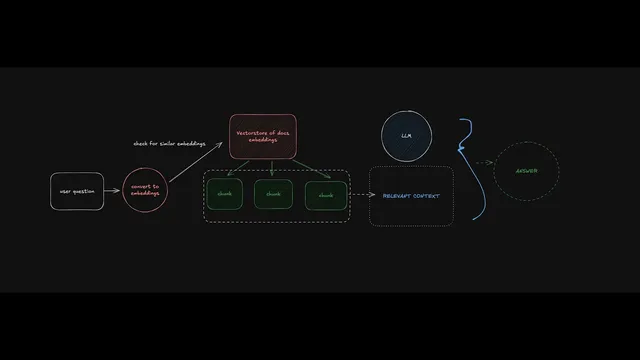
Once the vector store is populated, the agent’s runtime behavior is driven by a LangGraph routing step. A “query type” check sends the user question through a prompt that determines whether retrieval is needed. LangGraph conditional edges then branch the execution: if the question is document-related, the agent embeds the question and runs a similarity search in the vector store to retrieve the most relevant chunks (controlled by parameters like K, the number of chunks returned). Those retrieved chunks become the “context” passed to a large language model, along with the user question, prompting the model to answer using only the provided material.
If the question is unrelated to the ingested documents, the agent takes the direct-answer path and avoids retrieval. That design choice is intentional: it prevents the model from grounding responses in irrelevant PDF text and reduces the chance of misleading citations.
The transcript also details how the system is built and debugged. LangGraph Studio provides a visual interface for orchestrating the ingestion and retrieval graphs, inspecting node-by-node state, and testing runs before connecting a user-facing UI. Threads group conversational turns so follow-up questions retain context; starting a new thread clears memory. Tracing via LangSmith is emphasized as a way to monitor latency, token usage, costs, and intermediate steps, and to collect traces for later evaluation.
On the implementation side, the project is split into a backend (LangGraph graphs exposed via a local API) and a frontend (Next.js). The frontend supports PDF upload, triggers the ingestion graph to populate the vector store, and then streams responses from the retrieval graph during chat. The template is positioned as a foundation: it can be extended with additional branches such as web search for recency-sensitive questions, alternative retrievers/vector stores, different chunking strategies, and more complex tool-using agent routes.
In short, the core insight is that agentic PDF Q&A becomes more reliable when routing, retrieval, and context construction are explicitly orchestrated—rather than always performing retrieval for every question.
Cornell Notes
The system ingests large PDFs by splitting them into page-aware chunks, embedding each chunk into vectors, and storing content plus metadata in a vector database (default: Supabase). At question time, a LangGraph routing step classifies whether the query is related to the ingested documents. If related, the agent embeds the question, performs similarity search to retrieve the top K chunks, and passes those chunks as context to a language model for grounded answering. If unrelated, it skips retrieval and returns a direct answer. This matters because it reduces irrelevant context and citations while keeping responses efficient and easier to debug with LangGraph Studio and LangSmith tracing.
How does the ingestion pipeline turn a PDF into something a chatbot can search?
What makes the chatbot “agentic” rather than a basic PDF Q&A bot?
How does the system decide which parts of the PDF to include in the model’s context?
What role do LangGraph Studio and LangSmith tracing play during development?
How does the frontend connect to the backend graphs and support PDF uploads?
How can this template be extended beyond PDF-only retrieval?
Review Questions
- Why is routing based on query type important for PDF Q&A, and what failure mode does it help prevent?
- Describe the end-to-end flow from PDF upload to answering a question, including where embeddings and similarity search occur.
- What trade-offs do K (number of retrieved chunks) and chunk size introduce, and how would you test for the best settings?
Key Points
- 1
Ingest PDFs by chunking them with page-aware metadata, embedding each chunk into vectors, and storing vectors plus content in a vector store (default: Supabase).
- 2
Use LangGraph conditional routing to decide whether a question needs retrieval or should receive a direct answer, reducing irrelevant context and citations.
- 3
At runtime, embed the user question and run similarity search to retrieve the top K chunks; pass those chunks as context to the language model for grounded answering.
- 4
Tune retrieval parameters like K and chunking strategy to balance coverage against the risk of irrelevant information causing hallucinations.
- 5
Separate the system into a LangGraph backend (ingestion and retrieval graphs exposed via an API) and a Next.js frontend (upload + chat streaming).
- 6
Track and debug behavior with LangGraph Studio (graph state inspection) and LangSmith tracing (latency, token usage, costs, intermediate steps).
- 7
Maintain conversational continuity using LangGraph threads; start a new thread to clear memory and conversation context.