How to Build an AI Chatbot For Customer Support that Can Cut Support Costs By Up to 30%.
Based on Chat with data's video on YouTube. If you like this content, support the original creators by watching, liking and subscribing to their content.
Ground chatbot answers in company help-center content using retrieve-augmented generation rather than relying on generic model responses.
Briefing
An AI customer-support chatbot can be deployed quickly by grounding answers in a company’s own help-center pages, with built-in citations and a feedback loop that helps teams reduce support costs—claims in the demo peg savings at up to 30%. The workflow centers on ingesting documentation, turning it into searchable knowledge (via chunking and embeddings), and then serving responses through a website widget or an API, so customers get fast, policy-accurate answers instead of generic model output.
The demonstration uses Jablo’s help center as the training source. After signing up, the user creates a Mendable project and connects a data source through a website crawler. The crawler pulls help-center content from the site map, filters down to 74 relevant help articles, and processes them in parallel. The ingestion step handles the “hard stuff” automatically—text splitting, chunking, metadata extraction, and embeddings—so the team doesn’t need to build a separate retrieval pipeline. Despite expectations that training might take days, the demo shows the process completing in minutes, with slower pages attributed to JavaScript-heavy or blocking content.
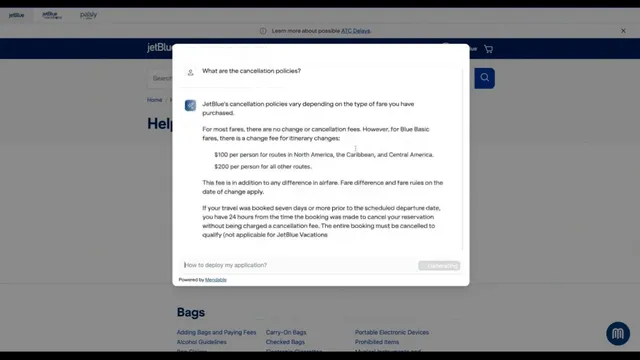
Once ingestion finishes, the chatbot is testable immediately. A user asks a specific question—such as what happens if a flight is cancelled—and receives an answer tailored to the help-center policy. Crucially, the response includes references that link back to the exact source page(s), addressing skepticism about hallucinations. The demo also highlights a retrieve-augmented generation approach: the model generates responses using retrieved context from the company’s documentation, which makes it more likely to answer precisely than a generic assistant.
Deployment is presented as “three buttons” using Mendable’s embeddable components. The user obtains an API key from the dashboard, swaps it into a JavaScript snippet, and the chat widget appears on the Jablo website with customizable branding (logo, colors, and UI elements). The dashboard also includes a “Workshop” area for customizing behavior: selecting underlying models (including GPT 3.5 turbo and Claude from Anthropic), adjusting prompts, controlling response length, and setting a “creativity” mode to “precise” so answers stay within the documentation.
To improve over time, the system logs conversations and user feedback (helpful/not helpful). If an answer is rated poorly, the “teach model” feature lets teams correct the bot without editing the help center itself. The correction process associates the new answer with the relevant question using embeddings and metadata, so similar future queries get prioritized toward the corrected response.
The demo further supports hybrid support flows. If the bot can’t answer, it can direct users to a support-agent link embedded in the widget, and the custom prompt can instruct the assistant to route unresolved questions to that contact path. Mendable also supports multiple chatbots for different data sources within the same account (e.g., customer support vs. sales).
Finally, the pricing discussion frames costs around message credits: a free tier includes 500 message credits per month, while higher-volume usage, fine-tuning, and enterprise features (like SSO and SLA support) require a custom plan. The overall pitch ties speed of implementation, measurable cost reduction, and continuous documentation improvement into a single operational loop for customer support teams.
Cornell Notes
The core idea is to cut customer-support costs by deploying an AI chatbot that answers using a company’s own help-center content. Mendable ingests documentation by crawling a help site, then automatically performs chunking, embeddings, and metadata extraction so the system can retrieve the right passages at question time. Responses include citations to the source pages, reducing hallucination risk compared with generic chat. A dashboard workflow supports customization (prompts, response length, model choice, and “precise” grounding) and a feedback loop where poorly rated answers can be corrected via “teach model.” This matters because it turns support knowledge into an operational system that can scale and improve without rewriting the entire help center.
How does the chatbot avoid generic or incorrect answers?
What does “training” mean in this workflow, and how fast is it?
How is the chatbot deployed to a website?
What tools help teams improve answers after launch?
How does the system handle questions it can’t answer?
How are costs framed for customer-support use cases?
Review Questions
- What retrieval mechanism is used to ground answers in company documentation, and how does the demo show that grounding in practice?
- Describe the end-to-end flow from data ingestion to website deployment, including what the dashboard components do.
- How does “teach model” change future responses, and what role does user feedback play in that improvement loop?
Key Points
- 1
Ground chatbot answers in company help-center content using retrieve-augmented generation rather than relying on generic model responses.
- 2
Ingestion can be done by crawling a help center (e.g., via a site map), then automatically performing chunking, embeddings, and metadata extraction.
- 3
Responses can include source references to the exact help-center pages, helping teams audit accuracy and reduce hallucination concerns.
- 4
Deployment is supported through embeddable widgets (JavaScript components) or via API for custom UI builds.
- 5
A dashboard workflow enables customization (model choice, prompts, response length, and “precise” grounding) and continuous improvement using conversation logs and feedback.
- 6
Poorly rated answers can be corrected without editing the help center using “teach model,” which updates retrieval so similar questions prioritize the corrected response.
- 7
If the bot can’t answer, it can route users to a support-agent link configured in the dashboard through custom prompt logic.