How to Find a Land Patent Using a Plat Map | Roam Your Roots
Based on Roam Your Roots's video on YouTube. If you like this content, support the original creators by watching, liking and subscribing to their content.
Extract the legal land description from the indexed county land ownership map, including township, range, and especially the section number.
Briefing
Indexed county land ownership maps—often surfaced as hints on Ancestry.com—contain more than just a rough location of an ancestor’s home. They encode the legal land description (township, range, and section), which can be used to pull the original federal land patent from the Bureau of Land Management’s General Land Office (GLO) records database.
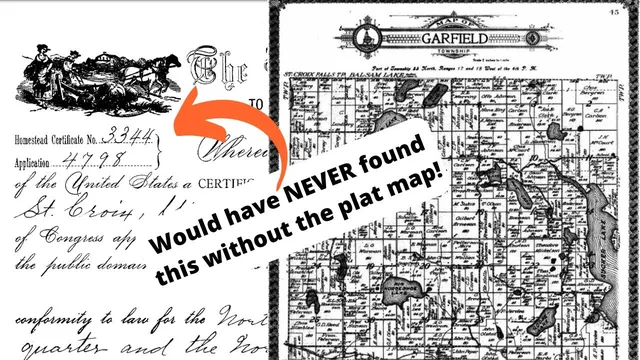
The process starts by locating the ancestor on the county map. In the example used, Charles Berggren’s family is tied to Wisconsin, and the map shows his position in the corner with a legal description for the township and ranges. The key step is to read the map’s land description: it identifies the township (e.g., “Township 33 north”), the range (e.g., “17 and 18”), and—most critically—the section number. The map is divided into sections, and the ancestor’s name appears within a specific section; in this case, Charles Berggren is in section 2. Once those details are extracted, the search moves away from name-based genealogy and toward land-based searching.
With the legal description in hand, the next move is to use the BLM GLO Records Search website (glo records BLM gov). Instead of searching by last name and first name, the method uses the “land description” field. The search is set to Wisconsin and then entered using the township and range, along with the section number. The result is a list of all individuals who purchased land in that exact section—an approach that can surface relatives who appear under different spellings or even different versions of a name.
In the example, the search results include “Carl Bergen,” which matches the ancestor’s Swedish name variation. The transcript notes a discrepancy between “Bergen” and “Berggren,” suggesting a transcription or spelling shift over time. Clicking the person’s accession number opens the record for that land purchase, including details about the plot and the patent.
The final step is selecting the “patent image,” which provides the actual scanned land patent document. That document confirms the land was acquired through the Homestead Act, framing the ancestor as one of the many immigrants and new settlers who benefited from the program. The payoff is twofold: the indexed county map becomes more than a locator, and the research gains a primary-source legal record tied to the exact parcel of land—turning an obscure map into a traceable chain of ownership and identity.
Cornell Notes
Indexed county land ownership maps encode legal land descriptions—township, range, and section—that can be used to find federal land patents in the BLM General Land Office (GLO) records. After locating the ancestor on the map, the researcher extracts the township and range and, most importantly, the section number. Then the GLO search is run using “land description” (with the state set to Wisconsin in the example), producing a list of all purchasers for that exact section. Selecting the relevant accession number and opening the “patent image” yields the scanned patent document, which in the example confirms acquisition under the Homestead Act. This land-based method also helps when names are misspelled or appear in alternate forms.
Why does searching by land description work better than searching by ancestor name on the BLM GLO site?
What specific land-description fields are taken from the indexed county map?
How does the GLO search result list relate to the ancestor’s parcel?
What does opening the “patent image” add to the research?
How can the method help when an ancestor’s name appears differently across records?
Review Questions
- When using the BLM GLO records search, which land-description elements from the county map are essential to include (and which one is most critical)?
- How would you proceed if your ancestor’s name doesn’t appear exactly as expected in the GLO results—what part of the workflow would you rely on?
- What new type of evidence does the “patent image” provide compared with an indexed county land ownership map?
Key Points
- 1
Extract the legal land description from the indexed county land ownership map, including township, range, and especially the section number.
- 2
Use the BLM General Land Office (GLO) Records Search website and search by “land description” rather than by name.
- 3
Set the state correctly (e.g., Wisconsin) and enter the township/range/section values from the map into the land-description search fields.
- 4
Review the resulting list of purchasers for that exact section and select the correct accession number to open the detailed record.
- 5
Open the “patent image” to obtain the scanned federal land patent document tied to the specific parcel.
- 6
Expect spelling or name variations (e.g., Berggren vs. Bergen) and let the land description guide the match when names don’t align.
- 7
Treat the patent document as primary-source confirmation of ownership and acquisition terms (such as Homestead Act involvement).