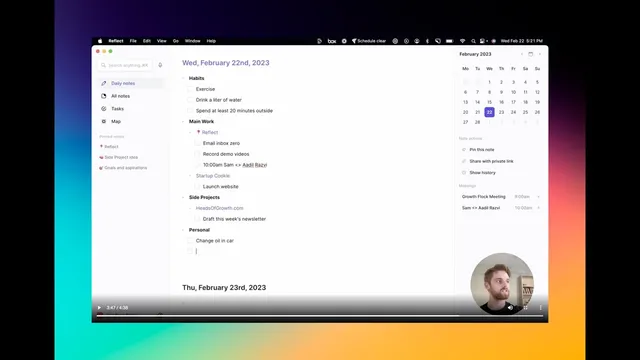
How to format to-do lists in Reflect
Based on Reflect Notes's video on YouTube. If you like this content, support the original creators by watching, liking and subscribing to their content.
Create a reusable “to do” template in Reflect under Preferences → Templates to avoid one long, unstructured task list.
Briefing
A structured to-do list template in Reflect can turn daily planning into a repeatable workflow—complete with categories for recurring habits, ongoing work, side projects, and personal errands. Instead of dumping every task into one long list, the approach starts by building a “to do” template under Preferences → Templates, then pulling that template into each day’s Daily note so the day’s plan appears instantly in the morning (or even the night before). The payoff is less mental scrambling and a clearer view of what matters across multiple projects.
The template is organized into four categories: Habits, Main Work, Side Projects, and Personal. Habits are treated as stable, repeatable items—examples include exercising every day, drinking at least a liter of water, and getting time outside (the transcript notes winter conditions as a reason to set a minimum duration). Main Work is set up as a checklist tied to a specific focus area; the example uses “Reflect work” and a “Consulting” practice with tasks like startup cooking (as written) and other consulting-related items. Side Projects get their own section, such as a newsletter workflow (the example references “heads of growth” as the newsletter category). Personal is left blank in the template so it can be filled only when needed, with examples like changing the oil in a car and grocery shopping.
Once the template exists, the daily routine becomes simple: open the Daily note and call up the to-do list, which “pulls it right up.” From there, tasks are added as individual items within the relevant category. The transcript gives concrete examples: “email inbox zero,” recording demo videos, adding a meeting if one appears, launching a new website (“launch website”), and newsletter-related tasks like “trap this week’s …” (as written). Personal tasks are added as well, such as “change oil in car” and “go to the grocery store.”
The system also handles unfinished work. If everything isn’t completed, the next day’s list can be reopened and the remaining items reviewed. Tasks that didn’t get done can be pasted back into the next day’s plan, making carryover frictionless. At the same time, leaving tasks in place provides a record of what was completed versus skipped, enabling quick look-backs on prior days and supporting gradual refinement of the categories.
Overall, the method trades a “purist brain dump” for a reusable structure that scales across multiple projects. It’s presented as complex only in concept—because it spans categories and projects—while remaining straightforward to operate day to day. The transcript also notes that Reflect’s Tasks feature exists in beta on the left-hand sidebar, but it’s intentionally excluded in favor of the template-driven approach until it matures.
Cornell Notes
Reflect to-do lists can be made more effective by using a reusable template with categories rather than one endless brainstorm. The workflow starts in Preferences → Templates by creating a “to do” template with Habits, Main Work, Side Projects, and Personal. Each day, the template is pulled into the Daily note so tasks appear immediately, and new items are added under the right category (e.g., inbox zero, demo videos, launching a website, car maintenance, grocery shopping). Unfinished tasks can be carried forward by pasting them into the next day’s list, and completed vs. incomplete items remain visible for quick review. This structure helps manage multiple projects without losing clarity.
Why does the transcript recommend a categorized template instead of a single “brain dump” to-do list?
How is the “to do” template set up in Reflect, and where is it created?
What does the daily routine look like after the template exists?
How does the system handle tasks that don’t get completed?
What role do habits play in the template?
Review Questions
- How would you design a Reflect to-do template for your own life using categories, and what would you put in each category?
- What steps would you follow each morning to pull the template into your Daily note and add new tasks correctly?
- How would you carry over unfinished tasks to the next day while still keeping a useful record of past performance?
Key Points
- 1
Create a reusable “to do” template in Reflect under Preferences → Templates to avoid one long, unstructured task list.
- 2
Use four categories—Habits, Main Work, Side Projects, and Personal—to keep tasks aligned with how you actually work and live.
- 3
Pull the template into each day’s Daily note so planning starts immediately in the morning (or the night before).
- 4
Add new tasks directly into the correct category as they arise, such as inbox cleanup, demo recording, website launches, or errands.
- 5
Carry unfinished tasks forward by pasting them into the next day’s list, reducing carryover friction.
- 6
Leave Personal blank in the template if you want errands to stay optional and only appear when needed.
- 7
Use task carryover and day look-backs to track what gets done and refine the system over time.