How to Make Your Digital Notes More Valuable | Progressive Summarization in Roam
Based on Dan Silvestre's video on YouTube. If you like this content, support the original creators by watching, liking and subscribing to their content.
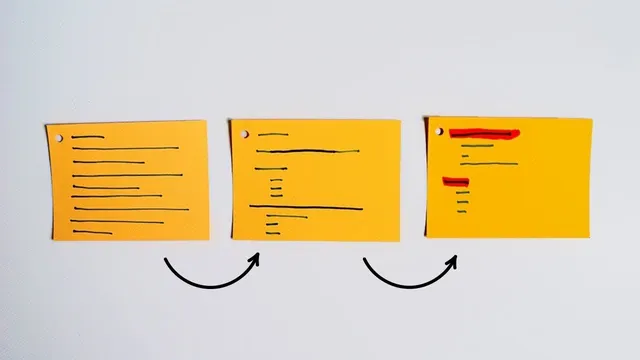
Progressive summarization in Roam increases note value by deleting unnecessary material and compressing each section into reusable theme blocks.
Briefing
Progressive summarization in Roam turns a long, imported note into a shorter, more reusable knowledge block by deleting what won’t matter later and adding just enough context to make each part stand on its own. The payoff is practical: refined notes become easier to search, easier to recombine into new ideas, and more likely to feed future writing, videos, or courses instead of sitting unread.
The workflow starts with “refining” a single source note—then making it easier to edit by restructuring it around the original boundaries. Using Austin Kleon’s book *Show Your Work* as an example, the process begins by removing automatically imported clutter (like the book title) and preserving the table of contents as a reference rather than keeping it inside the main page. The table of contents is copied into a separate page so the main note stays clean while chapter structure remains accessible.
Next comes chapter-by-chapter organization. Because Kindle chapter titles may appear as images (and can’t be highlighted directly), the method uses the Kindle alongside Roam to ensure each section is correctly assigned. The editor then adjusts text so everything under “Intro” stays together, and uses a quick technique to find chapter boundaries: check the last words of the final highlight in a chapter, then use search (Command-F) to locate the end point. Once the note is properly segmented, the reference page (like the table of contents) can be deleted, leaving a clean, chapter-separated structure.
With the note divided, progressive summarization becomes incremental rather than overwhelming. Instead of revising everything at once, the editor collapses the full text to view chapters and then works one chapter at a time—choosing the chapter that feels most relevant first. Each chapter gets compressed into a small set of “buckets” (common themes) expressed as bullets and blocks. The goal is to preserve meaning while cutting wordiness—sometimes by replacing a paragraph with a single distilled sentence.
In the *Show Your Work* example, the chapter is reduced into two main buckets: “Share your journey” and “Become a documentary.” The editor keeps key lines, italicizes or highlights the most important claims, and even restructures formatting when needed so specific phrases can be emphasized without breaking the bold/italic structure.
After compressing all chapters, the process can add an executive summary at the top—essentially a one-paragraph “chapter thesis” that captures the whole section in fewer words. Tags provide the next layer of value: key ideas become searchable anchors for later projects. For instance, “creator’s journey” can be tagged so it automatically surfaces when building future notes or drafting content.
Finally, refined ideas get connected to other ideas from elsewhere in the knowledge base. The editor adds links or new notes that tie a theme to concrete examples—like referencing Tom Bihn videos that show factories and behind-the-scenes work, or turning the idea of documenting process into a future “idea” tag. Done daily in small increments, this approach makes notes more discoverable now and more useful later, strengthening the overall system for turning accumulated insights into original output.
Cornell Notes
Progressive summarization in Roam refines a long note by removing unnecessary parts and adding just enough context so the remaining blocks stay useful over time. The method starts by cleaning imports (like deleting an automatically added title) and preserving reference material (like the table of contents) on a separate page. Then the note is reorganized by chapter so each section can be summarized independently, reducing the mental load of revising everything at once. Each chapter is compressed into a few theme “buckets,” optionally followed by an executive summary at the top. Tags and cross-links connect these distilled ideas to future projects, making the knowledge base more searchable and more likely to generate new original work.
How does progressive summarization make a note more valuable without losing meaning?
Why restructure a note by chapter before summarizing?
What does “bucket” summarization look like in Roam?
How do formatting and emphasis help during compression?
What roles do executive summaries, tags, and connections play after the chapter work?
What’s the practical benefit of doing this incrementally, one chapter at a time?
Review Questions
- When would it be useful to copy the table of contents into a separate Roam page instead of keeping it in the main note?
- Describe the steps used to ensure chapter boundaries are correct when chapter titles can’t be highlighted directly.
- How do tags and cross-links change what you can do with a refined note later?
Key Points
- 1
Progressive summarization in Roam increases note value by deleting unnecessary material and compressing each section into reusable theme blocks.
- 2
Keep reference content (like a table of contents) on a separate page so the main note stays focused and easier to refine.
- 3
Organize imported text by chapter first, using search and verified boundaries, so each chapter can be summarized independently.
- 4
Summarize each chapter into a few theme “buckets,” preserving only the essential claims and context.
- 5
Add an executive summary at the top to capture the chapter’s overall thesis in a compact form.
- 6
Use tags to turn recurring ideas into searchable anchors for future projects.
- 7
Connect refined themes to other notes and concrete examples so ideas can be recombined into new original work.