How to Organize Your Spotify Playlists
Based on Systematic Mastery's video on YouTube. If you like this content, support the original creators by watching, liking and subscribing to their content.
Set streaming quality and download quality to “very high” and adjust volume level to “allowed” for a more consistent listening experience.
Briefing
Spotify’s playlist folders—especially nested subfolders—can turn a chaotic library into a navigable system built around genres, subgenres, and repeatable “start points.” The core idea is to stop treating Spotify’s default layout as the structure and instead build a hierarchy that matches how someone actually discovers and revisits music (and podcasts), so the next listening session is only a few clicks away.
The setup starts with two practical account tweaks: streaming quality and download quality are both set to “very high,” and volume level is adjusted from the default “normal” to “allowed.” Social features are left off for years, keeping the interface focused on listening rather than what friends are playing. From there, the home page becomes mostly background noise—search and recommendations are used sparingly—while the sidebar becomes the command center.
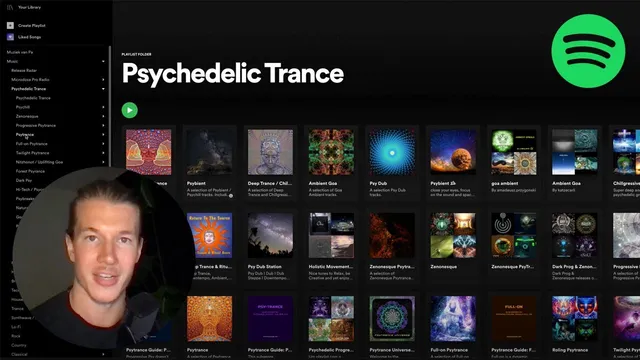
The real shift comes from using Spotify’s “Create folder” feature, which enables folders, subfolders, and even deeper nesting. Two top-level folders—“music” and “podcasts”—keep everything separated. Inside “music,” the structure begins with a broad discovery layer: “Release Radar” for weekly Friday drops from favorite artists. A second major branch, “microdose pro radio,” holds company-related playlists such as “deep work” and “hyperflow,” which are updated daily or weekly with tracks expected to resonate with customers.
For the rest of the music library, organization follows the highest-possible genre level first, then drills down into subgenres. A broad “psychedelic trans” playlist acts as a catch-all for the genre, while subgenre folders split the collection further—like “uplifting goa” or other named branches under psychedelic trans. Within each subgenre folder, a dedicated playlist gathers only that slice of the sound, making it easy to choose what to listen to without scanning everything.
New tracks are imported through a repeatable discovery workflow: follow or search for other people’s playlists that match a specific subgenre, then import those tracks into the user’s own overarching and subgenre playlists. The transcript describes creating an additional nesting level (“sub sub sub” folders) to store related external playlists by subgenre, such as a “nitso goa” playlist attributed to “mr adrian stan.” When it’s time to listen, the user plays from the imported playlist, then copies preferred tracks into their own master playlist and the matching subgenre playlist.
A practical problem—remembering where to resume next week—has no perfect Spotify solution, so the workaround is to “like” a track as the next starting point. Liked tracks become bookmarks for future sessions. Mood still matters, but the system keeps mood inside the same genre/subgenre framework rather than replacing it.
Podcasts use the same folder logic, but with topic-based playlists. For example, “bitcoin podcasts” are split by language (English and Dutch) and sorted with highly rated favorites placed at the top—highlighting a missing feature: Spotify lacks a true rating/sorting mechanism similar to tools like Notion. For podcast consumption, the workflow also includes searching Spotify for YouTube-discovered shows and listening on the go (gym, walks), using the folder structure as the library map.
Cornell Notes
The transcript lays out a genre-first Spotify organization system built on nested folders. Two top-level folders—Music and Podcasts—keep listening separate, while the sidebar becomes the main navigation tool. Music is organized by broad genres (e.g., a main psychedelic trans playlist) and then split into subgenre folders (e.g., uplifting goa), with dedicated playlists inside each. New tracks come from following or searching other creators’ playlists and importing matching tracks into both the overarching genre playlist and the relevant subgenre playlist. Since Spotify doesn’t provide a perfect “resume from here” feature, the system uses “liked” tracks as bookmarks for the next session.
Why does nested folder structure matter more than Spotify’s default layout?
How is music organized so that both discovery and precision coexist?
What workflow brings in new tracks without losing the structure?
How does the system handle the “where do I resume next time?” problem?
How are podcasts organized differently, and what limitation is called out?
How does YouTube discovery feed into Spotify listening?
Review Questions
- How does the system use nested folders to reduce decision fatigue during listening sessions?
- What is the difference between an overarching genre playlist and a subgenre playlist in this setup, and why are both kept?
- What workaround is used to remember where to resume listening next week, and what does it depend on?
Key Points
- 1
Set streaming quality and download quality to “very high” and adjust volume level to “allowed” for a more consistent listening experience.
- 2
Use the sidebar as the primary navigation tool; treat the home page as secondary to avoid recommendation-driven clutter.
- 3
Build a two-level foundation with top folders for Music and Podcasts, then expand into nested genre and subgenre folders.
- 4
Maintain both an overarching genre playlist and dedicated subgenre playlists so browsing and precision both stay one click away.
- 5
Import new tracks by following/searching other creators’ playlists tied to specific subgenres, then copy liked tracks into the matching user playlists.
- 6
Use “liked” tracks as bookmarks to mark the next starting point when Spotify doesn’t provide a perfect resume mechanism.
- 7
Organize podcasts by topic (and language) inside the same folder logic, and compensate for missing rating/sorting by manually prioritizing favorites.