How to turn a voice recording into a to-do list
Based on Reflect Notes's video on YouTube. If you like this content, support the original creators by watching, liking and subscribing to their content.
Record a voice memo in Reflect Notes to capture tasks as they come, even while multitasking.
Briefing
Turning a messy burst of thoughts into a structured to-do list is as simple as recording a voice memo and letting AI transcription and note automation do the heavy lifting. The workflow uses Whisper (from OpenAI) to transcribe spoken notes with near-human accuracy, then feeds the resulting text into Reflect Notes’ AI Palette Editor to convert the transcription into a clean checklist—solving the common problem of forgetting items after jotting down only one task.
The process starts in Reflect Notes’ desktop or mobile app. On mobile, users tap the plus sign to choose the option to transcribe audio; on desktop, they use the recording controls in the app. After recording a voice memo—anything from a quick thought dump to a longer ramble—Whisper transcribes it into the user’s Daily Note. A temporary status message appears while transcription runs, and longer recordings may take a few minutes, but short memos typically convert quickly.
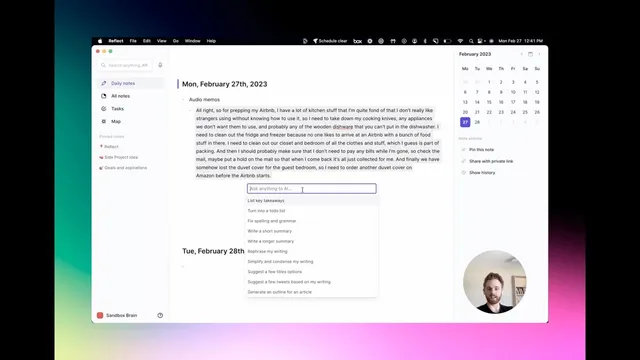
Once the transcription appears, the next step is turning raw text into actionable tasks. Users select the transcribed text, open the AI Palette Editor, and choose “turn into a to-do list.” The AI extracts task-like items from the spoken content and formats them into a list. In the demo, the voice memo about preparing a home for an Airbnb stay becomes a to-do list including items such as removing cooking knives, taking out appliances, and clearing wooden dishware that can’t go in the dishwasher. It also captures household logistics like cleaning the fridge and freezer, sorting clothes and items from the closet and bedroom, checking bills and mail (including placing a mail hold), and ordering a replacement duvet cover on Amazon before guests arrive.
After reviewing the generated checklist, users can replace the original text with the organized list and save it under a meaningful title (for example, “Airbnb prep to do”). The workflow also supports follow-up organization: the list can be turned into a linked note for ongoing use, or copied into a template if the same kind of preparation happens regularly.
The practical takeaway is that the system is designed for real-life multitasking. People can talk through tasks while cooking breakfast or doing chores, then return later to get the transcription automatically organized into a to-do list—reducing the mental load of remembering everything in the moment and minimizing the risk of missing steps.
Cornell Notes
The workflow turns spoken thoughts into an organized to-do list using Whisper transcription and Reflect Notes’ AI Palette Editor. Users record a voice memo in the Reflect Notes app (desktop or mobile), wait for Whisper to transcribe it into their Daily Note, then select the text and run “turn into a to-do list.” In the demo, an Airbnb-prep voice ramble becomes a checklist covering kitchen items, fridge/freezer cleanup, clothing sorting, bill/mail checks, and ordering a replacement duvet cover. The result is a practical way to capture tasks while multitasking, then convert them into structured action later.
How does the process capture tasks without losing items after a quick thought dump?
What are the key steps to convert a voice memo into a to-do list?
What does the Airbnb demo show about how tasks are extracted from speech?
Why might transcription time vary, and how should users plan for it?
How can the resulting to-do list be reused for recurring tasks?
Review Questions
- What two AI-driven steps transform a voice memo into a structured checklist in Reflect Notes?
- In the Airbnb example, which categories of tasks were turned into to-do items (kitchen, cleaning, logistics, or ordering), and what specific examples were included?
- How does memo length affect transcription time, and what does that imply for when someone should check their Daily Note?
Key Points
- 1
Record a voice memo in Reflect Notes to capture tasks as they come, even while multitasking.
- 2
Whisper transcription places the spoken text into the Daily Note, preserving all items mentioned in the ramble.
- 3
Select the transcribed text and use AI Palette Editor to convert it into a formatted to-do list.
- 4
Review and replace the text with the generated checklist, then name it for easy retrieval (e.g., “Airbnb prep to do”).
- 5
Use linked notes or templates to reuse the same checklist structure for recurring preparations.
- 6
Plan for longer voice memos to take longer to transcribe, typically up to a couple of minutes for extended recordings.