How to use GPT-3 and Tana Paste to generate structured data on known objects - in this case, birds
Based on Robert Haisfield's video on YouTube. If you like this content, support the original creators by watching, liking and subscribing to their content.
Use GPT-3’s playground to generate structured records by explicitly requesting a table schema (including the number of columns and field names).
Briefing
A practical workflow for turning natural-language prompts into structured, copy-paste-ready data is the centerpiece: pair GPT-3’s playground with Tana Paste so birdwatching notes can be automatically transformed into consistent fields—without manually typing every attribute. The use case is specific but broadly applicable: record the time and location of bird sightings while letting a language model fill in structured details like species distribution and behavior, leaving out categories a user doesn’t want to track (such as genus or long descriptions).
The process starts by asking GPT-3 to generate a table-like schema. A prompt requests five Bay Area, California bird species and specifies a format with five columns. Instead of accepting free-form text, the prompt instructs GPT-3 to output structured data in a particular template, using explicit field names (for example, “common name,” “distribution,” and “behavior”). GPT-3 then “completes the next thought” based on the prompt—similar to how iOS suggests words, but extended to whole structured blocks—producing entries that match the requested layout.
To make the output usable inside Tana, the workflow emphasizes formatting details. The creator adjusts the prompt to include the exact syntax Tana expects (including the use of double colons and consistent field delimiters). After GPT-3 generates the structured records, the result can be pasted into Tana so it maps cleanly into fields and references rather than landing as unstructured text. The transcript also highlights adding “actual references” by refining the prompt so GPT-3 includes the needed reference structure, not just descriptions.
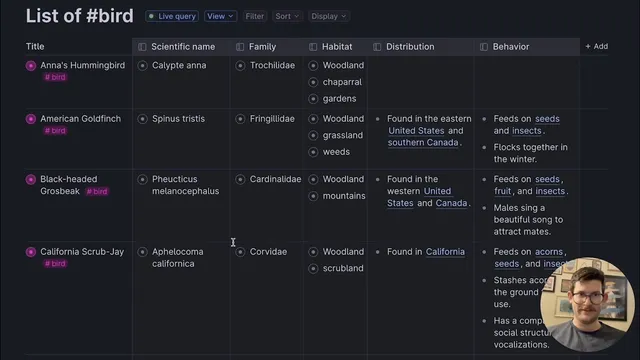
Once the structured output lands in Tana, the data can be expanded and organized—such as switching to a table view and applying color coding based on tags. The key payoff is repeatability: after finagling the prompt to get the formatting right, the user saves the prompt as a reusable template (e.g., “bird watching data generator”). That template can then be reused and modified—swapping in different birds like “American Eagle” or “blue jay”—to generate new structured datasets quickly.
Overall, the core insight is that language models can act as a structured-data generator when prompts are precise about schema, delimiters, and reference syntax. With the right template, the workflow reduces manual data entry while keeping notes consistent enough for sorting, filtering, and downstream organization in Tana.
Cornell Notes
The workflow pairs GPT-3’s playground with Tana Paste to generate structured data automatically from prompts. By specifying a table schema (five columns) and a strict output format (including Tana-compatible delimiters like double colons), GPT-3 can fill in fields such as common name, distribution, and behavior for bird species. The structured output can then be pasted into Tana so it becomes usable fields and references rather than raw text. After adjusting the prompt until the formatting works, the prompt is saved as a reusable template, letting users generate new datasets by swapping in different birds. This matters because it turns semi-structured note-taking (bird sightings) into consistent, queryable data with minimal manual typing.
How does the workflow turn a natural-language request into Tana-ready structured data?
Why does the transcript emphasize modifying the prompt with formatting details like double colons?
What birdwatching data does the workflow aim to automate, and what does it intentionally leave optional?
What does “save this template” accomplish in the workflow?
How does the transcript suggest validating that the structured output worked correctly in Tana?
Review Questions
- What specific prompt elements (schema, field names, delimiters) are necessary for GPT-3 output to paste cleanly into Tana?
- How would you redesign the prompt if you wanted to track a different set of bird attributes (e.g., nesting type and migration status) while keeping the same Tana structure?
- What steps would you take to troubleshoot a GPT-3 output that doesn’t expand into fields inside Tana?
Key Points
- 1
Use GPT-3’s playground to generate structured records by explicitly requesting a table schema (including the number of columns and field names).
- 2
Make the output Tana-compatible by matching the exact delimiter/syntax Tana Paste expects, including double colons.
- 3
Generate bird species lists for a specific region (e.g., Bay Area, California) and ask for structured fields like common name, distribution, and behavior.
- 4
Refine prompts to include reference structure, not just descriptive text, so pasted data becomes usable fields and references in Tana.
- 5
After getting the formatting right, save the prompt as a reusable template so new datasets can be generated by swapping inputs (e.g., different bird species).
- 6
Verify success in Tana by expanding the pasted entries and switching to table view, then optionally applying tags and color coding for organization.