How to use Notion AI to write better
Based on Notion's video on YouTube. If you like this content, support the original creators by watching, liking and subscribing to their content.
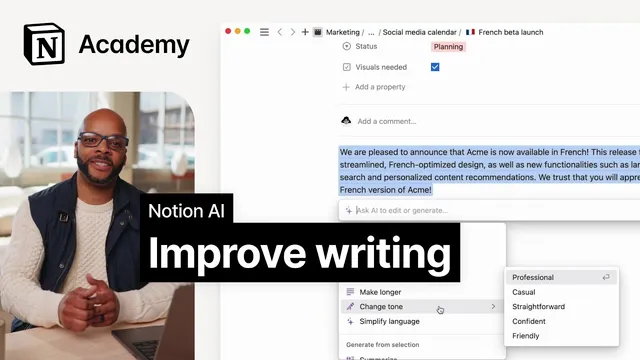
Highlight text in Notion and use “Ask AI” to apply writing edits directly inside the document.
Briefing
Notion AI turns existing writing into cleaner, clearer, and more audience-ready text without forcing users to juggle separate grammar tools. By highlighting text on a Notion page and choosing actions like “Improve writing,” “Fix spelling and grammar,” “Make shorter,” “Make longer,” “Change tone,” “Simplify language,” or “Translate,” users can rewrite in-place—whether the goal is polishing a draft, adjusting voice for a specific platform, or translating content for global readers. The practical payoff is speed: edits that might take hours—like rewriting or anonymizing names—can be completed in minutes.
The workflow starts with text already in a Notion document. Users select a passage and open the “Ask AI” menu to apply targeted improvements. For writing quality, “Improve writing” can adjust wording and structure, while “Fix spelling and grammar” removes typos and reduces distracting mistakes that can make content look unprofessional. For communication strategy, “Make shorter” and “Make longer” help reshape content for different contexts—such as condensing a message for quick readability or expanding a section when more detail is needed.
Tone control is another major use case. In social media captions or posts scheduled in a calendar, “Change tone” can shift phrasing to sound more professional or more casual depending on the audience. That same idea extends to business writing: a PRD overview or complex strategy document often needs a “zoomed out” summary that a reader with no background can understand. Notion AI can rewrite those sections to make the main point clearer and easier to follow.
The transcript also emphasizes adapting technical writing for non-technical stakeholders. Engineering documentation can become confusing when it leans too heavily on jargon; “Simplify language” helps convert dense explanations into more accessible wording. Similarly, feedback to colleagues benefits from being both concise and kind—Notion AI can shorten feedback or adjust it to be friendlier while keeping the message effective.
A concrete example ties these options together using a blog post draft stored in Notion. The post from “Acme Inc” contains numerous spelling and grammar issues, which are corrected by selecting the full text and running “Fix spelling and grammar.” Then, comments are addressed: one suggestion calls for expanding a section, handled via “Make longer,” and a follow-up prompt can request more specificity (such as adding details about a book club). Another comment flags an overly technical explanation; “Simplify language” rewrites that portion to reduce jargon. Finally, privacy protection is handled through a custom request: selecting all text and asking AI to replace employed names with different fake ones.
Once the draft is ready, the same editing flow supports publishing needs by translating the post into multiple languages. Overall, Notion AI is positioned as an integrated writing assistant inside Notion—built to transform existing text—so users can iterate faster, tailor tone and length, and reduce manual editing work across everyday documents and longer-form drafts.
Cornell Notes
Notion AI improves writing directly inside Notion by transforming text users already have on the page. After highlighting content and choosing options such as “Improve writing,” “Fix spelling and grammar,” “Make shorter,” “Make longer,” “Change tone,” “Simplify language,” or “Translate,” writers can quickly tailor drafts for different audiences and purposes. The transcript demonstrates this with an “Acme Inc” blog post: it’s cleaned for spelling/grammar, expanded to add missing details, simplified to remove technical jargon, and anonymized by replacing real names with fake ones. The practical value is speed—edits that could take hours can be done in minutes—plus consistent output for publishing, including translation into multiple languages.
How does a user start using Notion AI to edit text in-place?
What are the main writing-improvement actions, and when would each be useful?
How can Notion AI help with communication tasks beyond general proofreading?
What does the blog-post example show about using Notion AI iteratively?
How can Notion AI support privacy needs like anonymizing names?
What publishing step is mentioned after editing?
Review Questions
- When would you choose “Change tone” versus “Simplify language” in a writing workflow?
- Describe the sequence of edits used to improve the “Acme Inc” blog post in the example.
- What custom prompt capability does Notion AI provide beyond the dropdown menu options?
Key Points
- 1
Highlight text in Notion and use “Ask AI” to apply writing edits directly inside the document.
- 2
Use “Fix spelling and grammar” to remove typos that can undermine professionalism.
- 3
Adjust length with “Make shorter” or “Make longer” to fit different audiences and formats.
- 4
Match audience voice with “Change tone,” especially for social posts and business messaging.
- 5
Reduce jargon for non-technical readers using “Simplify language,” particularly in engineering documentation.
- 6
Iterate on drafts by addressing comments one at a time with targeted actions and follow-up prompts.
- 7
Protect privacy by asking AI to replace real names with fake ones, then translate the finished draft for publishing.